Feedback Form

Digital Signage Blog Archives


Posts Tagged ‘touch screen’


Clever Dry Cleaners Kiosk Digital Signage

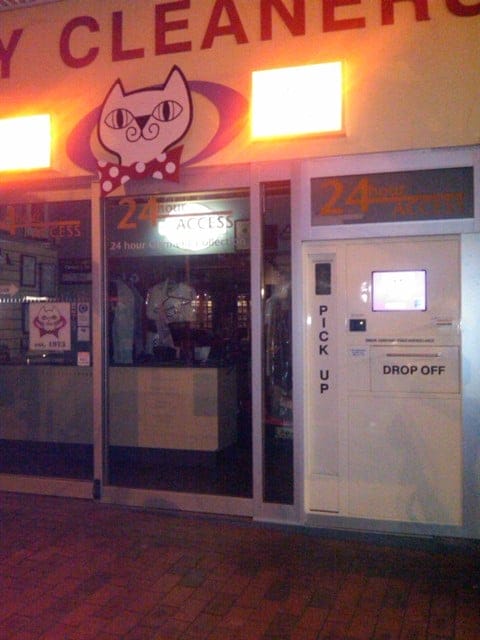
I was in Canberra Australia on the weekend and noticed a very clever and innovative kiosk/digital signage solution that I’ve never seen before. Basically, it at a 24 hour dry cleaners service. It’s an automated machine with a small touch screen that allows you to drop off your dry cleaning and pick them up at a later time. The whole point of having this is for convenience – how many of us don’t have the time to drop off our dry cleaning during business hours? There two compartments, one to drop of your clothes and the other to pick up the clothes. My understanding is that the clothes are dry cleaned during the day and are hanged on an automated hanger so all you need to do is enter your receipt number and it will automatically position your clothes to the pickup shaft.

dry cleaners kiosk digital signage

dry cleaners kiosk digital signage

dry cleaners kiosk digital signage 1

dry cleaners kiosk digital signage 1

I really haven’t seen it in action so the above is just a guess based on what I saw. Has anyone else seen any innovative kiosk or digital signage solutions?

Post to Twitter Tweet This Post

  • Share/Bookmark

Category: Digital Signage Blog Info


Idea – Integrating digital signage and skype

I recently thought of an idea (it’s probably out there already) to integrate digital signage and Skype (I’m sure you know what this is…. if not this is basically a computer application which allows you to make voice or video calls over the Internet).

After all digital signage is a communication tool and what better way to communicate with each other by using Skype. Here’s an example of what needs to be done and can be achieved:

1. Install a digital touch screen at a booth (maybe at a busy shopping centre)

2. Install the advertise me digital signage solution

3. Design the relevant templates and content

4. Install a web cam and connect this to your digital signage solution

5. Install the skype application

6. Install an internet connection

7. Develop the digital signage application which lists companies customer call centres

How to use it?

8. You look for Advertise Me (for example) in the directory list because you want to speak to a sales representative about a product you are about to purchase

9. You touch the “call Advertise Me” button and the system starts establishing a skype session to Advertise Me

10. A representative at Advertise Me receives the call and you have a video conference and start chatting away about the products. The Advertise Me representative may even show you how the product can be used etc and directs you to the nearest retail store.

11. Once you end the session, the digital signage application plays relevant content (product info, sales, discounts) from company you just dialed. Or this can also be displayed during the video call.

12. After a certain idle period of time, the digital signage application defaults back to a playlist displaying ads etc.

So there you go, that’s an idea I just came up with. Maybe if we have time we can actually make this happen, or if you want it straight away we can make this happen for you.Obviously we’ll need to get permission from Skype but I’m sure they too would want this to happen as well.

What do you think about this idea?

Feel free to submit your answer as a comment.

Post to Twitter Tweet This Post

  • Share/Bookmark

Category: Digital Signage Ideas


Using your Iphone as a mobile digital signage player?

Image Source: www.apple.com

Image Source: www.apple.com

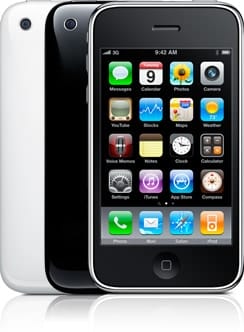
This may sound a bit ridiculous but has anyone thought about using your Iphone as a mobile digital signage player? I mean lets think about this, if people can use the Iphone to watch movies and video clips why can’t it be used as an integrated digital signage player. The unit can be easily connected to the Internet and it also has a touch screen so really its perfect for interacting with your intended audience. With the sheer number of Iphone users out there, setting a digital signage network can be easily established.

All we need now is a digital signage Iphone application… and my guess is that someone is already developing one.


Do you think that the Iphone should be used as a mobile digital signage player?


View Results

Loading ... Loading ...

Post to Twitter Tweet This Post

  • Share/Bookmark

Category: Digital Signage Blog Info, Digital Signage Blog News, Digital Signage Blog Products


Digital Signage at Oceanworld Manly Australia

It’s the holidays so I decided to take the family out to Oceanworld Manly Australia so the kid could experience and see the tropical and temperature fishes, sharks, snakes, lizards and insects. I’ve been there before so I wasn’t excited as the kid, but when I entered the first section of the venue (Middle Level – Level 2) my excitement grew. Yes… I saw digital signage being used around the floor which wasn’t there the last time I visited.

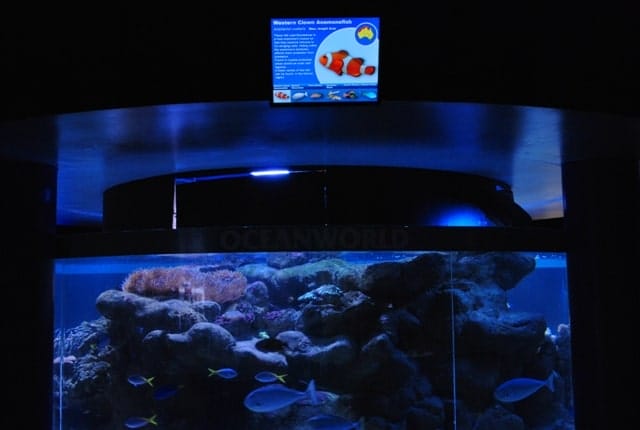
I’m always on the lookout for digital signage so this was a great opportunity for me to understand how Oceanworld implemented their system and if any, recommend ways to improve their setup. At each of the tanks, there was a 15-17 inch LCD screen displaying information about the fish or animal inside the tanks. This was located above each of the tanks and it eliminated the need to have a static board with this information.

Here’s an image of the screen:

Digital Signage at Oceanworld Manly Australia

Digital Signage at Oceanworld Manly Australia

Digital Signage at Oceanworld Manly Australia

Digital Signage at Oceanworld Manly Australia

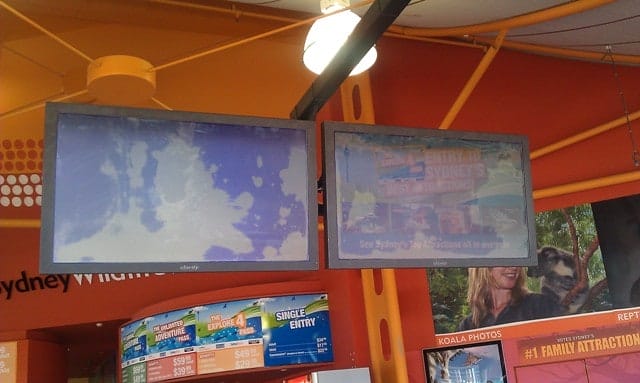
I noticed that some of the screens had one static slide (I’m assuming that the system was using powerpoint), however there were other screens which had pictures of each of the different types of fishes in the tank at the bottom of the screen. This however wasn’t initially obvious to me or to the people I asked as the time it took to rotate to the next slide was several minutes – I wasn’t going to stand around and wait for several minutes just to find out more information about each of the different types of fish in the tank. Overall, the solution was quite average and may need to be reviewed. Here is our recommendation of things that may need to be improved:

1. LCD screen location – to view the screen, one would need to step away from the tank and tilt your head slightly up.  I think the screens could have been strategically better located so the visitors would actually see the information whilst looking at the fishes in the tank. Just as a thought, maybe install a waterproof screen at the back wall of the tank??? We talked about strategically positioning your screens in one of our previous posts called “Location, location, location“.

You’re probably thinking “waterproof screens????”… yep here’s a video from youtube to prove it that it does exist.


For more Digital Signage videos visit the Digital Signage Portal.

2. Use touch screen technology to enable the visitors to interact with the fish tank. Currently, visitors like myself would not be standing around to wait for the next slide so why not get the visitor to initiate the slide change. Otherwise, decrease the time it takes for each slide to rotate and also place a reference on the screen stating that “The below fishes can be found in the tank”. Make the image of the fish at the bottom of the screen that the information is referring to more noticeable – either fade the other images or highlight the current image. We talked about touch screen technology in one of the previous posts called “To touch or not to touch – that is the question“.

3. I also found that the solution installed was using the Windows XP operating system. How did I know this? We that was easy because there was that typical windows notification balloon at the bottom right hand corner of the screen. Maybe disable all Windows XP notification messages.

Digital SIgnage Error Message

Digital Signage Error Message

4. On another screen there was also a notification that it found the Wireless network. This is definitely a security issue as the SSID of the wireless network was clearly visible to the public. We talked about digital signage security issues in two of our previous posts called “How secure is your digital signage solution?” and “Secure your digital signage solution – here’s why“.

Well that’s my recommendation based on what I saw and I apologise in advance if I misrepresented the solution and setup but I hope our readers can learn something from this post.

Do you have any digital signage experiences you would like to share with us?
Send us an email to info@digitalsignageblog.com or feel free to comment here.

P.S: For those who are interested in going to visit Oceanworld, there is a 15% discount if you enter after 3:30pm. Overall, the kid had fun and we will most likely visit Oceanworld again in the near future.

Post to Twitter Tweet This Post

  • Share/Bookmark

Category: Digital Signage Blog News, Digital Signage Reviews


To touch or not to touch – that is the question

game-console

In this current day and age, quite a number of technologies are now using touch screens.  For example, gaming consoles such as the Nintendo DS, Mobile phones (iphone, blackberry storm, various PDA’s) are all using some form of touch screen technology to further increase the interaction between the user and the device.

Why interact with digital signage?

The main reason why businesses would want to interact with their customers through digital signage are:

  • To provide targeted and specific information to the viewer e.g. Medical surveys whilst conducting eye sight tests.
  • Traffic analytics – to understand how many people interact with the system. One system that I could think of is a Health Checking system. A weight scale connected to a digital signage system could potentially be setup to perform the following:

- The system will request for the persons age and then it will measure and display their weight

- Based on the information gathered, the system will then display the recommended weight and potential health related problems associated to the persons weight.

- Obviously at the same time, there will be an area for advertising and this space can be sold to businesses in the health industry.

  • Any form of relationship requires a two way communication – to connect and build a strong relationship with your customers or clients you need to basically involve them in the decision making process. So if it’s to buy a new car, a digital signage signage solution at the car dealership should have the ability for the potential buyer to modify the colour or shape of the car as this can influence their purchasing decision.

So now the question is whether you should use touch screens in your current digital signage deployments. We cannot provide you with the answer to this question but what is important is to understand what the clients requirements are and then to assess whether a touch screen meets these requirements, but most importantly if you are planning to use touch screen technology in your digital signage solution, make sure you thoroughly look into the system usability i.e how can people interact with the system. Here are some examples from a youtube user that shows unusable touch screen systems – she refers to them as the “Usability Hall of Shame”:

For more Digital Signage videos visit the Digital Signage Portal.

My prediction is that touch screens will become part of the standard deployment for any future digital signage projects as we have seen touch screens mainly used for way finding, product catalogs, directories and gaming but is this all digital signage touch screens can be used for?

Feel free to submit your answer as a comment.

Post to Twitter Tweet This Post

  • Share/Bookmark

Category: Digital Signage Blog News, Digital Signage Blog Video

Request a Digital Signage Quote

RSS

Or subscribe via email:
 

Polls


    Do you use Powerpoint in your digital signage solutions?


    View Results

    Loading ... Loading ...
Digital Signage Blog Sponsors

Advertise Me Sponsorships available here!

Digital Signage Articles

Sponsored Links


Recent Comments: