
Feedback Form

Digital Signage Blog Archives


Archive for Category: ‘Digital Signage Blog Video’


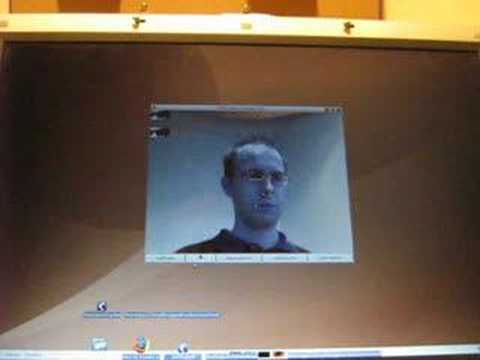
Open source eye tracking software

Eye tracking analytics has become one of the next big things in digital signage. We came across an open source eye tracking software which uses ordinary web cameras called opengazer. http://www.inference.phy.cam.ac.uk/opengazer/ We didn’t have enough time to test the application but here’s a video from their website:

Post to Twitter Tweet This Post

  • Share/Bookmark

Category: Digital Signage Blog Video


Weekend Fun: Using funny videos for your digital signage content

It’s another weekend so you know what that means? It’s time for some weekend fun. For this weekend fun post, I thought I’d look around for a fun video to post. Generally, most of the content for digital signage is serious (depends on the environment) but I believe that sometimes it’s those funny ads that stand out and makes it go viral. So here’s a Youtube video clip of a McDonald’s funny advertisement:

What I found most interesting about this video from McDonalds is that it doesn’t matter which language the video is in, as long as it portrays the intended message to the audience then in my eyes it’s definitely a sure winner!


Do you use funny videos for your digital signage content?


View Results

Loading ... Loading ...

Post to Twitter Tweet This Post

  • Share/Bookmark

Category: Digital Signage Blog Info, Digital Signage Blog Video


Coca-cola goes interactive with digital signage vending machines

We all knew this was going to happen and it eventually did. Coca-cola has released digital signage vending machines which are interactive. Here’s a video to show you what we mean:

And here’s a video of someone actually using the vending machine… I like it how he had to press the right arrow several times before it scrolled to the right and it also has the Pay Pass payment option (I haven’t really seen this been used in Australia):


What do you think about the Coca-cola interactive vending machine?


View Results

Loading ... Loading ...

Post to Twitter Tweet This Post

  • Share/Bookmark

Category: Digital Signage Blog Info, Digital Signage Blog Products, Digital Signage Blog Video


Weekend Fun: Digital Signage Mobility with the Humanoid iPhone

It’s the weekend and thought I’d share an exciting and fun video clip – you’ll be also surprised as well.

We previously talked about how the iPhone can be used as a digital signage player (there’s already a few companies out there who have created an application on the iPhone) but now how would you like to be served by a humanoid robot with an iPhone attached to it’s head? Watch the funky video and we’ll discuss later:

<object width=”425″ height=”344″><param name=”movie” value=”http://www.youtube.com/v/BBGA7ARLzPA&hl=en&fs=1&”></param><param name=”allowFullScreen” value=”true”></param><param name=”allowscriptaccess” value=”always”></param><embed src=”http://www.youtube.com/v/BBGA7ARLzPA&hl=en&fs=1&” type=”application/x-shockwave-flash” allowscriptaccess=”always” allowfullscreen=”true” width=”425″ height=”344″></embed></object>

In the examples in the video, the humanoid robot with the iPhone attached as it’s head, can be used to:

  • wake you up – morning!!! maybe even give you a hug or a slap
  • entertain – it’s a dance machine…shake it’s robo booty
  • teach it new tricks and moves – next thing you know it will start imitating your moves
  • and if you’re nice to it… it might even make you a coffee (just kidding – ummmm may be it is possible)

BUT more importantly it can interact with YOU – think about it from a sales and marketing perspective and you’ll start realising that this robot can be used to attract more customers into your store and even possibly serve it’s customers (stick your own photo image as it’s head :) ). The screen itself can be used even to promote sales, products and specials whilst it’s dancing around entertaining it’s customers (yes it’s  digital signage after all). And yes…. I’ve said it before… the possibilities seem to be endless with the future of mobile phones as digital signage players.

So that’s our weekend fun for this week and we all hope you’re having a great weekend.

Post to Twitter Tweet This Post

  • Share/Bookmark

Category: Digital Signage Blog Info, Digital Signage Blog Products, Digital Signage Blog Video, Digital Signage Ideas, Digital Signage Weekend Fun


Interesting Digital Signage Discussion Video

There’s quite a lot of content out there on the Internet but this is the very first time I’ve actually stumbled across a Video Discussion on digital signage. I have learnt quite a lot just from watching these videos and I thought why not share it with our readers.

Now this discussion was organised/sponsored by Dynamax (thanks guys) and the companies involved included Dogobert, DigiCom, Stand Media, Imperative Group and Rocket Communications.

The main topic of the discussion was “Digital Out of Home is a multi channel multi touch-point communications medium. How should we design for the future to maximise viewer and user relevancy?”

The actual discussion was divided into several questions and there were:

PART 1 What do we mean by “multi touch-point” (devices/access points etc) in the context of Digital Out Of Home and what is it trying to achieve for viewers and/or users? (relevancy?)

PART 2 What does the existing Digital Out Of Home solution need to do more of to enhance the medium’s relationship with the end user? What – if anything – should we also stop doing?

PART 3 Does ‘multi touch-point’ mean ‘two-way’ communication? If so, how and where should this be designed into the medium to offer view & user value (however you choose to define that) when out of the home?

PART 4 How can multi touch-point digital media generate experiential value for users? Is this value easy to identify and reconcile commercially?

PART 5 What creative design elements are considered to be best of breed today and what trends are likely to emerge in the next 12 months?

PART 6 What physical design elements are considered to be best of breed today and what trends are likely to emerge in the next 12 months?

PART 7 What is the commercial challenge of delivering DOOH across multiple touch-points and how can this be best planned & managed?

Part 8 What challenges does the transactional nature of a multi touch-point model mean in terms of capturing, managing, storing and commercialising data?

PART 9 The collection of data means we can offer the viewer or the customer more value; what value does this offer?

PART 10 Which component parts of a multi touch-point proposition may offer the most commercial opportunities over the next 12 months and why?

PART 11 Does opening up the medium to users generating their own content necessarily make the medium more ‘relevant’?

Source: http://www.ddrmag.co.uk/links.php

Here’s the video of the first part of the discussion:

If you were present in the discussion, how would you have answer this question:
“What do we mean by “multi touch-point” (devices/access points etc) in the context of Digital Out Of Home and what is it trying to achieve for viewers and/or users? (relevancy?)”

Feel free to submit your answer as a comment.

Post to Twitter Tweet This Post

  • Share/Bookmark

Category: Digital Signage Blog Events, Digital Signage Blog Info, Digital Signage Blog Video, Featured Post


Will the Microsoft Xbox 360 take over the Digital Signage Industry?

Just recently I read an article about the upcoming Microsoft Xbox Motion Sensor that allows the users to control games with our bodies. Unlike the Wii, this means that you do not have to hold anything to interact with the console and game.

This new product is being called “Project Natal” and is basically a sensor for the Xbox 360 which tracks movement, listens and executes commands from the console… don’t know what I’m refeering to? then watch this trailer from Youtube:

If you’re from the digital signage industry you’re thinking to yourself “The future of Digital Signage interaction?”. If you’re like me, when something catches your attention you start brainstorming on how this can be applied to the digital signage industry.  If I was working for Microsoft I would recommend and provide directions to the management team to push this product out to businesses to use as a digital signage console…. and not just a gaming console. Let’s think about this, most digital signage players out there in the market are using desktop PC’s, embedded PCs or some form of a PC – fundamentally that’s what the Xbox 360 is – and soon it will have a sensor. In my eyes,  I can potentially see this used as a digital signage player and not just a gaming console.

In the past, many top digital signage gurus predicted that the next “big thing” in digital signage was going to be interaction and guess what…. they were right.

Lets imagine this scenario:

  • You walk into a clothing store and you’re having trouble picking a dress for the night out with the girls.
  • Now like in the example in the trailer, you walk up to the dsx (digital signage xbox) and you contact your best friend to get advice on which dress you should wear.
  • In the application, you have the virtual product catalog of all the dresses available in the store.
  • The application takes a picture of you (measuring your body size, height etc) and you start trying out the different dresses (virtually).
  • Along the way you and your friend discuss whether the dress is suitable or not.
  • When you found some of the dresses both of you like  you add it to you’re favourite list.
  • You then press the “TRY” button or say “Let me try these” and the shop assistant brings in the dresses for you to try.
  • All the transactions and  information end up being recorded online so that the next time you visit a store that has the dsx you can retrieve this previous information.

This is one of the many applications I can see working for the digital signage industry and I can’t wait till we trial one of these units.

Post to Twitter Tweet This Post

  • Share/Bookmark

Category: Digital Signage Blog News, Digital Signage Blog Products, Digital Signage Blog Video


Inside the world of a Digital Signage Player

This week, our team thought of doing something different from our usual postings – we decided to open up the NDSP-500 digital signage player and give you a brief look at what’s inside one of these players. The video is not of the greatest quality but it does give you an idea of the components inside a typical digital signage player and what connections are available. So here’s the video:

As you can clearly see, the unit is small… it’s smaller than half of an A4 paper. With this particular unit, there are several connectors at the front:

1. RS232 – this is usually to provide serial communications with another device. It can be used to control and manage an display screen – that’s if the screen supports RS232.
2. Secure compartment to store the SD card – it’s also a quick way to easily swap out the SD card without having to open up the box

At the back of the unit you will notice the following connectors:

1.Video output:  the unit has these typical connections – S-Video Output/Composite Video and Audio, DVI, and VGA.

2. Video Input: Composite Video and Audio. With this particular unit you will be able to connect a video input source such as a DVD player, Foxtel, CCTV camera etc.

3. S/PDIF – for great audio quality

4. LAN port which support 10/100 Mbps

5. Two USB ports for connecting USB Storage

6. Power plug to connect the power supply. This power plug was different from other digital signage players we’ve seen in the past. It basically has a connector which allows you to twist and screw the power cable to the power plug.

Inside the player, all you will find is a circuit board, a frame for a small hard disk and several cables. As you can see from the video, you will not find a fan inside the player – this makes the unit very quiet when it’s turned on.

Would you like to see more videos? Let us know what you’ll like to see and we’ll try to get it done.

Feel free to submit your answer as a comment.

Post to Twitter Tweet This Post

  • Share/Bookmark

Category: Digital Signage Blog News, Digital Signage Blog Products, Digital Signage Blog Video


Digital Signage Portal – myBlog

We would like to introduce to you the “myBlog” feature on the digital signage portal (www.digitalsignageportal.com).  We have added the facility for registered members to create their own blog entries and share this with the rest of the digital signage community. We understand that most of you don’t have a business blog or don’t have either the technical expertise or knowledge to set one up. So we’ve done most of the hard work for you. All you have to do now is just post your entries. Here’s a quick tutorial on how to add your own blog entries on the digital signage portal.

Post to Twitter Tweet This Post

  • Share/Bookmark

Category: Digital Signage Blog News, Digital Signage Blog Video


To touch or not to touch – that is the question

game-console

In this current day and age, quite a number of technologies are now using touch screens.  For example, gaming consoles such as the Nintendo DS, Mobile phones (iphone, blackberry storm, various PDA’s) are all using some form of touch screen technology to further increase the interaction between the user and the device.

Why interact with digital signage?

The main reason why businesses would want to interact with their customers through digital signage are:

  • To provide targeted and specific information to the viewer e.g. Medical surveys whilst conducting eye sight tests.
  • Traffic analytics – to understand how many people interact with the system. One system that I could think of is a Health Checking system. A weight scale connected to a digital signage system could potentially be setup to perform the following:

- The system will request for the persons age and then it will measure and display their weight

- Based on the information gathered, the system will then display the recommended weight and potential health related problems associated to the persons weight.

- Obviously at the same time, there will be an area for advertising and this space can be sold to businesses in the health industry.

  • Any form of relationship requires a two way communication – to connect and build a strong relationship with your customers or clients you need to basically involve them in the decision making process. So if it’s to buy a new car, a digital signage signage solution at the car dealership should have the ability for the potential buyer to modify the colour or shape of the car as this can influence their purchasing decision.

So now the question is whether you should use touch screens in your current digital signage deployments. We cannot provide you with the answer to this question but what is important is to understand what the clients requirements are and then to assess whether a touch screen meets these requirements, but most importantly if you are planning to use touch screen technology in your digital signage solution, make sure you thoroughly look into the system usability i.e how can people interact with the system. Here are some examples from a youtube user that shows unusable touch screen systems – she refers to them as the “Usability Hall of Shame”:

For more Digital Signage videos visit the Digital Signage Portal.

My prediction is that touch screens will become part of the standard deployment for any future digital signage projects as we have seen touch screens mainly used for way finding, product catalogs, directories and gaming but is this all digital signage touch screens can be used for?

Feel free to submit your answer as a comment.

Post to Twitter Tweet This Post

  • Share/Bookmark

Category: Digital Signage Blog News, Digital Signage Blog Video


Digital Signage Video: Tenjin station in Fukuoka

A video captured by a youtube user in Tenjin Station (Fukuoka – Japan) of a digital signage screen.

For more Digital Signage videos visit the Digital Signage Portal.

Post to Twitter Tweet This Post

  • Share/Bookmark

Category: Digital Signage Blog Info, Digital Signage Blog Video, Featured Post

RSS

Or subscribe via email:
 

Polls


    Do you use twitter?


    View Results

    Loading ... Loading ...
Digital Signage Blog Sponsors

Advertise Me Sponsorships available here!

Digital Signage Articles

Sponsored Links


Recent Comments: