We’ve been testing the Asus Chromebit (CS10) as a digital signage player and it’s proven to work quite well. It was actually used for these two case studies: Case Study – Social Wall at the Gym and Social Wall at Health Beyond 2017. You can actually use it as a standalone application (packaged app) or it can even be scaled to an enterprise solution by using the Google Chrome Purpose-built Device Management – you can sign up here for a free trial.
During our testing of the Chromebit, we decided to see if it can be used as a touchscreen kiosk but couldn’t find a comprehensive list of which touchscreens are compatible with the Chromebit. So what did we decide to do? We simply decided to create one and here’s the list. If you’ve tested any touchscreens with the Chromebit please let me know so we can update this list.
| MANUFACTURER | MODEL | PASSED/FAILED | NOTES |
|---|---|---|---|
SAMSUNG | Screen: DM46 Overlay: CY-TM46 |  FAILED FAILED | Samsung support has advised us that Chrome OS is not supported by the Overlays. The strange thing is that it sort of works if you plug a USB hub to the Chromebit, but if it's rebooted with the Hub and Overlay USB cable connected it doesn't boot.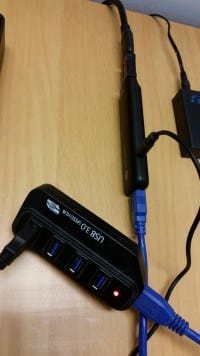 |
| Overlay: CY-TM40LCA/EN | FAILED | Samsung support has advised us that Chrome OS is not supported by the Overlays | |
DELL | Model: 02V1MF 21.5" Multitouch Monitor |  PASSED PASSED | |
LG | Screen: 49SM5KC Overlay: KT-T490 | PASSED |
LIKE WHAT YOU'VE READ?
When you subscribe you will also join other Digital Signage readers who receive our content right in their mailbox. Good luck!
Our Sponsors
- Advertise Me

We provide custom digital advertising solutions. We supply display screens, Video Walls, Touchscreens, Wayfinding, WordPress Plugins, create custom applications and basically implement any technology that is innovative.
- Social Wall
Social Wall is a simple and easy to use tool to aggregate and display social media posts on any digital medium