
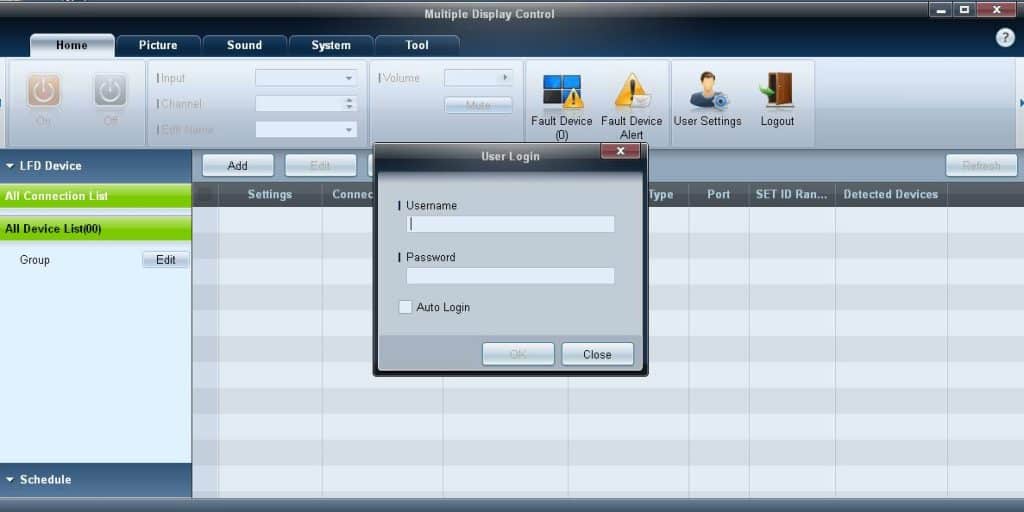
One of our most popular posts on this website with over 20 comments is “How to control a video wall using the Samsung MDC?” and it appears that there are quite a number of Audio Visual companies or Digital Signage companies who want to use the Samsung MDC but couldn’t find the setup files. In that post you will be able to find the download link that Samsung provided me to share with the reader on this site if you’re in need of that program download it from there or check out the resources section below.
What is Samsung MDC?
Samsung MDC (Multi Display Control) is a free software tool developed by Samsung that comes with every commercial display screen purchased. The software tool allows you to only manage Samsung screens using RS232 or via the LAN. It will work with most Samsung Commercial screens and it’s a handy tool to change and control 1 or multiple screen settings remotely. It is a very handy tool.
How do you backup your Samsung MDC settings?
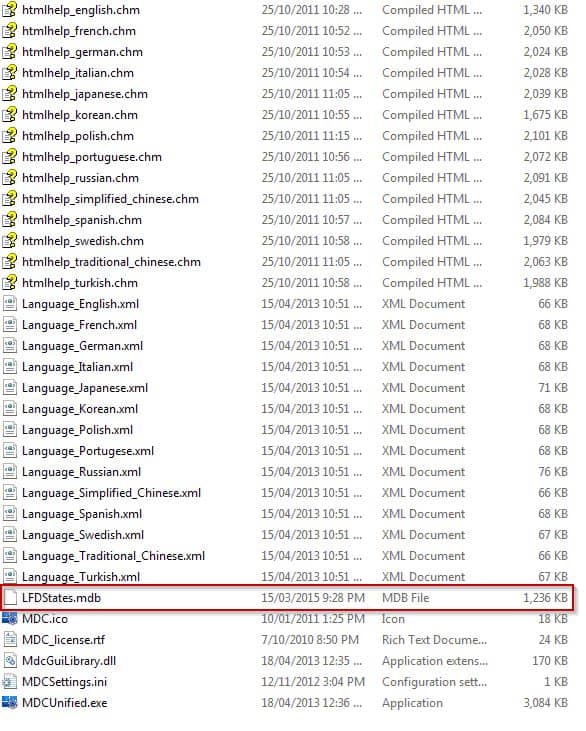
If you manage 10 or hundreds of Samsung screens then you want to backup the database file. This database file contains all the list of devices added to the MDC software. Having a backup comes in handy especially if you want to copy these settings to other computers or if you simply need to have a recovery point in the event your computer crashes and dies. So where is this file located?
The file name is LFDStates.mdb and it’s located in C:\Program Files (x86)\Samsung\MDC_Unified
Copy and backup this file and you’re done.
LIKE WHAT YOU'VE READ?
When you subscribe you will also join other Digital Signage readers who receive our content right in their mailbox. Good luck!
Our Sponsors
- Advertise Me

We provide custom digital advertising solutions. We supply display screens, Video Walls, Touchscreens, Wayfinding, WordPress Plugins, create custom applications and basically implement any technology that is innovative.



Is it possible to download the Software MDC at Dropbox or something other places? The Link above ist not running
Please check the above link. It’s been updated.