
News, Products
Digital Signage:How do I create a video wall?

Depending on your exact requirements, there are several ways to create a video wall (a series of screens set up in a matrix configuration).
Some people might not be aware of this but most commercial grade screens already have this video wall function built in.
For example, the Mitsubishi screens have an RGB input and output port. See the below image:

In order to set up a 3×3 video wall with the Mitsubishi screens, all you would need to do is “daisy chain” all the screen in the following video arrangement:
1. Connect the video RGB output port of Screen 1 to the RGB input of Screen 2
2. Connect the video RGB output port of Screen 2 to the RGB input of Screen 3
3. Connect the video RGB output port of Screen 3 to the RGB input of Screen 4
and so forth.
Alternatively, there are several other ways of achieving the same result. There are devices out in the market which perform the same function. Below is a short list:
1. Stretcher – this device stretches your monitor among four DVI or VGA screens without the use of software
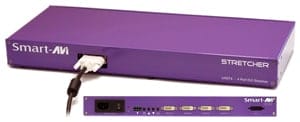
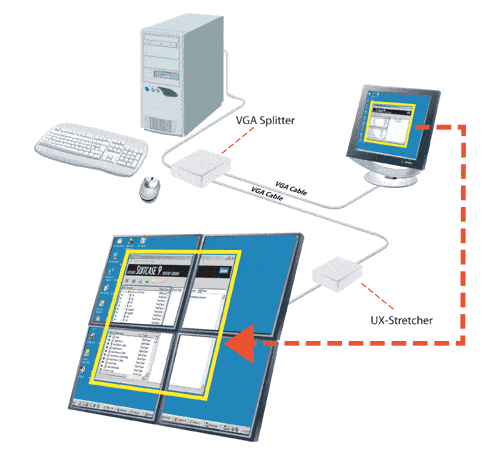
For information about this product, visit our online shop at the digital signage portal.
2. Xpander – Expand Your Desktop up to 32 VGA Screens with Video Overlay Support
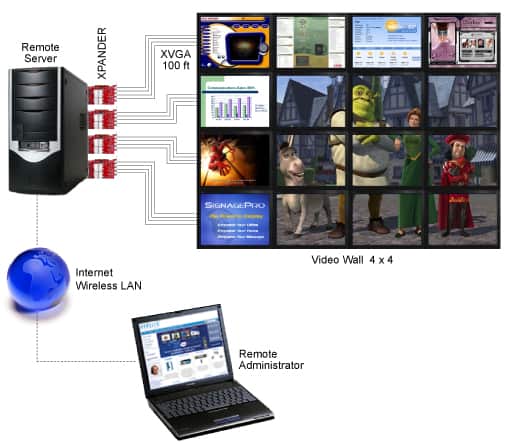
For information about this product, visit our online shop at the digital signage portal.
To discuss this topic further, visit the digital signage portal forum.
LIKE WHAT YOU'VE READ?
When you subscribe you will also join other Digital Signage readers who receive our content right in their mailbox. Good luck!
Comments (1)
write a comment
Latest News and Comments

INNOVATIVE RETAIL EXPERIENCES THROUGH IMMERSIVE VIDEO WALLS
Posted : February 23, 2024 at 6:06 pm

AUSTRALIAN DIGITAL SIGNAGE SOFTWARE ADVERTISEME.TV
Posted : January 5, 2024 at 3:50 pm

WHY HEALTHCARE CENTRES AND HOSPITALS NEED DIGITAL WAYFINDING
Posted : August 25, 2023 at 7:14 pm

DIGITAL WAYFINDING AT TAFE EDUCATION CENTRES
Posted : July 11, 2023 at 3:33 pm
olivia william on HOW SIGNAGES HAVE CHANGED THE MOTION OF ADS
February 19, 2021 at 6:36 pmDigital Signage Blog on How do you control a video wall using Samsung MDC?
December 29, 2020 at 9:06 pmDigital Signage Blog on How do you control a video wall using Samsung MDC?
December 29, 2020 at 9:06 pmkarim on How do you control a video wall using Samsung MDC?
December 29, 2020 at 7:22 pm

It’s always better to have more inputs and outputs than you currently need, in case you need to do some hardware upgrades in the future.