Digital Signage Blog Archives


Posts Tagged ‘lcd screens’


Samsung LED screens

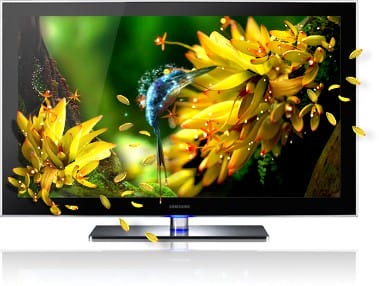
I’m amazed at how light and thin the Samsung LED screens are compared to the LCD screens. We just purchased several Samsung SA300 screens for the office.

Although they do come with a price, they are so much easier to install and configure.


Here’s some information of the screens: (source: http://www.samsung.com/hk_en/consumer/computer-peripherals/monitors/consumer/LS23A300BS/XK/index.idx?pagetype=prd_detail&tab=specification&subsubtype=series-3-led):

Display

  • Screen Size: 23″(16:9)
  • Resolution: 1920 x 1080
  • 250cd/? Brightness
  • Contrast Ratio: Mega DCR (Static 3000:1)
  • 5ms Response time
  • Viewing Angle(Horizontal/Vertical): 170?/160?
  • 16.7 Million Color Supported

Features

  • Support Eco Saving, Multi Screen S/W, MagicAngle, MagicBright3, MagicColor, Off Timer, Magic Tune, Customized Key, Image Size, DVI with HDCP
  • Compatible with Mac
  • Cabinet Color: Black

Stand

  • Use Simple stand

Signal Input

  • Video Signal: DVI, D-sub
  • Sync. Signal: Separate, Composite, SOG
  • Connector: DVI, D-sub

Dimension

  • Product Dimension(with stand)(W x H x D): 547 x 405 x 197mm
  • Product Dimension(without stand)(W x H x D): 547 x 330 x 53mm
  • Shipment Dimension(W x H x D): 615 x 395 x 151mm

Power

  • Power Consumption: 29W(Typ)
  • Stand By Power(DPMS): 0.3W (Typ)
  • External Power Adaptor

Weight

  • Product Weight: 2.9kg
  • Shipment Weight: 4.5kg


Monitor equipped with Samsung’s unique color engine and White LED-backlight (WLED), has higher color accuracy requirements, color temperature and brightness. The new monitors’ highest response time is 5ms and also features MEGA DCR technology, which enhances dynamic contrast 5,000,000:1 in textural images. Diversified “Magic” functions allow you to extend its viewing angle so the screen always appears as if viewed face-on.

Experience amazing new levels of colour, brilliance and picture quality through the very latest in Mega Dynamic Contrast Ratio. Samsung SA300 monitors deliver images so real-to-life that it will transform your whole viewing experience. Packed with breathtaking 5,000,000:1 contrast ratio, the highest level currently available, the SA300 monitor ensures that blacks are at their absolute darkest and (with pristine whites) colours are at their brightest. You will immediately notice the crystal clear picture and its unbelievable intensity. It is like an explosion of colours and leaves other screens seeming dull in comparison. So, take your viewing pleasure to the next level with Samsung Mega Dynamic Contrast Ratio – and enjoy your multimedia content with the professionalism it deserves.

Eco saving makes saving energy easy. It adjusts the brightness of your Samsung monitor based on how much energy you want to save. And with the choice of three energy saving modes (50%, 25% and Power Saving off), you can really tailor your monitor use to meet your own personal needs. Samsung’s commitment to saving energy is designed to help both you and the environment, and with up to 50% saving on consumption, you can really make a positive impact on your eco footprint. Take the effort out of saving energy and take control with Eco saving.

How do you like to watch movies? Do you like lying down on the couch? Sitting in your favorite chair? Cooking or exercising? Whether you’re standing, sitting or lying down, Samsung Magic Angle makes sure that the movie always takes center stage and that you’re always comfortable. This means, thanks to the 5-mode angle management, that whatever angle you watch your Samsung monitor, you will enjoy a full visual experience with amazing picture clarity. So, start seeing your favourite movies and other multimedia in total comfort and without limitations thanks to Magic Angle.


Category: Digital Signage Blog Products


Guest Post: The Pitfalls of Do-It-Yourself Digital Signage

Written by Guest Blogger: Barbara Jolie

Let me preface this post with the fact that I absolutely love Do-It-Yourself (DIY) hobbies and projects. There is nothing like building or accomplishing something yourself, having it look great and exactly the way you want it, and paying less for it too. I love DIY activities as much as the next industrious, frugal individual, but when it comes to digital signage, there may be some things you just want left to the pros.

Finding Your Limitations

Depending on your needs (and your skills of course), digital signage can just about be a complete DIY project. But your digital sign setup probably won’t be without some limitations. For instance, you can go out and buy your own LCD screens, design a Powerpoint or some sort of slideshow, and transmit your display through some type of computer or vod player that’s close enough to connect through wire to your monitor.

But what if you don’t want to tether a computer only a few feet away from your display monitor? What if you want to leave your sign somewhere outside your business where people could easily walk by and take your computer or even your whole monitor system for that matter? What if you don’t want to constantly create new content for your sign or have the same content repeating for months?

The more you actually try to make use of your digital signage, the more you’ll probably realize that you will need the help of at least some professionals. Perhaps you can mount the equipment yourself, or maybe you can design and create the content, but there’s likely no chance that you can do all of that in addition to network troubleshooting and everything else, even if you do have a fairly large and bright staff with even slightly appropriate skills.

How Professionals Can Help

One of the largest benefits to hiring professionals for digital signage is that you have multiple avenues you can take. You can go to a one-stop shop that will take care of all ends of your digital signage needs, but you can also select specific services from specific professionals.

And once you’ve received adequate service from a professional for one aspect of digital signage, they can refer you to other professionals that can help you out in other areas of digital signage. Having access to a network like this is valuable enough on its own.

Of course you can try out certain areas of digital signage on your own. Perhaps you have a knack for design and content strategy and would like to handle that whole aspect of digital signage. Why not at least give it a shot right? Just remember that, after all your own work, if you end up needing a professional, you have wasted some of your own resources that could have been spent elsewhere. You run this risk when you take on any DIY project rather than consorting with professionals.

About the Guest Blogger:

This guest post is contributed by Barbara Jolie, who writes for online classes.

Category: Digital Signage Guest Posts


DOOH = Digital Out Of Home vs Digital Signage – who cares

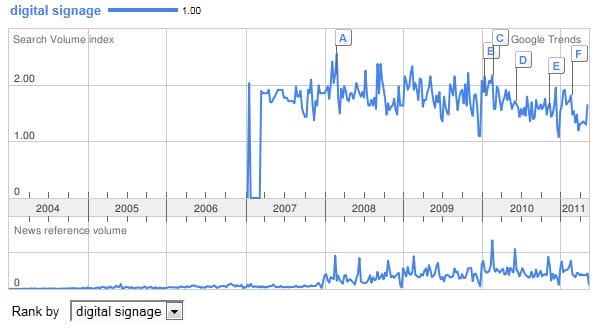
Before we first started our company advertise me – we didn’t have a clue what the industry was called and the different terminologies that was used to describe this booming industry. Back then, the idea of having advertisements  or content such as menus, images, videos, weather feeds, and text displayed on digital screens was still at its infancy. Commercial plasma screens was becoming more popular and with the introduction of LCD screens, prices of plasmas was becoming more affordable. If you look at the below image of google trends for the term digital signage, you’ll notice that this term became more popular (from google’s search perspective) in 2007.  I tried trending the term digital out of home and dooh but google responsed with “do not have enough search volume to show graphs.”

digital signage google trends

One of the terminologies that we were unfamiliar with was  DOOH – to date we still don’t use this term that often since it has been replaced by Digital Signage. Now to me, the two terms DOOH and Digital Signage can be used interchaneably and I don’t care if there is a difference. One might say that DOOH (since it’s not at home) is a screen network in a public area and that digital signage can be located in a corporate building to display internal communications. To me, both are the same but Digital Signage sounds shorter and easier to say so we’ll stick with this. :)

If you have a different opinion let us know.

Category: Digital Signage Blog News


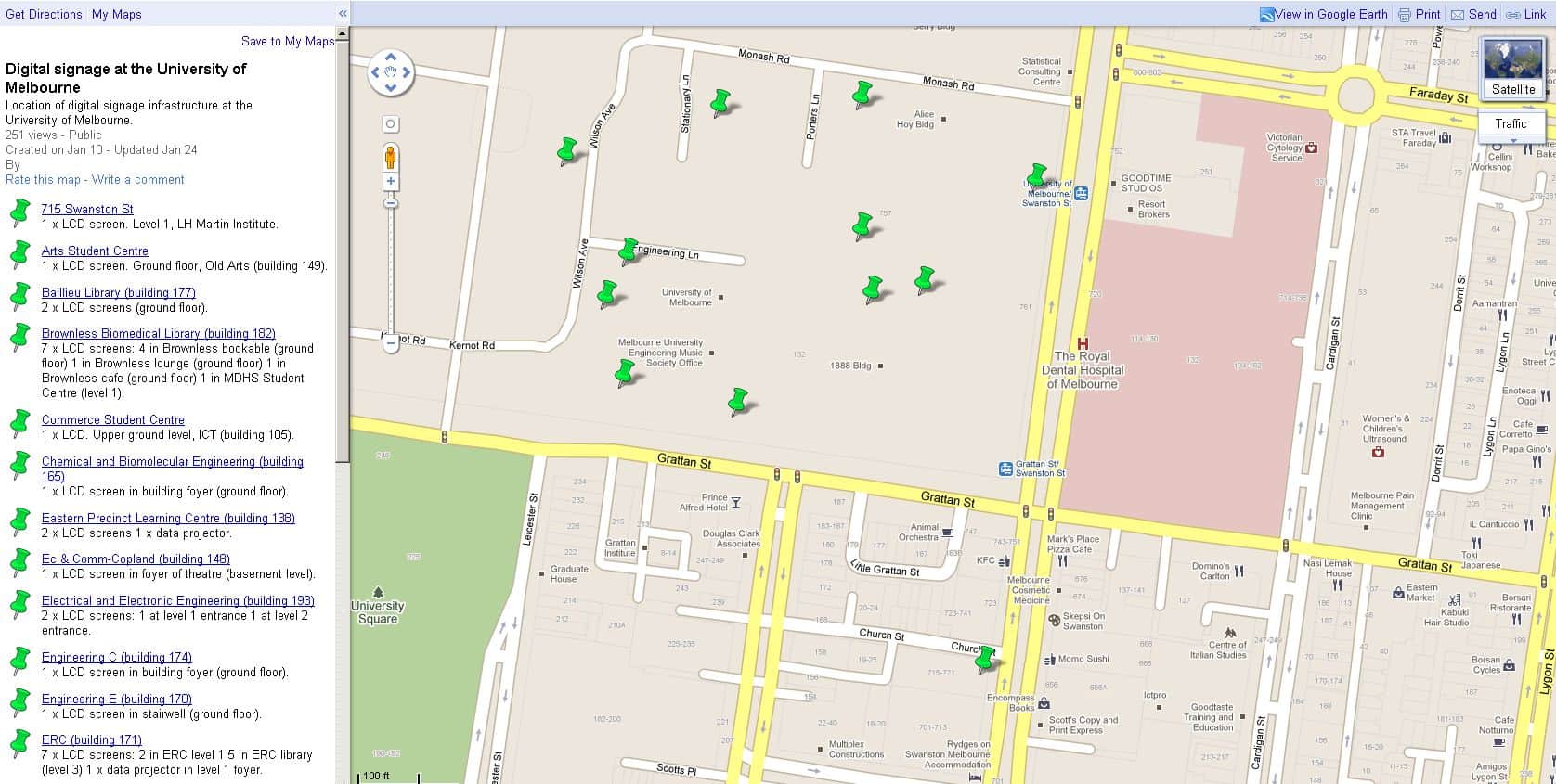
University of Melbourne Digital Signage Locations

It’s interesting to see that the University of Melbourne has a Google Map of where their digital signage screens are located in their campus. In total (based on the information on the map) the University has 43 LCD screens and 1 Projector as part of their digital signage infrastructure. What’s more interesting is that they are using the NDS PADS system (based on a URL I discovered). The University uses this system to promote university events and initiatives to staff and students.

Here’s a map of their digital signage screens:

University of Melbourne Digital Signage Location

Category: Digital Signage Blog News


Public RFP for Digital Signage in the US

I stumbled across an RFP that was released on the 15th March 2011 by bidUSA and here’s the link http://www.bidsusa.net/Default.CFM?Page=400&BSID=63937&PC=70DB213F . The closing date is the 29th March 2011 and it’s for the North Carolina region. Apparently from the title the RFP is for the supply of digital signage 46 LCD display screens. In order to obtain more information you will need to register and login. There is currently a special offer “Sign up today to get full access to bidsUSA through May 31, 2011. There is no cost, obligation or credit card required.” so for those of you who are interest, apply for an account and start bidding…. and good luck.

Category: Digital Signage Blog News


Panasonic Plasma Screens – Features part 1

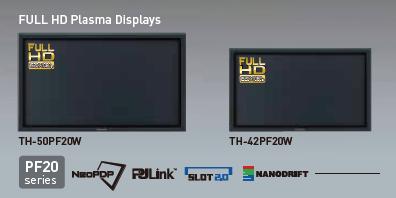
panasonic plasma screen

You’ve seen these at retails stores, venues, restuarants, lobbies and propably you’re looking at one right now. They are everywhere and the popularity of these screens are growing at a tremendous pace. Yes, we’re talking about the Panasonic Plasma screens. Panasonic this year launched the 20 Series screens and they also included the release of 42″ and 47″ LCD screens.

In this post (one of many) we will showcase some of features of the Panasonic Plasma screens. Most of this information can be found on the Panasonic website or their brochure.

MODELS

Firstly, lets look at the two of the latest models of the Panasonic Screens:

PH20W – these are high definition screens with the SLOT 2.0

PF20W – the main difference between the PF and PH is that the PF is a FULL HD (1080p^) plasma displays and uses NeoPDP* technology.

*NeoPDP technology is a newly developed cell structure, an innovative drive technology, a new discharge gas and a revamped panel that has four times luminous efficiency compared to their 2007 models.

^1080p means that the screen will deliver a moving picutre of 1080 lines for sharp and clear display of fast-motion images.

SIZE

The size of the Panasonic Screens range from 42″ to 103″. You can purchase one of the following size: 42″, 50″, 58″, 65″, 85″ and 103″.

ENVIROMENTALLY FRIENDLY PANEL

The Panasonic products are more friendly to the environment. All plasma display panels are mercury and lead free. The display panel also offers a long life of up to 100,000 hours under normal operating condition. This basically equates to 11.42 years if the screen was left on 24/7.

NATIVE CONTRAST

panasonic native contrast

To take maximum advantage of the inherently superior black expression of self-illuminating plasma displays, the newly developed panel allows the PF20 Series to emit light without the use of a pre-discharge. Its high contrast teams up with deeper black reproduction — which forms the basis of image expression — to render rich textures in images with subtle shading and colour differences.

Category: Digital Signage Blog News, Digital Signage Blog Products


Weekend Fun: Digital Signage and the Audi A4 Convertible

This week we had the opportunity to drive the Audi A4 convertible and we realised how most luxury cars or new model cars will have LCD screens. These are the perfect opportunities to utilise these screens for digital signage and I wonder how many car manufacturing companies are actually thinking about this.


Audi A4 Convertible Front

Audi A4 Convertible Front


Audi A4 Convertible Dashboard

Audi A4 Convertible Dashboard

continue reading »

Category: Digital Signage Weekend Fun, Featured Post


Why digital signage can work against you

If your digital signage solution is not implemented correctly it may work against you. Let me explain…

On the weekend whilst walking past a busy street I spotted across the road a real estate company with several LCD screens located at their front window. This is what I saw: (excuse the quality of the pictures but it was late at night and I was using my blackberry):

Digital Signage Screen not working

Digital Signage Screen not working

Digital Signage Faulty Screen

Digital Signage Faulty Screen

Digital Signage Faulty Screen

Digital Signage Faulty Screen

Now, in Australia quite a number of real estate agencies have moved away from using the traditional static posters for displaying their property listing and have implemented some form of a digital signage solution (visual display screens or touchscreen technology).

What I was most surprised about this particular installation and setup was that 1/3 of their screens was either turned off or had a fault with the LCD unit. Does this mean that 1/3 of the properties were not displayed? How would the property owner feel knowing that they are potentially losing interested buyers.

So what I have learnt from this situation is the following:

1. If there’s a hardware fault fix it immediately

2. Always have a backup plan – don’t be afraid to revert back to the old method of using traditional posters when required

3. Use a mixture of digital signage solutions and traditional posters

4. It looks unprofessional and embarrassing for both the digital signage solution provider and owner if the solution fails

5. You will definately lose customers if the problem is not rectified in a timely manner

Category: Digital Signage Blog Info


Make way for the Samsung LED HDTVs

samsung led

Samsung LED 55" HDTV Image Source: www.samsung.com

Say goodbye to LCD and Plasmas screens and let’s make way for the latest LED screen technology. You may have already started noticing that prices for LCD screens and Plasma screens have been dropping in the past few years and one of the many reasons for this is the introduction of the next screen technology “LEDs”. Now, your typical LED billboards have been around for quite some time now but now screen manufactures are developing screens for the home and for commercial purposes.

So today, we thought we’d look at some of the features of the Samsung LED HDTV and in particular the UN55B8000 (55″ 1080p LED HDTV). Firstly, you’ll probably have already noticed by the description that the screen is 55 inches – yes it’s big but also it’s ultra slim (1.2″ deep). The other great features about this unit is that it is environmentally friendly – it uses 40% less power consumption than the traditional LCD screens.

Samsung LED HDTV Content Management

Samsung LED HDTV Content Management Image Source: www.samsung.com

The other additional features is that it is Internet@TV capable, meaning it allows you to receive content via Yahoo!®, Flickr®, and other online TV Widgets on screen (would this be good enough for digital signage???). USB 2.0 Movie: Multi-Media Center makes it easy to watch movies, browse photos and listen to music on your TV. But wait, there’s more! Just say you feel like playing a game of chess or cooking instead of watching TV. Samsung Series 8 LED TV’s Content Library Flash feature lets you do just that. Enjoy hours of built-in entertainment features, then personalize it by adding content that’s available online. And downloading is easy. There’s so much you can do with te Series 8 LED TVs.

In terms of price… it’s not so bad, it’s actually only US$3,999.99 (who uses 1 cents these days?). Anyways, if you’re intending to capture your audience using the best picture quality – bright and clear images then look no further… LED is the way to go.

We would love to review this product when it hits Australia, so if someone from Samsung wants us to review the product send us an email to review@advertiseme.com.au

UN55B8000 55″ 1080p LED HDTV

With the features of the Samsung LED UN55B8000 HDTV, what are your thoughts about using this as a digital signage player?

Feel free to submit your answer as a comment.

Category: Digital Signage Blog News, Digital Signage Blog Products


Digital Signage: Location, location, location

Have you ever walked into a shop and incidentally spotted an LCD or plasma screen hanging near the back corner of the shop and you’ve asked yourself whether that’s the best location for the screen?

I’ve experienced this too many times and I often wonder whether there was any time spent by the installer to strategically position the screens in the most effective locations.

Our thoughts: Retail businesses with shop fronts need to come to a realisation that if the initial intention of installing digital signage was to engage and drive more customers into the shop, then installing the screen inside the shop will not achieve this. Our recommendation would be to install screens at the front of the shop were people passing by can actually see the specials your business is running, then with engaging content drive them into the shop. When they enter the shop, increase the chances of the visitor buying your products by using large screens with product videos and information.

We have also seen businesses installing and positioning small screens at “hot spots” for manufacturers to showcase and advertise their products. What we mean by “hot spots” is locations where the most traffic would pass at any given time – generally this could be in an area where the special or on sale products are located or at the front of the product iles.

Just as an example, here’s a couple of pictures of an install we completed for a Newsagency based in Sydney. We had two screens located right in front of the entrance to catch the attention of people passing by in both directions. Then inside the store, we had a large LCD screen located right at the magazine stand – this was a “hot spot” because people tended to hang around to read the magazines and pickup the newspaper.

Sometimes, you may also need to think “outside the square” and find locations where you think you can target a specific audience, e.g toilets – you can target your audience by gender (male or female).

Our question: Have you seen any screens installed in any interesting locations/areas?

Category: Digital Signage Blog Info, Digital Signage Blog News

Request a Digital Signage Quote

RSS

Or subscribe via email:
 
Digital Signage Blog Sponsors

Advertise Me Sponsorships available here!

Digital Signage Articles

Sponsored Links


Recent Comments: