Digital Signage Blog Archives


Posts Tagged ‘Digital Speakers’


Digital Signage at Sherwood Ridge Public High School

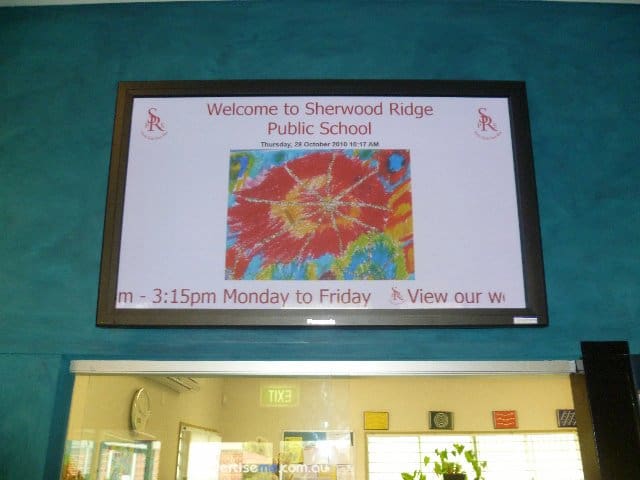
Sherwood Ridge Public SchoolThis month, we successfully completed a digital signage project for Sherwood Public High School. Firstly, here’s a little history of the school:

Sherwood Ridge Public School opened its doors to students for the first time on 28 January 2004. At this time the school had 8 mainstream classes between Kindergarten and Year 6 and 2 support classes.

The founding Principal of Sherwood Ridge is Mrs Jan Marshall.

In the weeks following the school’s inception, students, parents and teachers came together to give birth to: four sporting houses – Air, Fire, Earth and Water; three core values – community, respect and learning; and the school motto “From Each Their Best”.

Requirements

The requirements for this project was quite straight forward and these were:

  • Installation of 50” commercial grade screen in the Administration foyer
  • A digital signage player to display a range of content types including images, videos and text
  • The installation and configuration of  the screen, bracket, cabling and digital signage player
  • Audio Speakers in the Administration foyer
  • Initial template creation
  • Onsite Training
  • Technical Support

The Solution

The solution we provided the school consisted of the following:

  • Dell PC with dual VGA output
  • PADS Digital Signage Software
  • Panasonic 50″ Plasma screen
  • Venturi wall bracket
  • 2-Port USB KVM to control two PC’s by using the same keyboard, mouse  and monitor
  • Logitec Speakers
  • VGA extension cable

We provided the school with a standalone solution that enabled them to use the same PC to control, schedule and display the content and at the same time share the keyboard,mouse and monitor. Since the PC had two VGA outputs, one was connected to the local screen (used for managing and scheduling content) and the extended second output to the Panasonic screen (display the content). This setup is quite complex because the video configuration of the second output was setup as an  extended screen. This meant that the PADS Viewer (a component of the PADS software) which displays content had to automatically launch on this extended screen. How did we do this? It was simple, the PADS application allows you to enter the X and Y co-ordinates of where the viewer will be launched. Here’s an example, the horizontal position of the viewer screen is 1440 (since the horizontal size of the primary screen is 1440) :

pads settings extended screen

As a result, the digital signage solution was used as a tool to communicate messages with kids, teachers and parents through images and information. Below is a few pictures of the install:

Digital Signage in the Education sector in Australia is now becoming more popular and more affordable so why not talk to us so we can show you how you can achieve your digital signage goals.

Category: Digital Signage Case Study


Pulling apart a Digital Signage Stand

digital signage stands are now becoming more popular and last week we had the opportunity to open our 42″ LCD advertise me stand so I thought I’d blog about it. Firstly, let’s look at the enclosure of the stand. The outer shell of the enclosure is made out of black aluminum and inner shell  is made out of iron. There is also a 6mm tampered glass at the front of the enclosure and this makes is look very professional. The only bad thing is the reflection. continue reading »

Category: Digital Signage Blog Products, Digital Signage Reviews

Request a Digital Signage Quote

RSS

Or subscribe via email:
 
Digital Signage Blog Sponsors

Advertise Me Sponsorships available here!

Digital Signage Articles

Sponsored Links


Recent Comments: