Digital Signage Blog Archives
Archive for October, 2011
Free Tools to remotely manage your Digital Signage Solution
There are two basic free tools that we use to remotely manage our digital signage solution – (this is when we use the Microsoft Windows Operating System), Remote Desktop and VNC:
Microsoft Remote Desktop
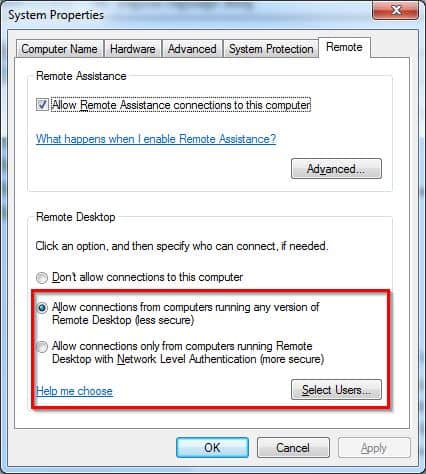
The first tool is the built in Microsoft Remote Desktop. This needs to be enabled in your Operating System by going to Control Panel – System – Remote Tab and click “Allow Connections from Computers running any version of Remote Desktop” for less secure connections or “Allow Connections only from computer running Remote Desktop with Network Level Authentication” for more secure connections.
We generally use this tool on the server. The advantages of using this is that it’s slightly faster than the second tool. There is also an option to connect your local drives to your remote pc which is great for transferring files.
VNC
There are several flavours of VNC (http://www.realvnc.com/) This software tool provides remote control of your digital signage player and basically allows you to see and interact with your digital signage software across any network. The one we use is called tightvnc (http://www.tightvnc.com/) and it is free for personal and commercial use. For managing the players, we recommend using this tool rather than remote desktop since it does not lock the remote PC.
For both tools, you’ll need to make sure you have the relevant ports enabled on your firewall.
With VNC there seems to be a limit to 8 characters for the password but either way both tools are highly recommended.
Category: Digital Signage Techie
Guest Post: 10 Best Practices for Digital Signage
1. Keep it Simple – Shorter words and phrases are easier to read – phrases with 3-4 words work well, but a single word can draw lots of attention as well. Each screen should only contain one focused message. Think of writing active, headline-style phrases rather than full sentences.
2. Repetition – Make sure to repeat your key message at the beginning and end of a segment. You may also want to consider using more than one segment to deliver the same message in different ways.
3. Call to Action – A call to action will tell your audience exactly what you want them to do and how you want them to do it. Start with a verb and keep the subject close to it, such as in the phrase “Ask a salesperson for details.” Then let your audience know when and where the action will take place, if applicable. You should also give information that allows them to act, such as a telephone number or Web URL.
4. Use Images Wisely – Complicated visual elements can easily draw attention away from an important message. On the other hand, simple, relevant images can be pleasing to the eye and help viewers remember the message.
5. Aesthetics Matter – Pay attention to aesthetic details such as font and color contrast. You should always use sans-serif fonts because they are the easiest to read. Likewise, high contrast between the foreground and background on a screen can make the content easy on the eyes.
7. Timing – The amount of time it takes to convey your message must be the same as the amount of time it takes a viewer to read it. If it takes a viewer 6 seconds to pass a screen, then he or she will probably only be able to read the screen for 4 seconds, which means that you have 4 seconds to convey your message.6. Text Size Over Screen Size – While it may seem that a big screen will be able to grab more attention, the message is ultimately the most important element of a digital sign. As you can see in the picture below, larger text on the same screen is more noticeable.
8. Display – It’s important to consider the field of viewing your audience will have. You should make sure that you position digital signs in places where they will be seen by as many people as possible, but that depends on the space you display them in. A screen placed higher up will be visible in a large area with lots of foot traffic, such as an airport. However, in narrow spaces like the aisles of a grocery store, screens tend to work better at eye level.
9. Know the Support Format – Due to the wide variety of formats available for images and video, you need to make sure that you presentation will work on all of your devices. The universal formats for images are JPEG and PNG. For videos, it’s generally easiest to stream a video you upload on YouTube, or to download a video from a cloud storage server and save it on your local display.
10. Test the Final Product – This may be the most important thing you do before officially putting your presentation on display to the public. First, you need to ensure that what you see on your computer screen is still effective and readable on the actual screen you will use, both in terms of the size of the screen and the distance from which people will read it. You should also consider the aspect ratio – perhaps the screen that will display your message is proportionally much wider than your computer screen. Most presentation software will have settings to help you easily change the aspect ratio. Finally, it is essential that you check spelling and grammar, because any errors could compromise the integrity of your message.
About the Guest Blogger:
Chuck Lorrell is a construction management enthusiast who writes about various topics including everything related to construction and is the owner of the site Construction Management>.
Category: Digital Signage Guest Posts
Digital Signage for Exhibitions
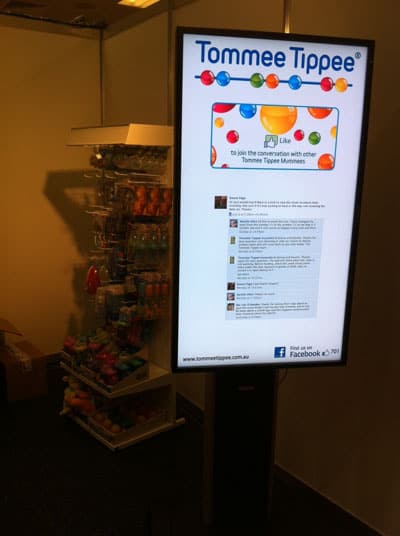
We recently helped one of our clients with implementing digital signage at their exhibition booth. As part of our digital signage exhibition package we included the following:
- Hardware rental of the LCD Screen, Stand and Digital Signage player
- Transportation of the goods to and from the exhibition hall
- Installation of the system and removal at the end of the event
- Template Design
- Management and Monitoring of the digital signage solution – we were able to monitor the system remotely and make the relevant changes if required
During this exhibition, we introduced an innovative way for the exhibitor to manually switch content with a push of a button. The idea was that on quiet periods, the exhibitor will push a button and the screen will display specials to draw more attention to their booth.
In addition, we also integrated Social Media (Facebook) with digital signage. The company’s Facebook page with the number of Fans was displayed.
We know how stressful attending and participating in exhibitions are, so let us take care of your digital signage needs whilst you take care of more the important taks.
Category: Digital Signage Blog News, Digital Signage Case Study
Digital Signage Blog Guest Bloggers
Guest BloggersDigital Signage Featured Links
Recent Posts
Featured Posts
- Product Review: Synrax Onyx Mini
- Introducing digitalsignagearticles.com
- Experience the digital signage world at the ABC Bondi Shop
- Will the Microsoft Xbox 360 take over the Digital Signage Industry?
- Subscribe to the digital signage blog
- Want to be featured on the digital signage portal newsletter?
- About Advertise Me
- Klips: Share your digital signage snap!
Most Viewed Posts
- Forum Post: World Wide Digital Signage Network - 33,159 views
- Digital Signage Portal Forum Post: CISCO Film Making Competition - 17,594 views
- Digital Signage Portal Forum Entry: Help with digital signage business plan - 12,406 views
- Points to consider for a Digital Signage Business Plan - 11,667 views
- Digital Signage:How do I create a video wall? - 11,431 views
Recent Comments:
- Samsung LED screens (2)
- LED Outdoor Screen: It’s gratifying to see your such a great information. We really impressed with your such a...
- Digital Signage Klips: Supermarket in Miami Florida (1)
- olga vega: hi, I would like to have information to publish my company a clip video and/or a photo screen on a tv on...
- Digital Signage Klip: Free Mobile Phone Charging station with a twist (3)
- Robustsigns: All new businesses should get the advice of a professional.
- Clever Concept Vending Machine with See-Through Display (1)
- Fresh vending locations: Fresh Vending – Locations, food franchise business, you will receive the help you need...
- Parramatta Westfield LED Screen (17)
- LED Displays Outdoor: It’s gratifying to see your such a great information. We really impressed with your such...
Popular Tags used in our posts
advertise advertise me Advertisements australia blackberry blog Caption Digital Id digital signage digital signage network digital signage player Digital Signage Software Digital Signage Solutions email Fun Google iphone klip Klips lcd screen lcd screens led screen Poll Id portal screens Signage Industry Signage Solution Signage System Sydney Australia video wall
Digital Signage Blog Categories
- Digital Signage Blog Events (29)
- Digital Signage Blog Info (123)
- Digital Signage Blog News (191)
- Digital Signage Blog Products (35)
- Digital Signage Blog Video (16)
- Digital Signage Case Study (11)
- Digital Signage Guest Posts (11)
- Digital Signage Ideas (4)
- Digital Signage Interview (8)
- Digital Signage Jobs (5)
- Digital Signage Klips (32)
- Digital Signage Newsletter (7)
- Digital Signage Polls (14)
- Digital Signage Reviews (12)
- Digital Signage Techie (25)
- Digital Signage Tutorials (1)
- Digital Signage Weekend Fun (29)
- Featured Post (41)