Digital Signage Blog Archives


Archive for August, 2011


Power On Management features for your digital signage player

Does your digital signage player allow you to automatically power on when it’s connected to power?
Have you been in this situation: Your digital signage players are powered on and are happily running the content on the screens. Then your building has a power outage and all of digital signage players lose power and end up being switched off.When the power comes back on and all the digital signage players are still switched off. You then have to walk around to all the players and switch them back on.What a waste of time right?

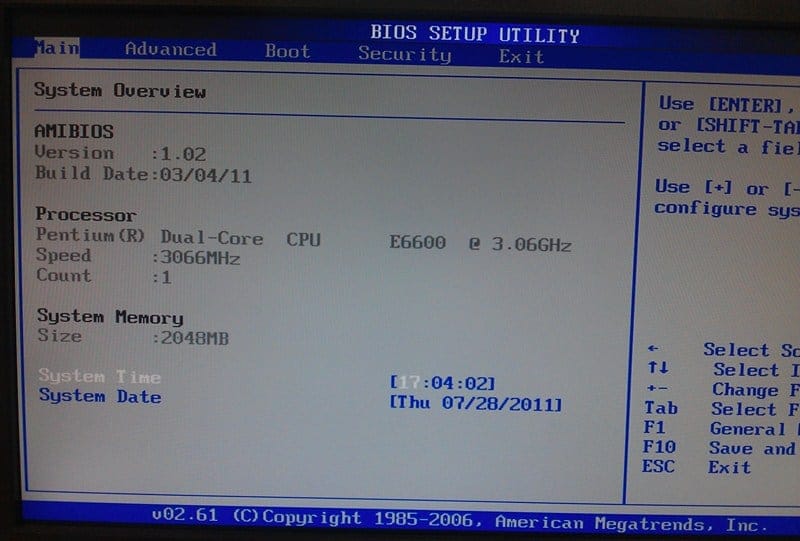
Now if you had the Wake On LAN feature enabled on your players you may be able to switch them back on using this feature but what happens if your using wireless? Wireless doesn’t have this feature. One alternative is to use the PowerOn Function Feature “Restore on AC Power Loss” in the BIOS. This feature basically turns on the player when it detects there is power.

Obviously your digital signage player needs to support this feature in the BIOS. If it does, follow these instructions to turn the feature on:

1. Turn on the player and press the DELETE button (or the relevant button to get into the BIOS) and go to the Advanced Tab.

2. Select Power Management Configuration

3. Enable the PowerOn Function

4. Select Retore on AC Power Loss

5. Make sure the Restore on AC Power Loss is selected to Power On

Category: Digital Signage Techie


3G modem providers that allow inbound connections for Digital Signage

Have you been in this situation:

1. You’ve installed a digital signage player and want to remotely manage the unit

2. You don’t want to install a telephone or ADSL line because the costs are too high

3. You only need the Internet connection for a short perid of time i.e. 1-2 months

4. You don’t care about the speeds and bandwidth

5. You need the player to connect to the Internet

After months of researching I have found the solution in Australia….. (drum roll) Virgin 3G prepaid modem  – YES can you believe it Virgin!!! is the only provider that allows Internet inbound connections. Most other providers only allow you to do this if you’re on a contract (post pay). There are several items or checklists to consider before purchasing any 3G modem and these are:

1. Is your digital signage hardware compatible and be able to support the 3G modem?

2. Is there coverage in the location where you intend to use the 3G modem?

3. Does your player have the ability to automatically connect to the Internet in the event of coverage dropouts? If not, we would recommend you use a 3G Modem router that has the ability to automatically connect to the Internet.

The APN information that you will need to use is Virgin.Internet

Good luck and let us know if you find any other prepaid providers that uses a Public IP Address and allows inbound connections from the Internet.

Category: Digital Signage Techie


Digital Signage Supplier in Australia

advertise me is your one stop shop for all your digital signage needs and solutions. Whether you need a digital menu board or an enterprise digital signage system, Advertise Me will be able to deliver a solution that will meets your budget and needs.
Advertise Me is a leading digital signage solutions provider and are able to supply digital signage displays from leading manufacturers, lcd/plasma/led screens, video walls, touch screens, digital signage players, digital signage software, digital signage servers, digital signage interactivity, digital signage hardware and accessories such as video extenders.
Advertise Me has completed digital signage installations at the major capital cities (Adelaide, Sydney, Brisbane, Perth, Melbourne) and can pretty much cover all the states in Australia.
So for your next digital signage solution, contact Advertise Me on 1300 880 005 or contact info@advertiseme.com.au or click here to request a quote.

Category: Digital Signage Blog News


Advertising Digital Signage networks

Last week I was at my local shopping centre and noticed that they installed digital signage. The setup was as follows:

  • There were two 47″ LG screens hanging from the ceiling.
  • There was an LG player the back of the first screen
  • Connected to the player there was a Telstra USB 3G modem – I’m assuming this was needed for Internet connectivity
  • There was also a VGA splitter that connected the Video output to the second screen

Now, in terms of content and what was displayed on the screen seemed quite disappointing. There was only two ads displayed on the screen. One was the company’s own advertisement and the other was just an image.

My initial thoughts were, “How is the company making money?” and “Are the network owners already struggling to find advertisers?”

I believe this is a common issue for digital signage network startups. Most believe that having a network means that they can easily generate advertising revenue but that’s not always the case. Finding advertisers is the biggest challange easpecially if the network only has a handful of screens. Its a numbers game -most of the advertisers want exposure and they are willing to pay for it if the exposure is high.

So before jumping at the chance of setting up a digital signage network make sure you have advertisers ready to buy your advertising space…. and good luck.

Category: Digital Signage Blog Info

Request a Digital Signage Quote

RSS

Or subscribe via email:
 
Digital Signage Blog Sponsors

Advertise Me Sponsorships available here!

Digital Signage Articles

Sponsored Links


Recent Comments: