Digital Signage Blog Archives
Archive for June, 2011
Guest Post: Why You Would Need Digital Signage
Written by Guest Blogger: Nadia Jones
Every sign has a purpose. Of course, some have more than others. The trend of using digital signage has become so rampant these days that many businesses and institutions, in my opinion, are getting them before even considering why they need them. Digital signs are awesome. But there’s nothing more cringe-inducing or face-palming than seeing a digital sign that offers no more variation or usability than a sign composed of a piece of paper and a Sharpee.
Schedules, Updates, and More Schedules
This should go without saying, but any sign or outpost that contains many schedules that are updated daily would be a perfect use of digital signage. Buildings with good numbers of conferences and institutions that hold a lot of meetings (such as universities) are prime candidates for digital signage. For conferences and lectures in particular, these digital signs can be helpful not only in updating time and locations of events, but also in providing descriptions and advertising for these types of events.
Of course any public transportation company or service should and probably is using digital signs; not using this technology in a field or situation that relies on relaying constant updates to customers is simply inexcusable. Maybe five years ago that sort of thing would be ok, but not this decade.
Pretty Pictures, Even videos!
If you feel like your signs could have a lot of digital media to offer, be them pictures or especially video, digital signage would work absolutely perfectly for your needs. For pictures and graphics, digital signage works great because it gives you an excellent quality image that you can then reuse or change without having to pay extra printing fees like you would for physical prints. Dollar for dollar, when you take into account long term costs of high quality prints, digital signage will always be cheaper and usually look better too.
For video, the need for digital signage is obvious. Frankly put, there is simply no other way to convey video through a sign without digital signage. Now, audio can get a bit more complicated, but it all depends on what you’re using to host the media for the sign.
Touch Media, Oh My!
While this technology is still pretty new and therefore expensive, touch signs can be a godsend for your digital signage needs. Particularly if you intend the sign to be used for information-getting and navigational purposes, having a touch-screen sign makes it so that you can offer a lot of information in one place without having it all cluttered and bunched together. Touch screen is definitely the future of digital signage.
About the Guest Blogger:
This is a guest post by Nadia Jones who blogs at online college about education, college, student, teacher, money saving, movie related topics.
Category: Digital Signage Guest Posts
Advertise Me at the Digital Signage World 2011
advertise me has showcased their digital signage solutions at the Digital Signage World 2011. The event was held over two days (9th & 10th June 2011) at Hall 1 at Darling Harbour Exhibition Center Sydney Australia. The Digital Signage World 2011 is the second digital signage event that has been held in Australia and is the only dedicated tradeshow and conference for the digital signage industry and included seminars from key speakers and exhibitors.
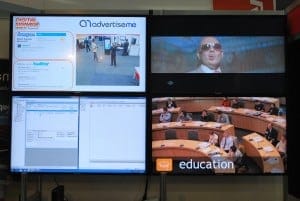
Advertise Me was one of the many exhibitors at the event which included large companies such as Sharp, Fujitsu and Netcomm. During this exhibition, Advertise Me stood out from their competitors by demonstrating the use of Social Networking tools such as Twitter and Foursquare to communicate real time information on the screen. The setup of their stand was also unique which incorporated the use of a video wall(2×2 47″ FULL High Definition LCD Panasonic screens) to demonstate different applications for digital signage. Here’s the setup:
![]() |
![]() |
||
![]() |
The digital signage software that was used for delivering and distributing the content to the screens was PADS Professional developed by a Netherlands based company called Net Display Systems. Net Display Systems has thousands of installations in multiple market sectors from transportation, corporate and government to hospitality and retail.
![]() |
![]() |
The PADS Professional software was installed on the Shuttle XS35 – one of the smallest and powerful PC we’ve seen on the market. The unit has an atom processor with an NVIDIA ION graphics chip set and is able to play Full HD videos without any issues. In actual fact, we played a number of Full HD Videos at the same time and didn’t notice any lag. For convenience, the unit can be mounted on the back of a screen with a Shuttle VESA mounting kit.
![]() |
![]() |
||
![]() |
The top left hand screen demonstrated the use of Twitter, Foursquare, News and Weather feeds, and the ability to show real time video (USB Camera) as an input source.
![]() |
![]() |
The top right hand screen demonstrated the use of Advertise Me’s custom built SMS solution. This digital signage solution enabled visitors to select a music video clip from a list by texting a code to a mobile number. According to the company, this application can be used with any digital signage software that can be connected to the Internet and it’s use can be applied in any industry. Advertise Me also used this solution to distribute the PADS demo key via SMS.
![]() |
![]() |
The bottom left hand screen played marketing videos and was also used to demonstrate the PADS software. This allowed Advertise Me to answer and show the user how easy the system is to use.
![]() |
![]() |
|
![]() |
The bottom right hand screen played an image slideshow demonstrating the use of digital signage in different industries such as hospitality, education, retail and the corporate sector.
![]() |
![]() |
Facial recognition, hand and SMS interactivity were some of the innovative technologies being showcase at the exhibition and it is anticipated that businesses will soon adapt to these new technologies in Australia.
Advertise Me would like to thank their sponsors for their help and assistance:
- Net Display Systems
- Shuttle/Altech
- Panasonic
- Visual Sounds
- Squeak.com.au
Here’s a few more photos of the expo:
![]() |
![]() |
|
![]() |
![]() |
|
![]() |
Category: Digital Signage Blog News
Weekend Fun: Digital Signage on Bikes? What the?
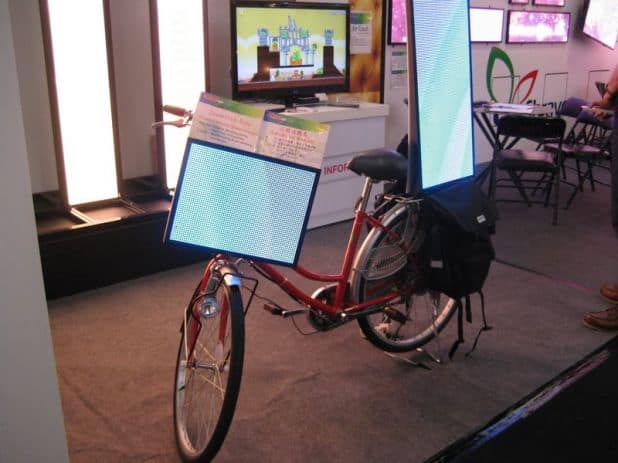
I just stumbled across an image of a bike with digital screens. Is this real or is it fake?
Here’s the picture:
If it is real, here’s a list of my concerns:
- theft – now it gives thieves more of a reason to steal your bike… they now will get a free screen
- what happens if it rain? is it a waterproof screen?
- what happens if there’s a strong wind? will the bike fall?
- will pedalling generate more electricity for the battery to run the screens?
- safety – if the screens draw too much attention to drivers will it cause accidents?
I must give it to the company or engineers that came up with this idea… but to be honest this digital signage implementation is not my cup of tea.
Category: Digital Signage Weekend Fun
Tutorial: How to update your digital signage player firmware
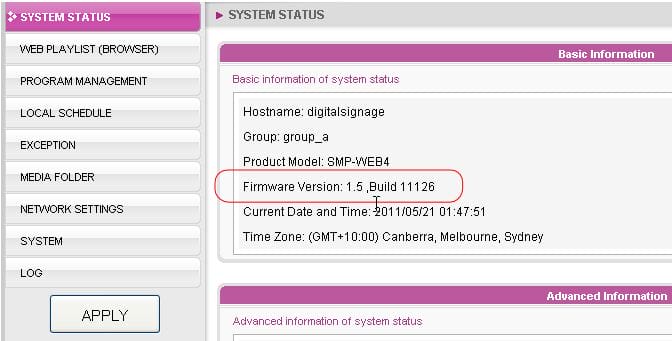
Here’s a quick tutorial on how to update the firmware on your Cayin digital signage player. It is web based so it’s pretty easy and straight forward.
In this particular example, we’re upgrading the Cayin player model WEB4 from version 1.0 to 1.5 (U11436). This new firmware version introduces several new features such as the ability to disable the annoying scroll bars for html templates, abitility to add HTML/flash regions in the skin editor templates, upgrades some of the built in software packages and also the support of 3G and GPS.
However, with any major upgrade sometimes it does introduce new problems and we’ve already experienced this. This patch has an issue with image transitions and some of the backend logic which causes the background to appear during the transitions (1-2 seconds). Cayin are currently working on a fix. But in any case this tutorial was created before we discovered the issue and it’s just meant to demonstrate how to upgrade the player and here’s the link:
http://www.digitalsignageblog.com/wp-content/uploads/2011/06/cayin web4 firmware update.htm
We’ll provide an update when we hear from the manufacturer.
Category: Digital Signage Tutorials
Digital Signage Blog Guest Bloggers
Guest BloggersDigital Signage Featured Links
Recent Posts
Featured Posts
- Product Review: Synrax Onyx Mini
- Introducing digitalsignagearticles.com
- Experience the digital signage world at the ABC Bondi Shop
- Will the Microsoft Xbox 360 take over the Digital Signage Industry?
- Subscribe to the digital signage blog
- Want to be featured on the digital signage portal newsletter?
- About Advertise Me
- Klips: Share your digital signage snap!
Most Viewed Posts
- Forum Post: World Wide Digital Signage Network - 33,159 views
- Digital Signage Portal Forum Post: CISCO Film Making Competition - 17,594 views
- Digital Signage Portal Forum Entry: Help with digital signage business plan - 12,406 views
- Points to consider for a Digital Signage Business Plan - 11,667 views
- Digital Signage:How do I create a video wall? - 11,431 views
Recent Comments:
- Samsung LED screens (2)
- LED Outdoor Screen: It’s gratifying to see your such a great information. We really impressed with your such a...
- Digital Signage Klips: Supermarket in Miami Florida (1)
- olga vega: hi, I would like to have information to publish my company a clip video and/or a photo screen on a tv on...
- Digital Signage Klip: Free Mobile Phone Charging station with a twist (3)
- Robustsigns: All new businesses should get the advice of a professional.
- Clever Concept Vending Machine with See-Through Display (1)
- Fresh vending locations: Fresh Vending – Locations, food franchise business, you will receive the help you need...
- Parramatta Westfield LED Screen (17)
- LED Displays Outdoor: It’s gratifying to see your such a great information. We really impressed with your such...
Popular Tags used in our posts
advertise advertise me Advertisements australia blackberry blog Caption Digital Id digital signage digital signage network digital signage player Digital Signage Software Digital Signage Solutions email Fun Google iphone klip Klips lcd screen lcd screens led screen Poll Id portal screens Signage Industry Signage Solution Signage System Sydney Australia video wall
Digital Signage Blog Categories
- Digital Signage Blog Events (29)
- Digital Signage Blog Info (123)
- Digital Signage Blog News (191)
- Digital Signage Blog Products (35)
- Digital Signage Blog Video (16)
- Digital Signage Case Study (11)
- Digital Signage Guest Posts (11)
- Digital Signage Ideas (4)
- Digital Signage Interview (8)
- Digital Signage Jobs (5)
- Digital Signage Klips (32)
- Digital Signage Newsletter (7)
- Digital Signage Polls (14)
- Digital Signage Reviews (12)
- Digital Signage Techie (25)
- Digital Signage Tutorials (1)
- Digital Signage Weekend Fun (29)
- Featured Post (41)