Digital Signage Blog Archives
Archive for May, 2011
Do you really need to a reason to have digital signage?
Let’s keep this simple, the only reason why you should install digital signage for your business is because everyone else is doing it. Yes, that’s my blog post for today. Short and simple.
Category: Digital Signage Blog News
Guest Post Digital Signage: Connecting Communities with Digital Signage Networks
Written by Guest Blogger: Kelly Johnson
With DVRs giving us the ability to skip TV commercials, newspaper readership declining and a feeling of bombardment from online ads, advertisers are getting creative. Communities around the country are finding a fresh, new way to target potential customers through digital signage network advertising. This medium is more targeted, effective and cheaper than many traditional forms of advertisement. It targets consumers when they are out and about and in some cases, at the point of sale.
The digital signage network connects communities with screens in key locations and ads from non-competing businesses. Independent marketing companies choose key community locations where large amounts of people gather to eat, shop or play. Some marketing companies will even offer to set up a screen in a business for free if the business owner will allow other businesses to advertise on their screen.
Category: Digital Signage Guest Posts
Digital Signage Job at Dell – Inside Sales Account Management
Dell in North America is looking to fill an Inside Sales Account Management position at their North America. The Scope of the position is as follows: Individual contributors responsible for selling Dell’s printer, projector and digital signage solutions, to new and existing customers in Federal. I didn’t realise that Dell had their own digital signag solution but I’m guessing they must be refeering to their display screens or all in one PCs.
Based on the qualifications required, the position doesn’t look like it’s that difficult to get if you have the right skills:
• Minimum 2 years relationship sales and Federal experience
• ISR-AE class completion or field experience equivalent
• Strong organizational/time management skills
• Highly energetic
• Support of your manager and RSM
If you’re looking at applying for this job here’s the link: https://dell.taleo.net/careersection/2/jobdetail.ftl?job=11000UD9&src=JB-10007
Good luck to those that are applying.
Category: Digital Signage Jobs
DOOH = Digital Out Of Home vs Digital Signage – who cares
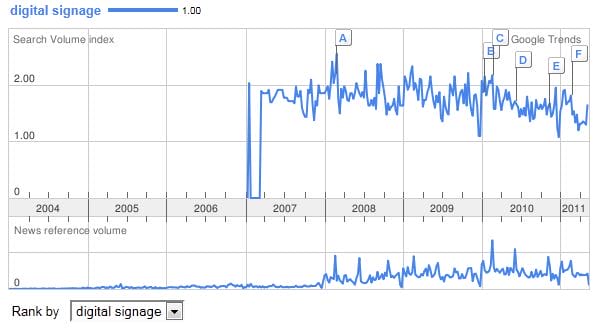
Before we first started our company advertise me – we didn’t have a clue what the industry was called and the different terminologies that was used to describe this booming industry. Back then, the idea of having advertisements or content such as menus, images, videos, weather feeds, and text displayed on digital screens was still at its infancy. Commercial plasma screens was becoming more popular and with the introduction of LCD screens, prices of plasmas was becoming more affordable. If you look at the below image of google trends for the term digital signage, you’ll notice that this term became more popular (from google’s search perspective) in 2007. I tried trending the term digital out of home and dooh but google responsed with “do not have enough search volume to show graphs.”
One of the terminologies that we were unfamiliar with was DOOH – to date we still don’t use this term that often since it has been replaced by Digital Signage. Now to me, the two terms DOOH and Digital Signage can be used interchaneably and I don’t care if there is a difference. One might say that DOOH (since it’s not at home) is a screen network in a public area and that digital signage can be located in a corporate building to display internal communications. To me, both are the same but Digital Signage sounds shorter and easier to say so we’ll stick with this.
If you have a different opinion let us know.
Category: Digital Signage Blog News
Guest Post Digital Signage: How to Get It and Why It Should Be Utilized
Written by Guest Blogger: Bryan Cochand
Communication is crucial to any type of business, but choosing the right way to communicate can be challenging. digital signage — a term for publicly displaying important information and announcements on a large plasma, LED, or LCD screen — is a cutting-edge method for businesses or organizations to get their message out to their consumers in an economical and flexible way. Catching up to all the advantages of this method can be an easy and very lucrative improvement. So if you are looking for new methods to increase the exposure of your company or organization, it may be worthwhile to check out the benefits of using digital signage.
Category: Digital Signage Blog News, Digital Signage Guest Posts
University of Newcastle Implements Digital Signage
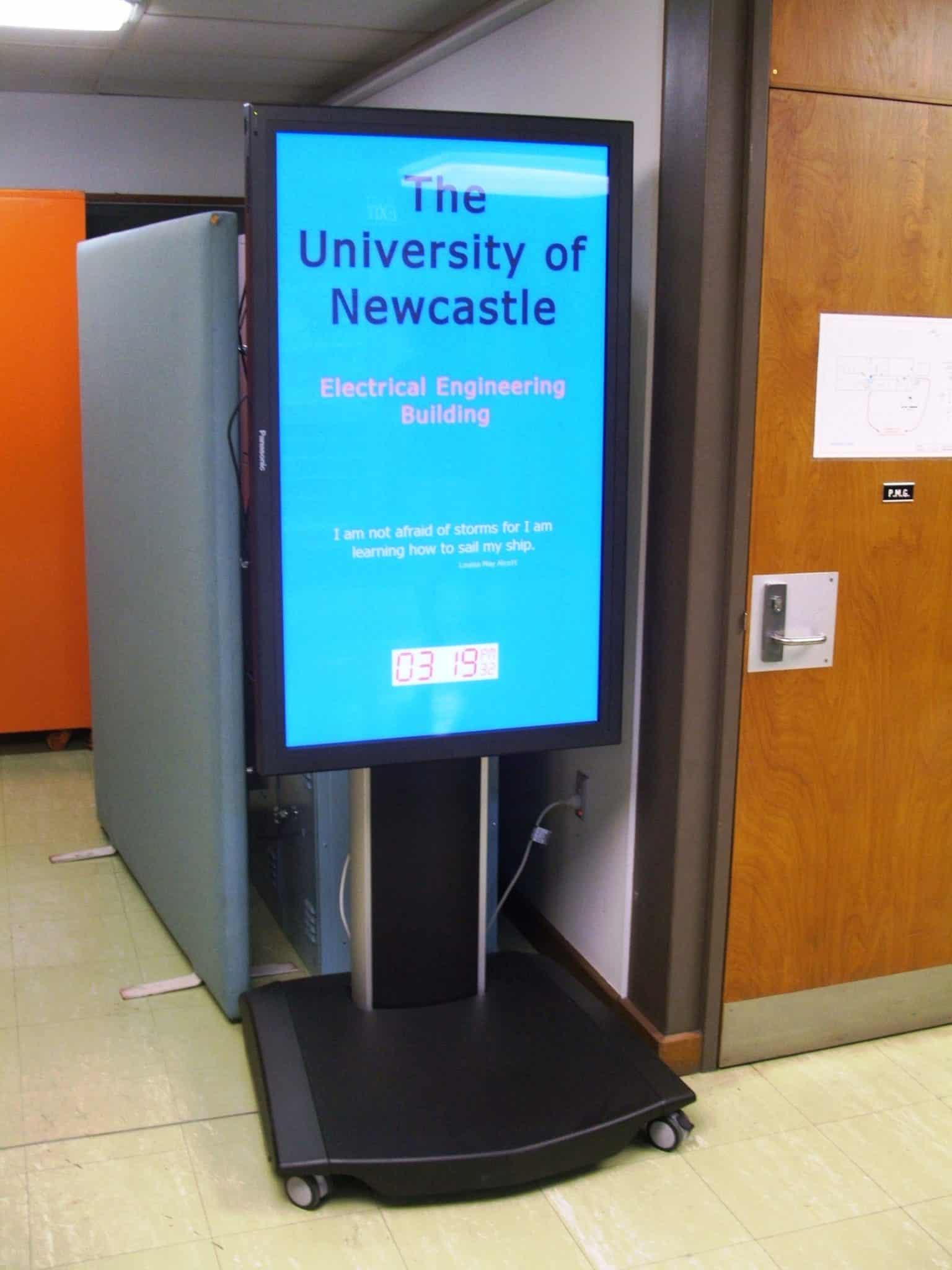
The Electrical Engineering Department at the University of Newcastle has implemented a digital signage solution to help communicate information (course timetables, date/time and important notices) to students. The 50″ Screen is installed on a professional and sturdy stand that is located near the front entrance hall of the building. One of the main reasons why the screen is positioned in portrait mode is due to space – it was envisaged students would accidentally bump the screen if it is located in landscape. However, we supplied the University with a versatile stand that allows the client to easily rotate the screen in either landscape or portrait.
Here’s a few photos of the installation:
About The University Of Newcastle
Sector leader in providing opportunities for students from diverse backgrounds.
Over 40,000 students including onshore, offshore and distance education.
Expanded into the Newcastle city centre on a campus accommodating business, law and creative arts students. Planning underway to establish education, humanities and social sciences disciplines in the city.
Home to the best engineering and health faculties in the country relative to size.
Even stronger health and medical research capabilities through the new state of the art Hunter Medical Research Institute building.
Increased reach across the region and overseas through expanded online program delivery.
Established infrastructure and support systems that provide one of the best student experiences in the country.
Category: Digital Signage Blog News, Digital Signage Case Study
Best way to cool down a FANLESS Digital Signage Player
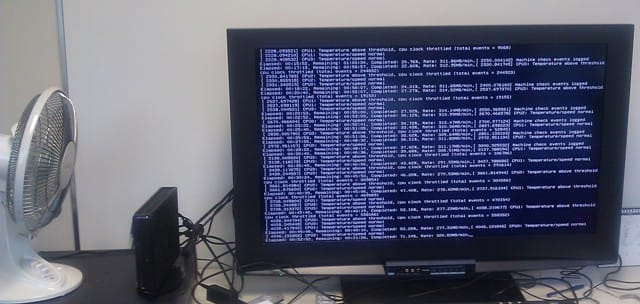
Just for laughs, here is a picture of what you can do to cool down a FANLESS digital signage embedded player – you add an external FAN:
On a serious note, we did notice that temperature had an impact on CPU performance on a FANLESS embedded player so although there are some advantages of using a fanless system you may want to check whether CPU performance is more important for your requirements.
Category: Digital Signage Blog News, Digital Signage Blog Products
Networking Managed vs Unmanaged switches for Digital Signage
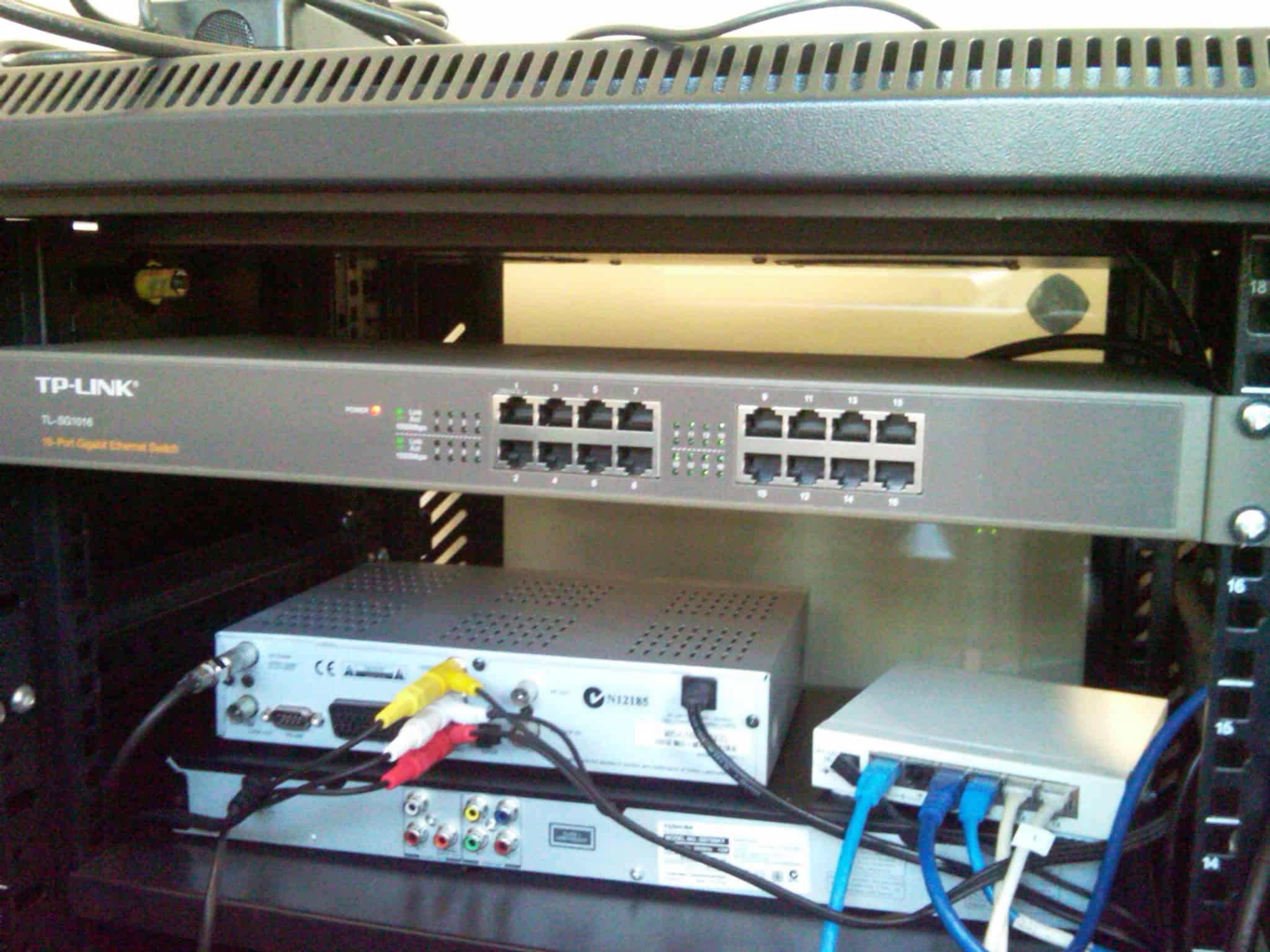
If your business provides an end to end digital signage solution, have you thought about which type of network switching infrastructure you should use for your digital signage solution? Basically, in the networking realm there are two main types of switches, one is managed and the other is unmanaged. What does this mean? Well, for an unmanaged switch you don’t need to administer or make any configuration changes – you power it up and connect your cables and that’s it, it will work. The only downside with this is that you don’t get the extra features like being able to remotely or locally manage the devices and use additional features e.g VLANs, Quality of Service, Security etc. Many small to medium business would most likely use an unmanaged switch because it does not require additional resources and man hours to complete the setup. In this case, it means that connecting the digital signage players and servers to the network is simple and straight forward.
However, based on our experience working with large corporations they are most likely to have a Cisco or HP managed switches. To be honest working with this infrastructure can become very troublesome in some ways. Especially if the company uses VLAN tagging and manually disables each port. This means the installer needs to co-ordinate and rely on the IT network administrator to make the necessary changes on the networking switches. If it’s not done correctly or in a timely fashion, it could mean that the installer has no way of testing the digital signage players.
In my opinion, unless you need the additional features mentioned before I would personally just use an unmanaged switch – the overall solution becomes cheaper as well. As part of advertise me‘s services, we design and supply all the necessary infrastructure to build an enterprise digital signage solution that includes the networking component.
Category: Digital Signage Blog News
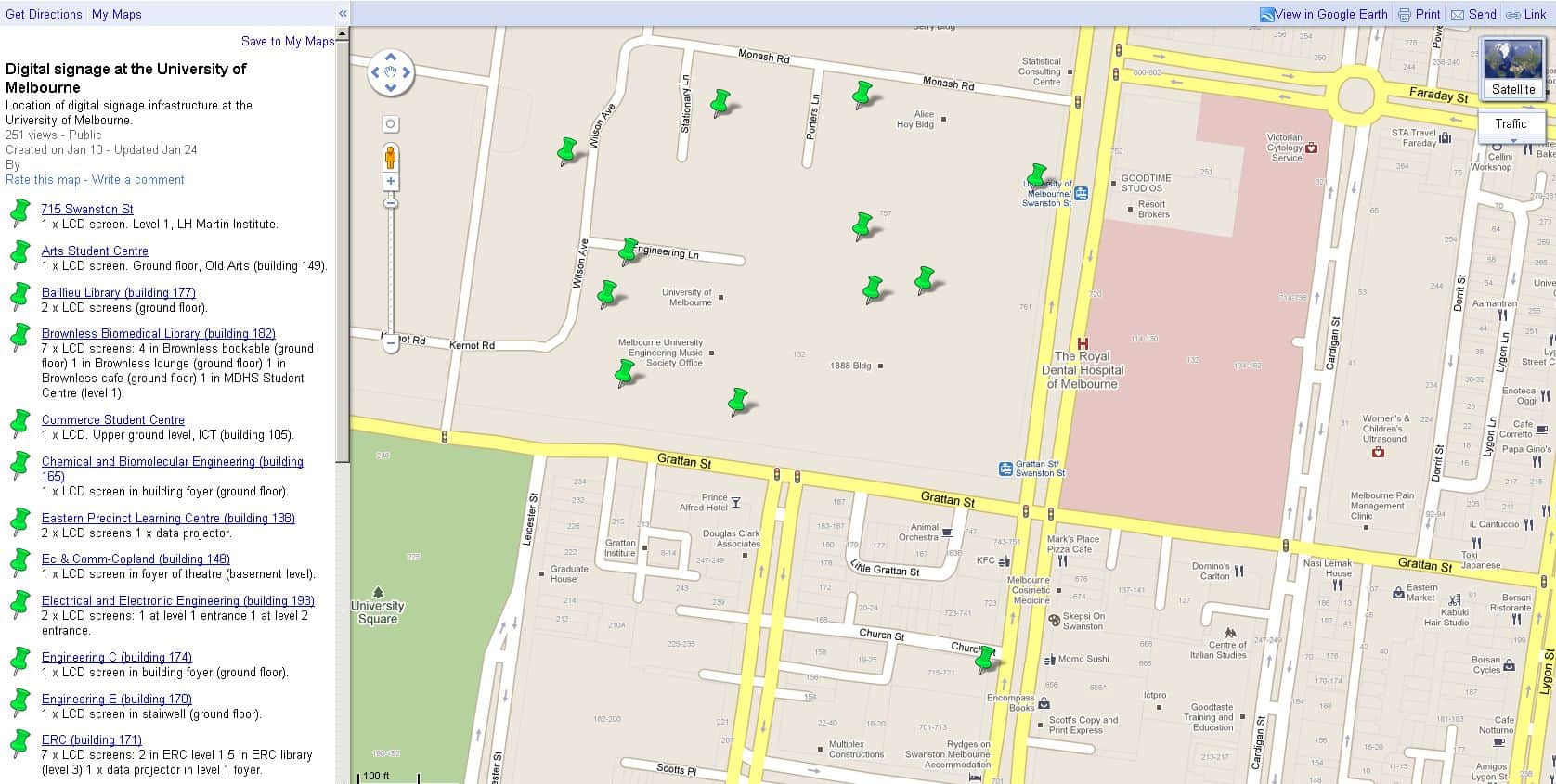
University of Melbourne Digital Signage Locations
It’s interesting to see that the University of Melbourne has a Google Map of where their digital signage screens are located in their campus. In total (based on the information on the map) the University has 43 LCD screens and 1 Projector as part of their digital signage infrastructure. What’s more interesting is that they are using the NDS PADS system (based on a URL I discovered). The University uses this system to promote university events and initiatives to staff and students.
Here’s a map of their digital signage screens:
Category: Digital Signage Blog News
Pulling apart a digital signage player
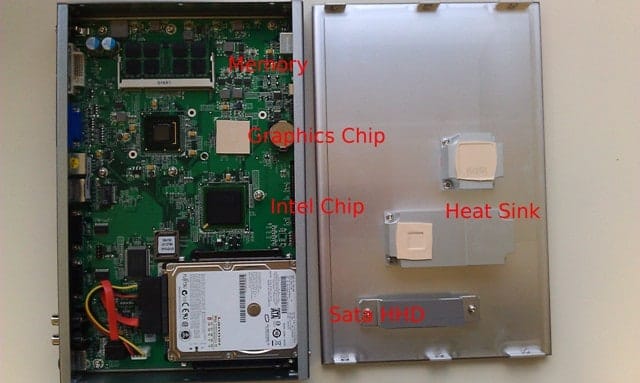
This week we were up to no good and opened up two digital signage players to have a look to see what is inside the unit. Here’s some pictures of what we discovered:
![]() |
![]() |
| Digital Signage player 1 | Digital Signage Player 2 |
As you can see from the picture, these players have the same components as a computer – basically it is a computer. It has a CPU, Motherboard, PSU (Power Supply Unit), Graphics chip, HHD, Memory, Storage Drive and heat sinks/FANs.
Most of the digital signage players that we have seen have an Intel Central Processor Unit chip. The CPU requirements will depend on type of content and software you intent to use the player for. For example, if you just intent to display images and text an Intel ATOM CPU will suffice but if you need to display High Definition videos with flash and images, then a Dual Core CPU will be required.
In addition, the Graphics chip is also a crucial component when determining what digital signage player is required. In particular, there are different types of Graphics chips and cards that has many useful features e.g multiple video outputs (HDMI, VGA, DVI), extended or clone video (the ability to duplicate or extend the content to multiple screens)
If you intent to display lots of Videos as content, then the bigger the HHD the better. SATA is generally faster than IDE. These days, HD Videos can take up as much as Gigabytes of storage, and given that storage is quite affordable then why not have the large storage space.
RAM (Random Access Memory) is temporary storage that loads much faster than a HHD. Memory is also cheap, so the bigger the memory the better. Obviously, costs is always a deciding factor when purchasing any type of product but before you do decide to make that final purchasing decision, make sure you thoroughly review and test the unit.
Category: Digital Signage Blog News, Digital Signage Reviews
Digital Signage Blog Guest Bloggers
Guest BloggersDigital Signage Featured Links
Recent Posts
Featured Posts
- Product Review: Synrax Onyx Mini
- Introducing digitalsignagearticles.com
- Experience the digital signage world at the ABC Bondi Shop
- Will the Microsoft Xbox 360 take over the Digital Signage Industry?
- Subscribe to the digital signage blog
- Want to be featured on the digital signage portal newsletter?
- About Advertise Me
- Klips: Share your digital signage snap!
Most Viewed Posts
- Forum Post: World Wide Digital Signage Network - 33,159 views
- Digital Signage Portal Forum Post: CISCO Film Making Competition - 17,594 views
- Digital Signage Portal Forum Entry: Help with digital signage business plan - 12,406 views
- Points to consider for a Digital Signage Business Plan - 11,667 views
- Digital Signage:How do I create a video wall? - 11,431 views
Recent Comments:
- Samsung LED screens (2)
- LED Outdoor Screen: It’s gratifying to see your such a great information. We really impressed with your such a...
- Digital Signage Klips: Supermarket in Miami Florida (1)
- olga vega: hi, I would like to have information to publish my company a clip video and/or a photo screen on a tv on...
- Digital Signage Klip: Free Mobile Phone Charging station with a twist (3)
- Robustsigns: All new businesses should get the advice of a professional.
- Clever Concept Vending Machine with See-Through Display (1)
- Fresh vending locations: Fresh Vending – Locations, food franchise business, you will receive the help you need...
- Parramatta Westfield LED Screen (17)
- LED Displays Outdoor: It’s gratifying to see your such a great information. We really impressed with your such...
Popular Tags used in our posts
advertise advertise me Advertisements australia blackberry blog Caption Digital Id digital signage digital signage network digital signage player Digital Signage Software Digital Signage Solutions email Fun Google iphone klip Klips lcd screen lcd screens led screen Poll Id portal screens Signage Industry Signage Solution Signage System Sydney Australia video wall
Digital Signage Blog Categories
- Digital Signage Blog Events (29)
- Digital Signage Blog Info (123)
- Digital Signage Blog News (191)
- Digital Signage Blog Products (35)
- Digital Signage Blog Video (16)
- Digital Signage Case Study (11)
- Digital Signage Guest Posts (11)
- Digital Signage Ideas (4)
- Digital Signage Interview (8)
- Digital Signage Jobs (5)
- Digital Signage Klips (32)
- Digital Signage Newsletter (7)
- Digital Signage Polls (14)
- Digital Signage Reviews (12)
- Digital Signage Techie (25)
- Digital Signage Tutorials (1)
- Digital Signage Weekend Fun (29)
- Featured Post (41)