Digital Signage Blog Archives
Archive for October, 2010
Digital Signage Job in LA as Regional Sales Manager
I came across another digital signage job today and from this I can sense the digital signage industry is booming in some parts of the world. This is probably the second job posting I saw this month advertising for a digital signage job in LA. The first was posted by one of our readers (Frank) – see the post here. The job is for a Regional Sales Manager in Los Angeles for a company called InlineAdz. It pays US$75k which is not too bad since it include commission etc. The job can be found here and good luck to those who are applying.
Category: Digital Signage Jobs
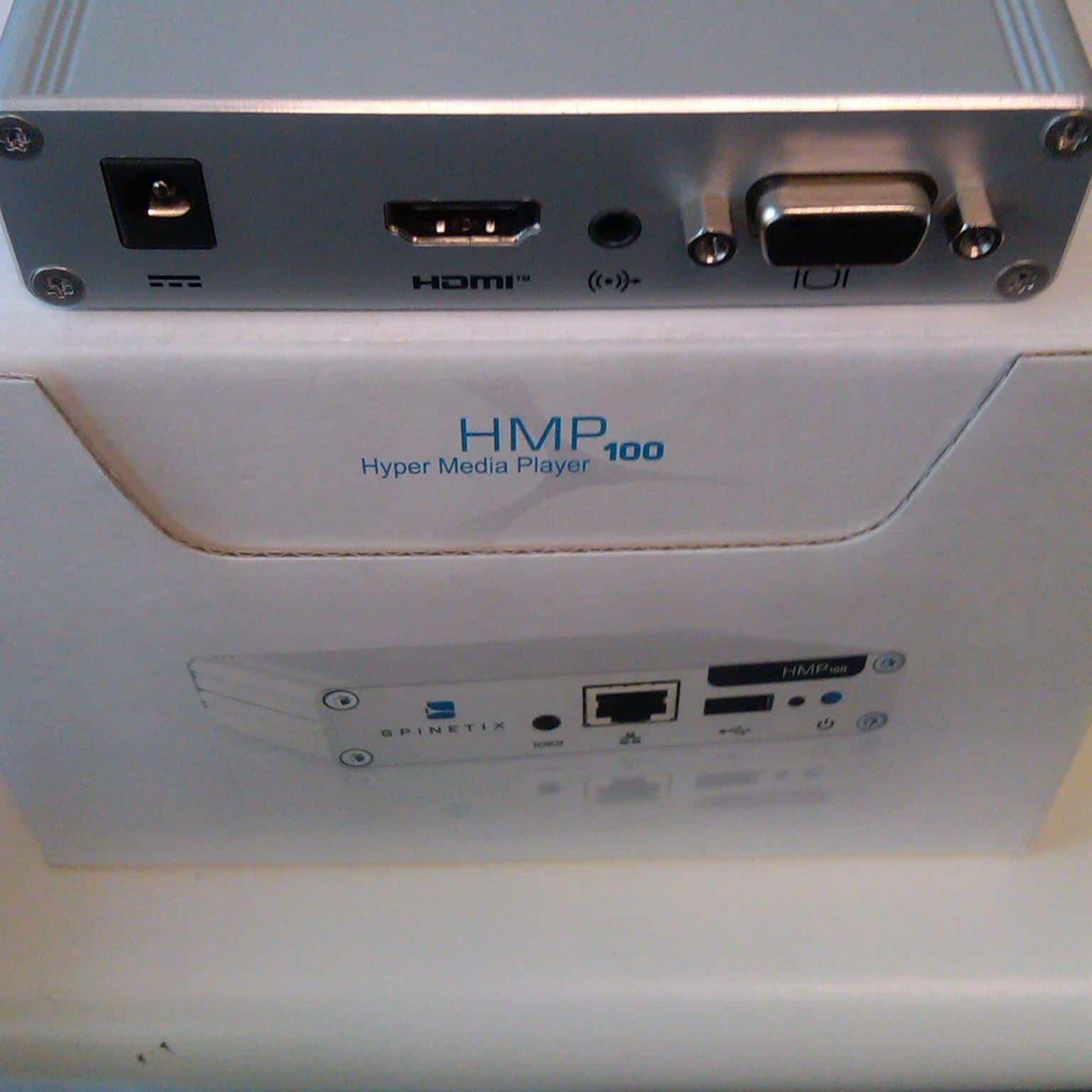
Testing the Spinetix Digital Signage Player Hyper Media Player HMP100
Undoubtedly the smallest digital signage player we’ve seen on the market – the size is 105(W) x 26(H) x 83(D) mm
. The Spinetix [pronounced as "spenetix" or something like that] player is one great little unit and we’re currently testing and reviewing the product so watch this space. Apparently the unit has lifetime warranty!!!
Here’s some pictures of the unit.
Here’s the specs of the unit:
Digital Display Compatibility
Aspect ratio 16:9, 16:10, 4:3 (horizontal & vertical)
Video output 50/60 Hz: 720p (1280×720), XGA (1024×768), WSVGA
(1024×640), WVGA (768×480), 576p (720×576), 480p
(720×480), SVGA (800×600), VGA (640×480), EDID
24/25 Hz: 1080p (1920×1080; only for semistatic content)
Video connectors HDMI (incl. digital audio), DVI via adapter. VGA (DB15 HD
connector). Simultaneous use of HDMI and VGA possible
Media Format
Description language SVG Tiny 1.2+ (Scalable Vector Graphics)
Media synchronization SMIL 2.1 (Synchronized Multimedia Integration Language)
Still image formats JPEG, PNG, GIF, SVG
Supported video codecs Up to SD resolution: MPEG-4 ASP, MPEG-2, MPEG-1,
H.264, MJPEG, Microsoft VC-1 (Windows Media Video 9)
Supported audio codecs MPEG audio layer 1/2/3 (MP3), ITU G.711, G.722,
G.729,PCM, Microsoft WMA, Real Audio
Media container formats AVI, WMV/WMA, VOB, AIFF, OGG, WAV, MOV (Quicktime)
Streaming media protocol MMS, RTSP, RTP, SDP, HTTP; Uni- & multicast
Import filters provided for Flash 9, Microsoft PowerPoint presentations, BMP, TIFF,
XPM, WBMP, PNM bitmaps
Scripting language PHP5, JavaScript, ECMAScript
Content scheduling iCalendar (RFC2445)
Graphic Effects Engine
Graphic effects language SVG Tiny 1.2+
Vector graphics primitives Rectangles, polygons, paths with lines, elliptical arcs and
Bezier curves, text areas, linear and radial gradients
International text support Unicode standard compliant with bidirectional text support
Font file formats TrueType and OpenType
Animation capabilities Color, gradients, transparency level, audio volume, motion
along a path, translation, scaling, rotation, clipping
Animation modes Discrete, linear, paced and spline interpolation
Specialized Applications
Kiosk applications Touch screen, keyboard/joysticks/gamepads/mouse, HID
I/O devices via USB 2.0 or user defined serial port, with
touch screen calibration
Event management Real-time event communication for triggering content
changes on-demand
Time synchronized Millisecond accuracy, for unconstrained
video wall configurations
Streaming Video and audio streaming compatibility, including
live TV streamers
Network
Connectivity Ethernet 10/100 Mbit/s (RJ-45), IEEE 802.3u, 802.3x
3G connectivity through USB modem stick;
Protocols DHCP or fixed address; IPv4; IPv6;
Remote configuration HTTP(S) configuration server, password protected
Content administration WebDAV server, password protected
Other protocols SNMPv1/v2c, NTP, Zeroconf
Content updates Pull mode, push mode, server based
Storage
Internal storage 2GB solid state
External storage Flash drives and hard disks via USB 2.0 port
Physical Specification
Size 105(W) x 26(H) x 83(D) mm
4.13’(W) x 1.02’(H) x 3.27’(D)
Weight 190g / 6.7 oz
Power supply 5V DC, typ. 0.4A (2W)
Power supply input 100-240V 50-60 Hz, max input current 0.6A
Operating temperature 0-40ºC / 32-104ºF; 10-90% RH
Storage temperature -25ºC to 45ºC / -13ºF to 113ºF; 10% to 90% RH
Real time clock Min. accuracy 1 minute/month free running, battery
backed
Serial RS232, up to 115200 bauds, mini-jack 3.5mm
Analog audio output Line level, stereo, mini-jack 3.5mm
Category: Digital Signage Blog Products, Digital Signage Reviews
Weekend Fun: How many screens are there in the Shinagawa Station Tokyo tunnel?
I came across a video on youtube called “??? digital signage Sinagawa Station Tokyo” – I don’t know what the first 3 Japanese Characters are but I think they spelt the name of the station incorrectly…
Anyways, the first 1 1/2 minute of the video is quite boring so if you are going to watch the video make sure you start from 1:30. From there it get’s interesting and I was amazed to see the number of screen located in the tunnel. I did a quick count and if my maths is correct there was 44 screens just in the tunnel – geezzz that’s a lot of screens in the space of a few meters. Keep in mind that this must be a high traffic area so there’s $$$$$ revenue for advertising. Great work for whoever came up with this implementation.
Oh and he’s the video if you want to watch it… the end is quite boring as well.
Category: Digital Signage Weekend Fun
Techie Question: How do you setup a 3G modem with Digital Signage?
There are a number of ways to connect your digital signage player to the Internet and to your local network. The most basic method of connecting your digital signage player to the network is via a Network Interface Card on the player. But what happens when you don’t have a local network setup or when there is no CAT5/6 cabling in place for your digital signage player?
If you’re in this situation then most likely you’ll either use a wireless network card or a 3G modem. In this post I want to focus on providing basic steps in setting up your digital signage player with a 3G modem. I will be assuming that your player does not have a SIM slot and does not support 3G modems so your only option would be to use a 3G modem router. You will need the following items:
- digital signage player
- USB 3G Modem – we used a pre-paid Vodafone modem
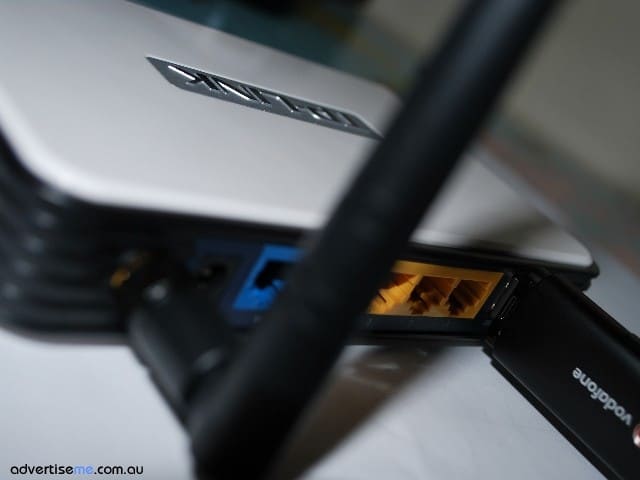
- 3G modem router – there are many brands and manufacturers but the one we used was a TP-LINK 3G/3.75G Wireless N router (Model TL-MR3420)
The first thing to do is setup the network settings on your digital signage player to use DHCP. This means that when it is connected to the network it will obtain a Dynamic IP address. If it’s a new digital signage player, it will most likely already be configured for DHCP but if not then simply change it’s network settings. Once you physically connect the digital signage player to the router via a standard network cable, it will automatically assign an IP address.
Now, before buying a 3G modem router you need to make sure it supports the actual 3G modem you’re planning to use. If it does, then once it’s plugged in the router, it will automatically use the correct modem drivers. If not either change the router or constantly check the manufacturer website to see whether the drivers has been released.
On the 3G modem router, you will need to setup the APN and Dial Number. An example is below:
Generally, the 3G Modem router will have preselected ISP settings but for us we spent a few hours trying to figure out why our Vodafone USB 3G modem would not connect to the Internet. After researching and troubleshooting for almost 1 hour, we found the cause of the problem. The 3G Modem router has predefined Mobile ISP settings e.g Vodafone (Australia) configured, but what we discovered was that since we were using a Vodafone Prepaid modem we actually needed to use vfprepaymbb as the APN value rather than using the standard value of vfinternet. After changing that value the router immediately connected to the Internet. That’s a gotcha!! So be careful with this. Once connected you should see something like this:
The best way to test to see if your digital signage player is connected to the network is to simply add a URL to your playlist item and display a website. That’s it, your digital signage player is now connected to the Internet via 3G. One issue that I found is the inability to connect to the digital signage player from the Internet. I was not able to do so because either the ISP has a firewall and is blocking inbound connections or the ISP is using a proxy server for browsing. If someone has figured out a way to overcome this please let us know.
Category: Digital Signage Techie
Digital Signage Job Business Development Manager in the UK
I just came across this job advertisement which I found quite interesting. The job is based in the UK (St Albans) and its for a Business Development Manager in a AV company. The company is looking for a sales manager with digital signage experience. When I read this I thought to myself how many people had this type of experience and how much demand is there for such a position?
Well this role doesn’t pay too bad… 45 – 55,0000 (I’m assuming its in pounds)…. 55,0000 what the? + Benefits + Bonus. If you’re interested then check out the job description here and good luck to those that apply.
Category: Digital Signage Jobs
Techie Question: What is the best way to split your VGA signal?
One of the challenges with splitting your VGA signal is the ability to maintain the video quality and aspect ratio of the original video source. There are a number of ways to split your VGA signal and the main purpose of doing so it to display the same video content across to multiple screens. This basically means a cost savings as you will only need to purchase 1 PC/digital signage player rather than having multiple players for each screen. The only limitation is distance, the VGA video quality degrades for longer distances.
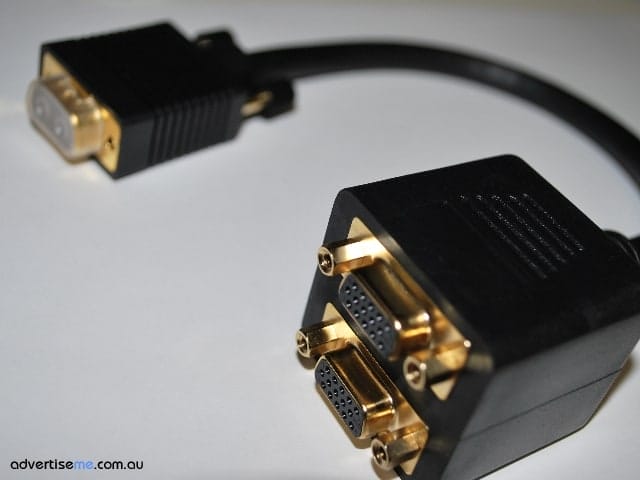
Here, we will look at 3 ways of splitting up the VGA signal (assuming you just want to split 1 video signal to 2 screens):
|
2 way VGA Cable |
When we used this we noticed that the quality was pretty poor. Especially when adding a second VGA cable you immediately notice a difference. No power is required hence the reason why the degradation. |
|
2 Port VGA Splitter |
Required power to be connected to it. For the video input it requires a VGA extension cable that has a male on one end and a female on the other. Better than the 2 way VGA cable but noticed fuzzy lines running through the screen and some ghosting. |
|
Video Card with dual output (for PC’s) |
You will need to find a video card that supports two VGA outputs. The Radeon x300 video card is one that we’ve tried and tested. Video quality was perfect or as good as the video card can output. The advantage of using this video card was that you didn’t need an additional power point and you are also able to change the video configuration to clone or extended. |
For implementations of more than 2 screens then you will need to get a splitter that caters for more video output ports, there are many brands and model in the market but just make sure you test it before installing it at your clients sites.
Are there any other methods people have used to split the VGA signal?
Category: Digital Signage Techie
Guest Bloggers on the digital signage blog
It’s official, after many years of blogging we have decided to open our doors and accept guest bloggers. After some discussions we decided to invite digital signage industry experts from all over the world to help us share their industry experiences and insights with the rest of the digital signage community.
It is an open invitation, however, we are selective on the content.
There are some guidelines that need to be taken into thought when producing each post.
We will NOT be accepting:
- Advertisements about your company
We will include a short description about who you are and your company but we will not accept a post that is solely focused on advertising your company or your products. - PRs that get splatted across the internet
We want unique content so if it’s a PR that has already been submitted on the internet we will not accept it. - Duplicate blog posts
Please do not copy and paste content from your current blog, Unique content is what makes the digital signage blog different and we would like to keep it this way - Posts that indemnify or scrutinise other people or companies
As the title suggests, this part is pretty much self-explanatory. Please keep your content professional.
We will be limiting to publish 1 post per guest blogger a week.
We are looking for guest bloggers that have a passion about digital signage and are not purely looking for an avenue to advertise their company – we have a paid advertising section for this! So if you think you fit in this criteria and are interested to become a guest blogger for the digital signage blog then send us an email at info@digitalsignageblog.com with a short description on what you can offer to this blog and we’ll get back to you.
Category: Digital Signage Blog News, Digital Signage Guest Posts, Featured Post
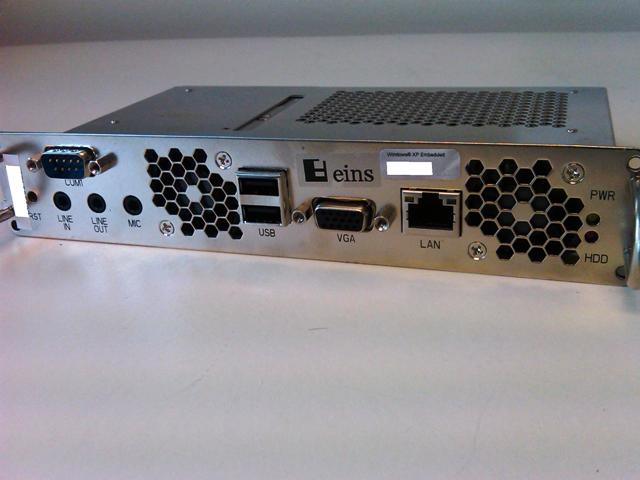
Product Review: Panasonic Embedded Player ETX1312C1000
This week we want to share with you another great Panasonic product we use for our digital signage installations. It is the Panasonic Embedded player ETX1312C1000 which can only be used with Panasonic Plasma screens with the Slot compartments. These units come with pre-installed Windows Embedded XP or Linux and are just like any other ordinary PC’s except that they allow you to hide these in the actual screens. The current unit only has 1GHz processor which can sometimes videos with scrolling ticketers to lag, although we’ve heard rumours that there is an new model being released which has much higher CPU specs. The embedded player actually takes up two slot compartments so you need to be aware of this.
Category: Digital Signage Reviews, Featured Post
University Of New South Wales installs digital signage in Hospitals
Last month we were engaged to install the digital signage Solution for the UNSW (University of New South Wales) Western Sydney Clinical Studies in one of the major hospital in NSW.
The South Western Sydney Clinical School (SWSCS) was established in 1990 and it is unique to the UNSW city clinical schools in that it embraces multiple campuses, allowing access to a broad and diverse range of health care services delivered to a large (approximately 800,000 people) and diverse population.
The SWSCS is centered at Liverpool Hospital (600 beds), a principal tertiary referral hospital for the South Western Sydney Area Health Service (SWSAHS). An active teaching and research programme is also run at Bankstown-Lidcombe Hospital (400 beds; the second principal referral hospital in SWSAHS) and at Campbelltown and Fairfield Hospitals, as well as a number of other facilities.
Requirements
The requirements for this digital signage project were:
- The large screens needed to be in portrait rather than landscape
- Screen needed to be mounted against the wall
- Display different content including websites, timetable, presentations, images, RSS uni news etc.
- Needs to be scalable and flexible
- A dedicated CMS server hosted at the main Hospital Campus
- Players needed to be embedded in the screen since there was no space to store these
The Solution
The solution we provided the University consisted of the following:
- CMS Dell Server
- PADS Digital Signage Software
- Panasonic Screens with embedded players
- Adtec wall bracket
As usual we worked with local staff and the IT network engineers to connect the players to the UNSW network. We’ve got more screens and players to install but for now have a look at the some of the below photos
Category: Digital Signage Case Study, Featured Post
Weekend Fun: Digital Signage and Augmented reality
This was a video clip that one of our digital signage portal members Travis from Blue Pony submitted in the discussion forum and its about Augmented reality. This blew me away so I thought I’d share this with our digital signage blog readers so have a look at it yourself and let me know what you think.
Category: Digital Signage Blog News, Digital Signage Blog Video
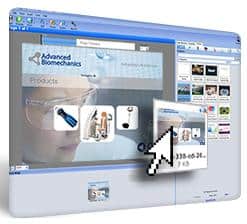
Announcement: Flypaper releases version 3.3 for digital signage including multi-touch
We just received news that Flypaper Studio, Inc, has released version 3.3 of the Flypaper digital signage software. According to Flypaper:
“The latest updates and new components included with this version support the growing demand in digital signage for faster, better quality content with a focus on touch-screen interactive experiences. The newest multi-touch features, including the ability to slide, swipe and flick at all components on a screen, allow companies to do cooler things with digital signage, and do them more affordably and in significantly less time.” continue reading »
Category: Digital Signage Blog Products, Digital Signage Reviews
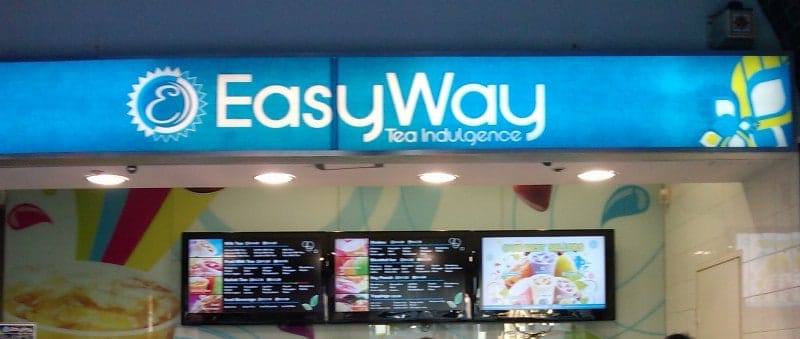
Digital Signage Klip: Digital Signage is easy at EazyWay
I was walking past one of the most popular locations in Sydney Australia and noticed the first digital menu board for EasyWay. There were three large screens on the back wall and each had a different menu listing or image displayed. Digital Menu boards are now becoming more popular for take away stores and outlets.
Category: Digital Signage Klips
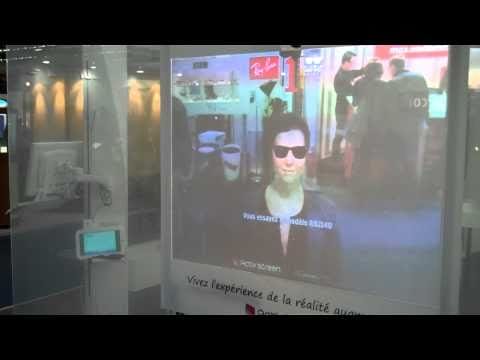
Awesome Interactive Shop Window
This is a great video of a Ray-Ban interactive shop window, the digital signage system allows the user to try on virtual ray ban glasses and then lets you take a photo… check it out:
Have you seen any other interesting digital signage implementations?
Category: Digital Signage Blog Video
Digital Signage Blog Guest Bloggers
Guest BloggersDigital Signage Featured Links
Recent Posts
Featured Posts
- Product Review: Synrax Onyx Mini
- Introducing digitalsignagearticles.com
- Experience the digital signage world at the ABC Bondi Shop
- Will the Microsoft Xbox 360 take over the Digital Signage Industry?
- Subscribe to the digital signage blog
- Want to be featured on the digital signage portal newsletter?
- About Advertise Me
- Klips: Share your digital signage snap!
Most Viewed Posts
- Forum Post: World Wide Digital Signage Network - 33,159 views
- Digital Signage Portal Forum Post: CISCO Film Making Competition - 17,594 views
- Digital Signage Portal Forum Entry: Help with digital signage business plan - 12,406 views
- Points to consider for a Digital Signage Business Plan - 11,667 views
- Digital Signage:How do I create a video wall? - 11,431 views
Recent Comments:
- Samsung LED screens (2)
- LED Outdoor Screen: It’s gratifying to see your such a great information. We really impressed with your such a...
- Digital Signage Klips: Supermarket in Miami Florida (1)
- olga vega: hi, I would like to have information to publish my company a clip video and/or a photo screen on a tv on...
- Digital Signage Klip: Free Mobile Phone Charging station with a twist (3)
- Robustsigns: All new businesses should get the advice of a professional.
- Clever Concept Vending Machine with See-Through Display (1)
- Fresh vending locations: Fresh Vending – Locations, food franchise business, you will receive the help you need...
- Parramatta Westfield LED Screen (17)
- LED Displays Outdoor: It’s gratifying to see your such a great information. We really impressed with your such...
Popular Tags used in our posts
advertise advertise me Advertisements australia blackberry blog Caption Digital Id digital signage digital signage network digital signage player Digital Signage Software Digital Signage Solutions email Fun Google iphone klip Klips lcd screen lcd screens led screen Poll Id portal screens Signage Industry Signage Solution Signage System Sydney Australia video wall
Digital Signage Blog Categories
- Digital Signage Blog Events (29)
- Digital Signage Blog Info (123)
- Digital Signage Blog News (191)
- Digital Signage Blog Products (35)
- Digital Signage Blog Video (16)
- Digital Signage Case Study (11)
- Digital Signage Guest Posts (11)
- Digital Signage Ideas (4)
- Digital Signage Interview (8)
- Digital Signage Jobs (5)
- Digital Signage Klips (32)
- Digital Signage Newsletter (7)
- Digital Signage Polls (14)
- Digital Signage Reviews (12)
- Digital Signage Techie (25)
- Digital Signage Tutorials (1)
- Digital Signage Weekend Fun (29)
- Featured Post (41)