Digital Signage Blog Archives


Archive for 2010


Show me the money Digital Signage!

advertisemeshowmethemoneyI have been asked this question quite a number of times and thought I’d give my opinion on which areas you can make money in the digital signage industry. I have broken this up into the following areas:

Selling Hardware/Software

I believe this is an area that the majority of the IT and AV companies are getting into which has now become over saturated and too competitive. With the growing number of digital signage manufacturers and developers, choosing the right solution is also now becoming more difficult. There are too many options available on the market. Each system has it’s own features and issues so choosing the most suitable solution has now become more difficult. I don’t believe there is a one size fits all solution on the market and please don’t try to convince me. I’ve seen and tested quite a number of products, both hardware and software packages and they seem to be either too limited in it’s capabilities or too comprehensive which equates to being too expensive. If you’re starting a business in the digital signage industry, selling hardware and software packages is not where the bulk of the money is unless you started at the early stages of the digital signage boom, or if you became a distributor of a well know digital signage company in your country. I don’t believe resellers make a lot of money just by selling another company’s equipment or software.

Now if you’re thinking of developing your own player then that’s worse. You’re going to struggle selling and and penetrating the market unless your solution is innovative and different from the others.

Maintenance

This is an area or service you would generally offer to clients who are purchasing hardware and software. The only drama is that a large percentage of clients do not think or budget for this particular service. It’s pretty much like selling life insurance to someone who doesn’t want it so if you have a good sales pitch and provide your client with this service then you may be able to earn some yearly revenue. The only catch is to make sure your hardware is reliable so that you don’t have to spend the time, money and resources to replace failed equipment. If its software, you may be able to charge an additional fee for upgrades and maintaining patches etc. I don’t believe there’s much money to earn from this aspect of the digital signage business.

Installations

advertise me installThis involves anything from installing the screen, digital signage player, configuring the software, network, cabling etc. These are one off costs and generally its for paying the labour costs – either charged per hour or per screen. So if your an installer you can make a bit of money from this but it’s not where the big $$$ are.

Content

There’s no point in installing a digital signage system if there’s no content. The saying “Content is KING” can be misinterpreted but in in the digital signage world content is important. There are different types of content e.g video, images, text, RSS feeds, MRSS feeds, news, TV and if you’re a designer, content producer or provider you can make quite a bit of money especially when content needs to be refreshed on a daily or weekly basis.  

Advertising Network

I strongly believe this is where the “secret treasure chest” is. Simply put, an advertising network is a collection of screens and an operator manages the contents on all of these screens. I know most advertising networks struggle in the first few years to make a reasonable profit but once they expand their screen and viewer coverage then they will be able to make a considerable amount of money. Advertisers are always looking at ways of marketing their new products and services and digital out of home advertising is an area that most advertisers are looking at spending their marketing dollars.

Building a advertising network can become costly at first (the operator covers the costs of all of the above areas) but the ROI is high if done well. It will be the most difficult and the most challenging but at the same time it will be the most rewarding.

Category: Digital Signage Blog News


Panasonic Plasma Screens – Features part 1

panasonic plasma screen

You’ve seen these at retails stores, venues, restuarants, lobbies and propably you’re looking at one right now. They are everywhere and the popularity of these screens are growing at a tremendous pace. Yes, we’re talking about the Panasonic Plasma screens. Panasonic this year launched the 20 Series screens and they also included the release of 42″ and 47″ LCD screens.

In this post (one of many) we will showcase some of features of the Panasonic Plasma screens. Most of this information can be found on the Panasonic website or their brochure.

MODELS

Firstly, lets look at the two of the latest models of the Panasonic Screens:

PH20W – these are high definition screens with the SLOT 2.0

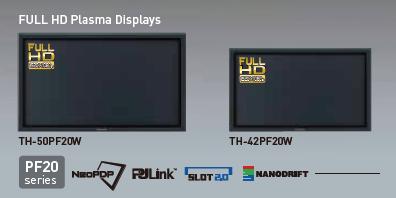
PF20W – the main difference between the PF and PH is that the PF is a FULL HD (1080p^) plasma displays and uses NeoPDP* technology.

*NeoPDP technology is a newly developed cell structure, an innovative drive technology, a new discharge gas and a revamped panel that has four times luminous efficiency compared to their 2007 models.

^1080p means that the screen will deliver a moving picutre of 1080 lines for sharp and clear display of fast-motion images.

SIZE

The size of the Panasonic Screens range from 42″ to 103″. You can purchase one of the following size: 42″, 50″, 58″, 65″, 85″ and 103″.

ENVIROMENTALLY FRIENDLY PANEL

The Panasonic products are more friendly to the environment. All plasma display panels are mercury and lead free. The display panel also offers a long life of up to 100,000 hours under normal operating condition. This basically equates to 11.42 years if the screen was left on 24/7.

NATIVE CONTRAST

panasonic native contrast

To take maximum advantage of the inherently superior black expression of self-illuminating plasma displays, the newly developed panel allows the PF20 Series to emit light without the use of a pre-discharge. Its high contrast teams up with deeper black reproduction — which forms the basis of image expression — to render rich textures in images with subtle shading and colour differences.

Category: Digital Signage Blog News, Digital Signage Blog Products


Senior Product Line Manager For Digital Signage

Looks like there is another job posting for the digital signage industry. This job is based in Denver Colorado and its for a Senior Product Line Manager. According to the website getdigitaljobs.com the employer is Harris Digital Signage and this is the job post: (If you’re interested visit the website here)

Harris Digital Signage is looking for an experienced and technical Senior Product Line Manager to manage Harris? Digital Signage solution and products. In this role, you will be a member of a dynamic team with a start-up mentality to innovate and drive the direction of the Harris Digital Signage Solution for Digital-Out-of-Home networks. If you are a highly motivated individual with a proven track record and looking to bring innovative solutions to the market, you don?t want to miss this great opportunity. 

While managing a team of two product managers, gather, prioritize, and document solution requirements and validate value proposition 
Lead cross-functional team in concept development, new product introduction and lifecycle management for Harris? Digital Signage solution 
Communicate and refine solution requirements with development team, and successfully guide product design, implementation, testing, and maintenance. 
Analyze market and business trends, and develop solution requirements and roadmap plans to deliver to future market needs across a variable set of target verticals 
Manage cross-functional relationships for the development of new products – including working with engineering, manufacturing, finance, and operations. 
Participate on relevant standards committees and help to ensure product compliance with industry standards and regulatory requirements 
Accountable for program metrics, including roadmap development, schedule, cost analysis, pricing analysis, product forecasting, product quality, and customer satisfaction 
Present technology, product, and roadmap to key audiences, including customers, partners, and internal groups. 

Qualifications: 
* Undergraduate degree in Business, Computer Science, Engineering, or related technical field. 
* 5+ years of technical Product Management and/or technology marketing experience with 2+ years in a supervisory capacity 
* 5+ years of expereince hiring, managing and developing a great team 
* 5+ years of expereince in delivering products and services in a high growth environment 
* 5+ years of expereince with technical concepts, managing tradeoffs and evaluating opportunistic new ideas with internal and external partners 

Preferred Additional Skills: 
* MBA and/or advanced degree highly desirable 
* Proven analytical and quantitative skills; ability to use hard data and metrics to back up assumptions, recommendations, and drive actions 
* Strengths in problem solving, issue-resolution, ability to work in a deadline-driven work environment, attention to detail, and ability to multitask 
* Ability to work cross-functionally across many internal teams 
* Prior experience in Digital Signage, DOOH is preferred


Category: Digital Signage Jobs


Christmas is just around the corner – use digital signage to increase sales!

Christmas is just around the corner and retail stores should take the opportunity to install a digital signage signage for their business during this festive season. The benefits are simple:

1. draw more customers into your stores with a christmas theme on the screens

2. showcase special christmas products on the screens

3. announcements and greeting your customers e.g “Merry Christmas and Happy New Year”

4. make more money… don’t worry about the ROI you’ll certainly make you’re money back within the first 2 years.

5. stand out from your competitors

If your store needs to stand out then digital signage is the most cost effective solution.

Category: Digital Signage Blog Info


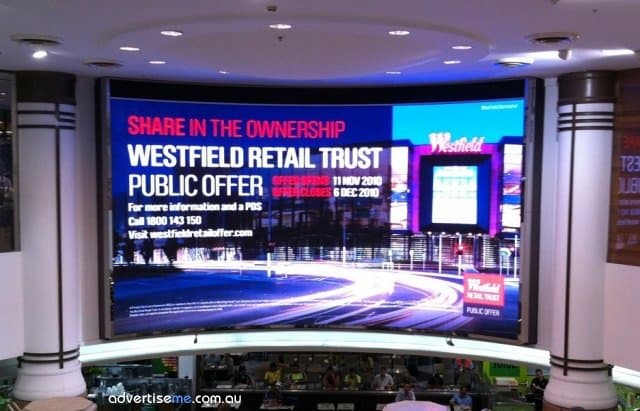
Digital Signage Klip: LED screen in Westfields Pitt Street

The following klip was submitted by Danny from Sydney Australia. The klip shows a large LED screen in the food court area in Westfields Pitt Street Mall Australia. It appears LED screens in shopping centres are becoming more popular.

The Westfields in Pitt Street was officially opened at the end of last month and so far has received quite a lot of attention. There is more than 100 fashion and food specialty stores will open for trade by Christmas, at what will be a world class retail and commercial precinct. I wonder how many are going to use digital signage for their stores.


LED Screen Westfield Pitt Street Mall

Stores which will be opening are listed below -
General Pants
Hart & Heim
Henleys
Saxony
Sneakerology
Streetology
Surf Dive & Ski
Tree of Life
Via Alley
Aldo Shoes Pitt Street Mall
Aquila Pitt Street Mall
Bardot Pitt Street Mall
CK Pitt Street Mall
CK Underwear Pitt Street Mall
Cue Pitt Street Mall
Decjuba Pitt Street Mall
DKNY Pitt Street Mall
Esprit Pitt Street Mall
Florsheim Pitt Street Mall
Gap Pitt Street Mall
Georgini Pitt Street Mall
Guess Pitt Street Mall
Jurlique Pitt Street Mall
L’Occitane Pitt Street Mall
Napoleon Perdis Pitt Street Mall
Nespresso Boutique Pitt Street Mall
Sportsgirl Pitt Street Mall
Swarovski Pitt Street Mall
Tag Heuer Pitt Street Mall
Thomas Sabo Pitt Street Mall
Veronika Maine Pitt Street Mall
Wanted Shoes Pitt Street Mall
ZARA Pitt Street Mall
Carla Zampatti Castlereagh Street
Cerrone Castlereagh Street
Frey Wille Castlereagh Street
Germani Jewllery Castlereagh Street
Gucci Castlereagh Street
Hugo Boss Castlereagh Street
Lloyd Castlereagh Street
Maggie T Designer Gallery
Miu Miu Castlereagh Street
Mulberry Castlereagh Street
Prada Castlereagh Street
Stuart Weitzman Castlereagh Street
Little Joe Designer Gallery
Zimmermann Designer Gallery
Summit Espresso Sydney Room (Food)
Summit Panini & Wine Bar Sydney Room (Food)

Thanks to Danny for the photo.

If you have klips you would like to share with the rest of our readers let us know by sending an email to info@digitalsignageblog.com

Category: Digital Signage Klips


Understanding Screen Packaging Labels

Have you ever spent time looking at the packaging labels on the plasma/LCD boxes? I have about 5 boxes of Plasma  screens near my desk and when I looked at the boxes I noticed that there are quite a number of labels on the box. Some we actually need to pay particular attention to – especially if we were to transport the boxes.

So today, I decided to investigate what do some of these labels mean; some are self explanatory and you don’t need to be a genius to figure out what they mean but then there are some that seem unusual.

Let’s have a look at the images (note:I have provided my interpretation of what they mean – if it’s incorrect then let me know):

packaging label for screen boxes part1 The first image means to always have two people to lift the box since its approximately 40kg – this is normally a OHS requirement so whatever you do and now matter how strong you are don’t lift the screens by yourself. The middle image shows you to remove the plastic clips at the bottom of the box which is used to hold the top and bottom sections of the box. The last image, gives you a breakdown of all the components you need to remove in order to get to the screen.
packaging label for screen boxes part2 The top left corner image means not to stack anything on top of the box. The top right hand corner image means to keep the box upright i.e this way up. The bottom left image is a picture of a glass which obviously means that the item inside is fragile and there’s glass inside the box so take care when transporting the box. There’s also an additional message on the side of the box stating “As a glass product, treat it with extreme care.”. The bottom right image gives you an indication that the weight of the box is 40kg and it’s heavy.
packaging label for screen boxes part3 The first image means not to transport the box  laying flat and to make sure it’s in the upright position (middle image). Also make sure you don’t drop the box because there’s glass in there. Once again, there’s the message “As a glass product, treat it with extreme care.” and the Caution message: “Transport only in upright position”.
packaging label for screen boxes part4 The first two images are the same as above. The last two images indicate how to best clamp the box.

I wonder how many courier or freight companies transporting these goods actually understand these label mean and adhere to the instructions. I have seen some couriers take down the screens and had them in a vertical position… ouch. Fortunately the screen still worked but it’s best to follow the guidelines provided on the boxes.

Category: Digital Signage Blog News


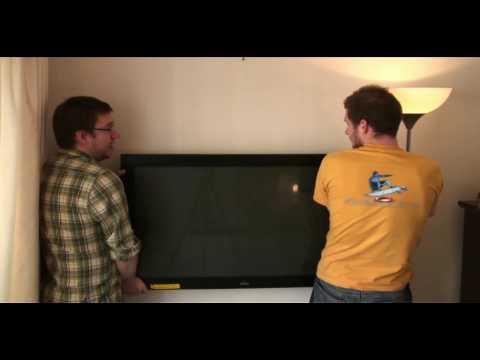
Weekend Fun: NOT How to wall mount a Plasma/LCD WITHOUT a bracket!

I stumbled across a funny Youtube video titled “How to wall mount a Plasma/LCD WITHOUT a bracket!Exclusive… it really works!!!” Since it’s the weekend, have a look at this video.


Lesson learnt, use a bracket and a professional to mount a LCD or Plasma screen. Once the screen is dropped…. it will never be the same.

Category: Digital Signage Weekend Fun


Digital Signage at Sherwood Ridge Public High School

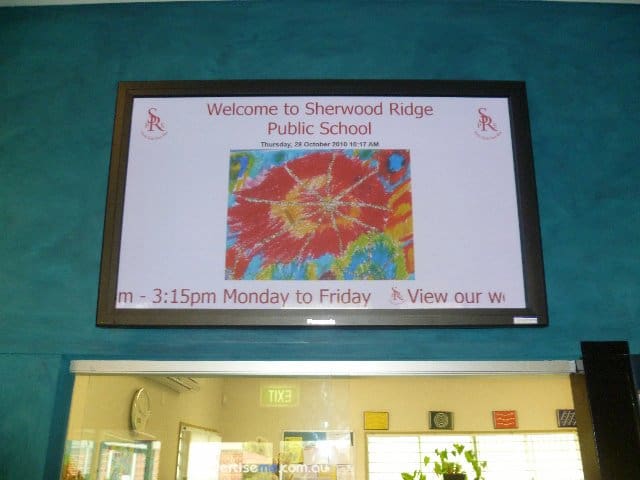
Sherwood Ridge Public SchoolThis month, we successfully completed a digital signage project for Sherwood Public High School. Firstly, here’s a little history of the school:

Sherwood Ridge Public School opened its doors to students for the first time on 28 January 2004. At this time the school had 8 mainstream classes between Kindergarten and Year 6 and 2 support classes.

The founding Principal of Sherwood Ridge is Mrs Jan Marshall.

In the weeks following the school’s inception, students, parents and teachers came together to give birth to: four sporting houses – Air, Fire, Earth and Water; three core values – community, respect and learning; and the school motto “From Each Their Best”.

Requirements

The requirements for this project was quite straight forward and these were:

  • Installation of 50” commercial grade screen in the Administration foyer
  • A digital signage player to display a range of content types including images, videos and text
  • The installation and configuration of  the screen, bracket, cabling and digital signage player
  • Audio Speakers in the Administration foyer
  • Initial template creation
  • Onsite Training
  • Technical Support

The Solution

The solution we provided the school consisted of the following:

  • Dell PC with dual VGA output
  • PADS Digital Signage Software
  • Panasonic 50″ Plasma screen
  • Venturi wall bracket
  • 2-Port USB KVM to control two PC’s by using the same keyboard, mouse  and monitor
  • Logitec Speakers
  • VGA extension cable

We provided the school with a standalone solution that enabled them to use the same PC to control, schedule and display the content and at the same time share the keyboard,mouse and monitor. Since the PC had two VGA outputs, one was connected to the local screen (used for managing and scheduling content) and the extended second output to the Panasonic screen (display the content). This setup is quite complex because the video configuration of the second output was setup as an  extended screen. This meant that the PADS Viewer (a component of the PADS software) which displays content had to automatically launch on this extended screen. How did we do this? It was simple, the PADS application allows you to enter the X and Y co-ordinates of where the viewer will be launched. Here’s an example, the horizontal position of the viewer screen is 1440 (since the horizontal size of the primary screen is 1440) :

pads settings extended screen

As a result, the digital signage solution was used as a tool to communicate messages with kids, teachers and parents through images and information. Below is a few pictures of the install:

Digital Signage in the Education sector in Australia is now becoming more popular and more affordable so why not talk to us so we can show you how you can achieve your digital signage goals.

Category: Digital Signage Case Study


Digital Signage Player Development

I stumbled across this job advertisement on elance.com and it appears a company is planning to development their own digital signage player/system. Based on the description below it looks ordinary – ie. there’s already quite a number of players that does exactly what they want so why spend more time developing your own?

I guess the main reason why anyone would develop their own system would be for flexability and satisfaction. By developing your own custom application you can design and build it the way you want it and eventually customise parts that need improvements. There’s also the satisfaction factor, knowing people are using your application gives you joy and satisfaction. Below is the job that was advertised on the elance website:

Network Distributed Media Player

The SIGNWAVE DIGITAL MEDIA PLAYER will be able to playback full screen 1920 x 1080 compressed video in the .MOV/M4V format. The user-friendly playlists can be managed by any web browser on the network. The playlist duration will be 24 hours. Scheduled spots will have the ability to playback at pre-defined times within the 24 hour schedule. All playlists are based on a 1 hour schedule. For instance if a specific spot needs to play back at 9:50am the base schedule can be interrupted to play the unique scheduled spot. Once the spot has played the original playlist will resume normal playback. Playlists can be auto-populated by selecting how many times per hour a spot will play. When a schedule is getting close to 1 hour the remaining time can be filled with content from a fill directory that contains appropriate fill content until the next hour starts. A system may consist of many playback devices (Mac Mini). The management software will have the…

Category: Digital Signage Blog News


Commercial vs Retail screens

I always get disappointed and frustrated when I see a residential screen installed in a retail store or restaurant. But more importantly I always wonder whether the store owner had any idea of what they were getting themselves into when they decided to purchase a residential screen (yes… it’s obviously cheaper!!!) but can you really use it in a commercial environment?

What most people don’t know is that if a residential screen is installed in a commercial environment the warranty may become void. So check the warranty before installing residential screens. Another big difference between Commercial and Residential Screens is that most commercial grade screens do not have internal TV tuner cards – you’ll generally need to purchase this as an additional module or item. What I find most interesting is that most restaurants with screens just display live TV rather than promote their products or menu items. This could be a reason why these types of businesses would want to use retail screens or maybe they don’t realise what they can use this real estate for.

As I mentioned before retail screens are cheaper. Most businesses use price to make their final purchasing decision so when submitting your next proposal keep in mind that your competitor’s prices could be cheaper than yours. Commercial screens are designed to be left on for long periods of time and will last longer.

I also believe there is a myth that using retails screens means you can install the screen yourself and that for commercial screens you need a skilled and professional installer. Both are equally the same and if can install a retail screen then you will most likely be able to install a commercial screen but we highly recommend you have a skilled professional install the screens.

Category: Digital Signage Blog News


Is your digital signage system DLNA certified?


DNLA Certified logo

DNLA Certified logo - www.dnla.org


I was doing some research about the upcoming release of the HTC Desire HD – what an impressive little mobile phone!!!… anyways I was reading the technical specifications of the unit and came across the terminology DLNA i.e “Share videos, photos, or music from your phone to your TV via DLNA®” and I asked myself what the heck is DNLA? After a bit of research I found out that DNLA stands for Digital Living Network Alliance and it’s a non profit organisation with 245 member companies. All the major screen manufacturers are members of the DNLA and the goal of the organisation is to use a specific standard based technology to make it easier for consumers to use, share digital photos, music and videos. That’s when it hit me and I started thinking on how digital signage systems could easily fall into this category. Does anyone know of any Digital Signage system manufacturer that is DNLA certified? At advertise me, we are not a digital signage manufacturer but if we were, we would spend the time and money to become DLNA certified so that our digital signage system can be easily integrated with other DLNA certified devices  like Panasonic screen or even other Digital Signage players.

If your interested in learning more on how to become DNLA certified or know more about DNLA then visit http://www.dlna.org

Category: Digital Signage Blog News


Digital Signage on The Social Network

For those of you who have watched the facebook movie, “The Social Network” did you notice the video wall at the scene when facebook reached past the 1 millionth member? Although the video wall was just displaying the countdown, it did show us how screens can be used in corporate environments to show information to the wider audience. So, I was wondering whether any company or business has integrated facebook to their digital signage system?

Category: Digital Signage Blog News


Digital Signage Job in LA as Regional Sales Manager

I came across another digital signage job today and from this I can sense the digital signage industry is booming in some parts of the world. This is probably the second job posting I saw this month advertising for a digital signage job in LA. The first was posted by one of our readers (Frank) – see the post here. The job is for a Regional Sales Manager in Los Angeles for  a company called InlineAdz. It pays US$75k which is not too bad since it include commission etc. The job can be found here and good luck to those who are applying.

Category: Digital Signage Jobs


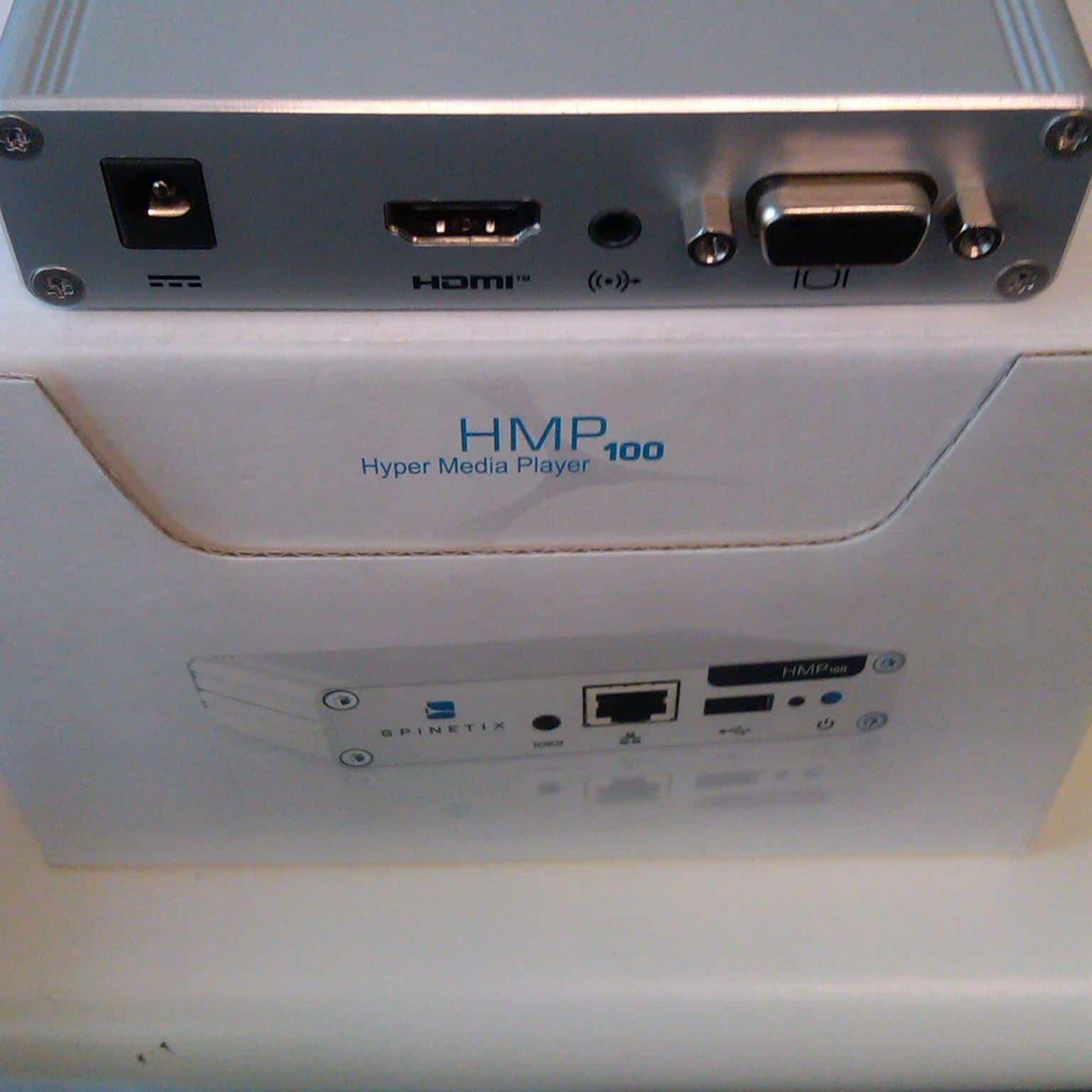
Testing the Spinetix Digital Signage Player Hyper Media Player HMP100

Undoubtedly the smallest digital signage player we’ve seen on the market – the size is 105(W) x 26(H) x 83(D) mm
. The Spinetix [pronounced as "spenetix" or something like that] player is one great little unit and we’re currently testing and reviewing the product so watch this space. Apparently the unit has lifetime warranty!!!

Here’s some pictures of the unit.


digital signage player spinetix front

Digital signage player spinetix front


digital signage player spinetix back

Digital signage player spinetix back


Here’s the specs of the unit:

Digital Display Compatibility
Aspect ratio 16:9, 16:10, 4:3 (horizontal & vertical)
Video output 50/60 Hz: 720p (1280×720), XGA (1024×768), WSVGA
(1024×640), WVGA (768×480), 576p (720×576), 480p
(720×480), SVGA (800×600), VGA (640×480), EDID
24/25 Hz: 1080p (1920×1080; only for semistatic content)
Video connectors HDMI (incl. digital audio), DVI via adapter. VGA (DB15 HD
connector). Simultaneous use of HDMI and VGA possible
Media Format
Description language SVG Tiny 1.2+ (Scalable Vector Graphics)
Media synchronization SMIL 2.1 (Synchronized Multimedia Integration Language)
Still image formats JPEG, PNG, GIF, SVG
Supported video codecs Up to SD resolution: MPEG-4 ASP, MPEG-2, MPEG-1,
H.264, MJPEG, Microsoft VC-1 (Windows Media Video 9)
Supported audio codecs MPEG audio layer 1/2/3 (MP3), ITU G.711, G.722,
G.729,PCM, Microsoft WMA, Real Audio
Media container formats AVI, WMV/WMA, VOB, AIFF, OGG, WAV, MOV (Quicktime)
Streaming media protocol MMS, RTSP, RTP, SDP, HTTP; Uni- & multicast
Import filters provided for Flash 9, Microsoft PowerPoint presentations, BMP, TIFF,
XPM, WBMP, PNM bitmaps
Scripting language PHP5, JavaScript, ECMAScript
Content scheduling iCalendar (RFC2445)
Graphic Effects Engine
Graphic effects language SVG Tiny 1.2+
Vector graphics primitives Rectangles, polygons, paths with lines, elliptical arcs and
Bezier curves, text areas, linear and radial gradients
International text support Unicode standard compliant with bidirectional text support
Font file formats TrueType and OpenType
Animation capabilities Color, gradients, transparency level, audio volume, motion
along a path, translation, scaling, rotation, clipping
Animation modes Discrete, linear, paced and spline interpolation
Specialized Applications
Kiosk applications Touch screen, keyboard/joysticks/gamepads/mouse, HID
I/O devices via USB 2.0 or user defined serial port, with
touch screen calibration
Event management Real-time event communication for triggering content
changes on-demand
Time synchronized Millisecond accuracy, for unconstrained
video wall configurations
Streaming Video and audio streaming compatibility, including
live TV streamers
Network
Connectivity Ethernet 10/100 Mbit/s (RJ-45), IEEE 802.3u, 802.3x
3G connectivity through USB modem stick;
Protocols DHCP or fixed address; IPv4; IPv6;
Remote configuration HTTP(S) configuration server, password protected
Content administration WebDAV server, password protected
Other protocols SNMPv1/v2c, NTP, Zeroconf
Content updates Pull mode, push mode, server based

Storage
Internal storage 2GB solid state
External storage Flash drives and hard disks via USB 2.0 port

Physical Specification
Size 105(W) x 26(H) x 83(D) mm
4.13’(W) x 1.02’(H) x 3.27’(D)
Weight 190g / 6.7 oz
Power supply 5V DC, typ. 0.4A (2W)
Power supply input 100-240V 50-60 Hz, max input current 0.6A
Operating temperature 0-40ºC / 32-104ºF; 10-90% RH
Storage temperature -25ºC to 45ºC / -13ºF to 113ºF; 10% to 90% RH
Real time clock Min. accuracy 1 minute/month free running, battery
backed
Serial RS232, up to 115200 bauds, mini-jack 3.5mm
Analog audio output Line level, stereo, mini-jack 3.5mm

Category: Digital Signage Blog Products, Digital Signage Reviews


Weekend Fun: How many screens are there in the Shinagawa Station Tokyo tunnel?

I came across a video on youtube called “??? digital signage Sinagawa Station Tokyo” – I don’t know what the first 3 Japanese Characters are but I think they spelt the name of the station incorrectly…

Anyways, the first 1 1/2 minute of the video is quite boring so if you are going to watch the video make sure you start from 1:30. From there it get’s interesting and I was amazed to see the number of screen located in the tunnel. I did a quick count and if my maths is correct there was 44 screens just in the tunnel – geezzz that’s a lot of screens in the space of a few meters. Keep in mind that this must be a high traffic area so there’s $$$$$ revenue for advertising. Great work for whoever came up with this implementation.

Oh and he’s the video if you want to watch it… the end is quite boring as well.

Category: Digital Signage Weekend Fun


Techie Question: How do you setup a 3G modem with Digital Signage?

3G modem router with Vodafone modem

There are a number of ways to connect your digital signage player to the Internet and to your local network. The most basic method of connecting your digital signage player to the network is via a Network Interface Card on the player.  But what happens when you don’t have a local network setup or when there is no CAT5/6 cabling in place for your digital signage player?

If you’re in this situation then most likely you’ll either use a wireless network card or a 3G modem. In this post I want to focus on providing basic steps in setting up your digital signage player with a 3G modem. I will be assuming that your player does not have a SIM slot and does not support 3G modems so your only option would be to use a 3G modem router. You will need the following items:

  • digital signage player
  • USB 3G Modem – we used a pre-paid Vodafone modem
  • 3G modem router – there are many brands and manufacturers but the one we used was a TP-LINK 3G/3.75G Wireless N router (Model TL-MR3420)

The first thing to do is setup the network settings on your digital signage player to use DHCP. This means that when it is connected to the network it will obtain a Dynamic IP address. If it’s a new digital signage player, it will most likely already be configured for DHCP but if not then simply change it’s network settings. Once you physically connect the digital signage player to the router via a standard network cable, it will automatically assign an IP address.

Now, before buying a 3G modem router you need to make sure it supports the actual 3G modem you’re planning to use. If it does, then once it’s plugged in the router, it will automatically use the correct modem drivers. If not either change the router or constantly check the manufacturer website to see whether the drivers has been released.

On the 3G modem router, you will need to setup the APN and Dial Number. An example is below:

Generally, the 3G Modem router will have preselected ISP settings but for us we spent a few hours trying to figure out why our Vodafone USB 3G modem would not connect to the Internet. After  researching and troubleshooting for almost 1 hour, we found the cause of the problem.  The 3G Modem router has predefined Mobile ISP settings e.g Vodafone (Australia) configured, but what we discovered was that since we were using a Vodafone Prepaid modem we actually needed to use vfprepaymbb as the APN value rather than using the standard value of vfinternet. After changing that value the router immediately connected to the Internet. That’s a gotcha!! So be careful with this. Once connected you should see something like this:

Vodafone 3G connected

The best way to test to see if your digital signage player is connected to the network is to simply add a URL to your playlist item and display a website. That’s it, your digital signage player is now connected to the Internet  via 3G. One issue that I found is the inability to connect to the digital signage player from the Internet. I was not able to do so because either the ISP has a firewall and is blocking inbound connections or the ISP is using a proxy server for browsing. If someone has figured out a way to overcome this please let us know.

Category: Digital Signage Techie


Digital Signage Job Business Development Manager in the UK

I just came across this job advertisement which I found quite interesting. The job is based in the UK (St Albans) and its for a Business Development Manager in a AV company. The company is looking for a sales manager with digital signage experience. When I read this I thought to myself how many people had this type of experience and how much demand is there for such a position?

Well this role doesn’t pay too bad… 45 – 55,0000 (I’m assuming its in pounds)…. 55,0000 what the? + Benefits + Bonus. If you’re interested then check out the job description here and good luck to those that apply.

Category: Digital Signage Jobs


Techie Question: What is the best way to split your VGA signal?

One of the challenges with splitting your VGA signal is the ability to maintain the video quality and aspect ratio of the original video source. There are a number of ways to split your VGA signal and the main purpose of doing so it to display the same video content across to multiple screens. This basically means a cost savings as you will only need to purchase 1 PC/digital signage player rather than having multiple players for each screen. The only limitation is distance, the VGA video quality degrades for longer distances.

Here, we will look at 3 ways of splitting up the VGA signal (assuming you just want to split 1 video signal to 2 screens):

2 way VGA Cable

2 way VGA cable


When we used this we noticed that the quality was pretty poor. Especially when adding a second VGA cable you immediately notice a difference. No power is required hence the reason why the degradation.

2 Port VGA Splitter

VGA Splitter

Required power to be connected to it. For the video input it requires a VGA extension cable that has a male on one end and a female on the other. Better than the 2 way VGA cable but noticed fuzzy lines running through the screen and some ghosting.

Video Card with dual output (for PC’s)

VGA video with dual video output

You will need to find a video card that supports two VGA outputs. The Radeon x300 video card is one that we’ve tried and tested. Video quality was perfect or as good as the video card can output. The advantage of using this video card was that you didn’t need an additional power point and you are also able to change the video configuration to clone or extended.

For implementations of more than 2 screens then you will need to get a splitter that caters for more video output ports, there are many brands and model in the market but just make sure you test it before installing it at your clients sites.

Are there any other methods people have used to split the VGA signal?

Category: Digital Signage Techie


Guest Bloggers on the digital signage blog

internet digital signage blog

It’s official, after many years of blogging we have decided to open our doors and accept guest bloggers. After some discussions we decided to invite digital signage industry experts from all over the world to help us share their industry experiences and insights with the rest of the digital signage community.
It is an open invitation, however, we are selective on the content.

There are some guidelines that need to be taken into thought when producing each post.
We will NOT be accepting:

  • Advertisements about your company
    We will include a short description about who you are and your company but we will not accept a post that is solely focused on advertising your company or your products.
  • PRs that get splatted across the internet
    We want unique content so if it’s a PR that has already been submitted on the internet we will not accept it.
  • Duplicate blog posts
    Please do not copy and paste content from your current blog, Unique content is what makes the digital signage blog different and we would like to keep it this way
  • Posts that indemnify or scrutinise other people or companies
    As the title suggests, this part is pretty much self-explanatory.  Please keep your content professional.

We will be limiting to publish 1 post per guest blogger a week.
We are looking for guest bloggers that have a passion about digital signage and are not purely looking for an avenue to advertise their company – we have a paid advertising section for this! So if you think you fit in this criteria and are interested to become a guest blogger for the digital signage blog then send us an email at info@digitalsignageblog.com with a short description on what you can offer to this blog and we’ll get back to you.

Category: Digital Signage Blog News, Digital Signage Guest Posts, Featured Post


Product Review: Panasonic Embedded Player ETX1312C1000

panasonic digital signage embedded playerThis week we want to share with you another great Panasonic product we use for our digital signage installations. It is the Panasonic Embedded player ETX1312C1000 which can only be used with Panasonic Plasma screens with the Slot compartments. These units come with pre-installed Windows Embedded XP or Linux and are just like any other ordinary PC’s except that they allow you to hide these in the actual screens. The current unit only has 1GHz processor which can sometimes videos with scrolling ticketers to lag, although we’ve heard rumours that there is an new model being released which has much higher CPU specs. The embedded player actually takes up two slot compartments so you need to be aware of this.

continue reading »

Category: Digital Signage Reviews, Featured Post


University Of New South Wales installs digital signage in Hospitals

Last month we were engaged to install the digital signage Solution for the UNSW (University of New South Wales) Western Sydney Clinical Studies in one of the major hospital in NSW.

The South Western Sydney Clinical School (SWSCS) was established in 1990 and it is unique to the UNSW city clinical schools in that it embraces multiple campuses, allowing access to a broad and diverse range of health care services delivered to a large (approximately 800,000 people) and diverse population.

The SWSCS is centered at Liverpool Hospital (600 beds), a principal tertiary referral hospital for the South Western Sydney Area Health Service (SWSAHS). An active teaching and research programme is also run at Bankstown-Lidcombe Hospital (400 beds; the second principal referral hospital in SWSAHS) and at Campbelltown and Fairfield Hospitals, as well as a number of other facilities.

Requirements

The requirements for this digital signage project were:

  • The large screens needed to be in portrait rather than landscape
  • Screen needed to be mounted against the wall
  • Display different content including websites, timetable, presentations, images, RSS uni news etc.
  • Needs to be scalable and flexible
  • A dedicated CMS server hosted at the main Hospital Campus
  • Players needed to be embedded in the screen since there was no space to store these

The Solution

The solution we provided the University consisted of the following:

  • CMS Dell Server
  • PADS Digital Signage Software
  • Panasonic Screens with embedded players
  • Adtec wall bracket

As usual we worked with local staff and the IT network engineers to connect the players to the UNSW network. We’ve got more screens and players to install but for now have a look at the some of the below photos

Category: Digital Signage Case Study, Featured Post


Weekend Fun: Digital Signage and Augmented reality

This was a video clip that one of our digital signage portal members Travis from Blue Pony submitted in the discussion forum and its about Augmented reality. This blew me away so I thought I’d share this with our digital signage blog readers so have a look at it yourself and let me know what you think.

Category: Digital Signage Blog News, Digital Signage Blog Video


Announcement: Flypaper releases version 3.3 for digital signage including multi-touch

flypaper digital signage softwareWe just received  news that Flypaper Studio, Inc, has released version 3.3 of  the Flypaper digital signage software. According to Flypaper:

“The latest updates and new components included with this version support the growing demand in digital signage for faster, better quality content with a focus on touch-screen interactive experiences. The newest multi-touch features, including the ability to slide, swipe and flick at all components on a screen, allow companies to do cooler things with digital signage, and do them more affordably and in significantly less time.” continue reading »

Category: Digital Signage Blog Products, Digital Signage Reviews


Digital Signage Klip: Digital Signage is easy at EazyWay

I was walking past one of the most popular locations in Sydney Australia and noticed the first digital menu board for EasyWay.  There were three large screens on the back wall and each had a different menu listing or image displayed. Digital Menu boards are now becoming more popular for take away stores and outlets.

digital signage easyway

Category: Digital Signage Klips


Awesome Interactive Shop Window

This is a great video of a Ray-Ban interactive shop window, the digital signage system allows the user to try on virtual ray ban glasses and then lets you take a photo… check it out:

Have you seen any other interesting digital signage implementations?

Category: Digital Signage Blog Video


What are some of the biggest challenges the digital signage industry is facing in 2010?

We would like to hear from our readers “What are some of the biggest challenges the digital signage industry is facing in 2010?”

Category: Digital Signage Blog News


Digital Signage Klips: oovie kiosk

Renting movies has become so much easier especially when you have a oovie kiosk. I saw one at a petrol station and thought to myself what a “great idea”. Basically, the kiosk allows you to rent the latest dvd movies and the process is really simple. All you do is select the movie from a touch screen at the front of the kiosk and then process the payment using your credit card. You then collect the DVD and return it the next day. The price of renting the DVD is $2.99 and it needs to be returned the next night by 9:00pm. I’m not sure what the late fees or charges are but according to their website you won’t pay any more than $36.00 continue reading »

Category: Digital Signage Klips


First digital signage magazine in Australia

We recently received the first digital signage magazine published by an Australia company (alchemedia publishing) and this is really a good sign of the growth of digital signage in Australia.
The great thing about the magazine was the case studies of digital signage implementations of local business in Australia. There is also the traditional advertisements of digital signage companies and manufacturers and this is really good to have as a local directory. We look forward to receiving future magazines and hope to eventually feature in an article.

digital signage magazine

digital signage magazine


Category: Digital Signage Blog News


Time for an upgrade and use digital signage

I think it’s time for an upgrade if you’re still using a LCD screen with a DVD player. I noticed this whilst waiting at a queue at a bank. I couldn’t help myself and just take a quick snapshot of this implementation. Althought most of these have been replaced with a larger screen and a digital signage player, I found it quite effective having audio playing in the background. It actually caught my attention!!

digital signage with audio

digital signage with audio

Category: Digital Signage Blog News


Digital Signage Advertisement in the Inside Retailing magazine


Inside-Retailing-Magazine-Digital-Signage

Inside-Retailing-Magazine-Digital-Signage


This week the Retail Expo was held in Sydney Australia from the 20 – 22 September 2010. Unfortunately we were not able to exhibit this year due to various projects and the workload, but we did decide to spend a bit of money on advertising in the inside retailing magazine which gets distributed at the expo and also to retailers all over the country.


Here’s a picture of our advertisement… it was right on the first page as soon as you open up the technology section.


retail expo digital signage advertisement


It was also great to see our company name being mentioned in one of the articles in the magazine.


Advertise Me mention in magazine


Hopefully through this ad we’ll generate more leads and sales.

Category: Digital Signage Blog News

« Previous Entries

Request a Digital Signage Quote

RSS

Or subscribe via email:
 
Digital Signage Blog Sponsors

Advertise Me Sponsorships available here!

Digital Signage Articles

Sponsored Links


Recent Comments: