Digital Signage Blog Archives
Archive for November, 2009
Display enclosures – protect your investment
When it comes to protecting your investment, physical security should be considered for any digital signage installation. Whether its for outdoor or indoor purposes, enclosures are the best form of physical protection. We previously touched upon some of the other security considerations in two of our previous posts called “How secure is your digital signage solution?” and “Secure your digital signage solution – here’s why“.
Enclosures are primarily designed to protect the display screens from:
- the environment – direct sunlight or extreme weather can cause damage to the screen
- theft – fortunately we haven’t come across this situation but I’m sure others around the world have experience this
- physical damage – vandalism is quite common in public areas continue reading »
Category: Digital Signage Blog Info
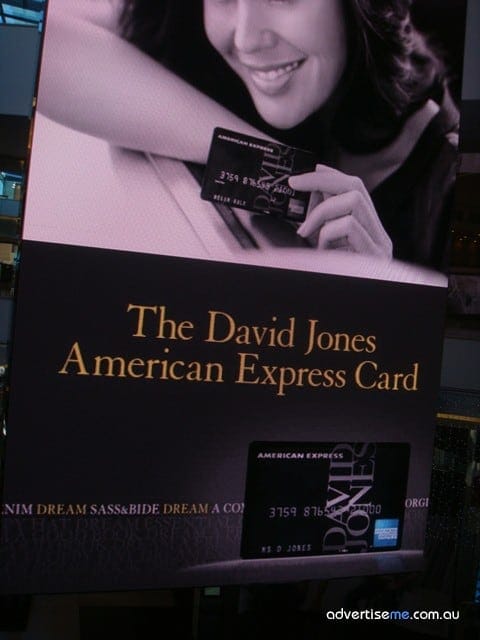
Shopping Centres – Battle of the big screens
Shopping centres attract over $8 million customers each week nationally, so when you have these pairs of eyes walking in the shopping centres who would want to have the biggest screen to attract the attention of these customers. Using digital signage for advertising in shopping centres is one of the biggest revenue making streams and obviously we know the reason why…. exposure. continue reading »
Category: Digital Signage Blog News
Weekend Fun: Digital Signage and the Audi A4 Convertible
This week we had the opportunity to drive the Audi A4 convertible and we realised how most luxury cars or new model cars will have LCD screens. These are the perfect opportunities to utilise these screens for digital signage and I wonder how many car manufacturing companies are actually thinking about this.
Category: Digital Signage Weekend Fun, Featured Post
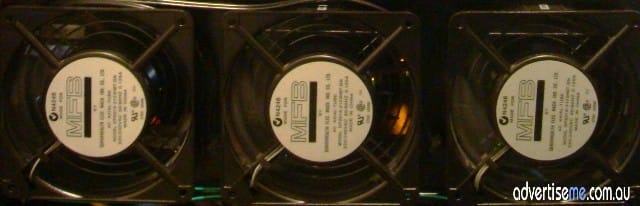
Techie question: Digital Signage Player Operating temperature
This is a questions for all those techies out there: How does the operating temperature effect the digital signage player and what is the recommended operating temperature?
Category: Digital Signage Techie
How to enable the Blackberry Media Transfer Protocol
Today I had a breakthrough with trying to get my blackberry to connect to any computer and use it as a storage device. My dilemma was that I could not connect my blackberry to any PC for transferring files to/from unless I installed the Blackberry Software + the Media Manager.
See where I’m coming from… wouldn’t it be just great to connect the Blackberry to any PC using the USB cable and just transfer the files? We’ll after a bit of researching I found out the solution. It seems like many of the Blackberry users had this problem.
Here’s the step by step instructions on how to get this working:
On the Blackberry
1. Go to Option
2. Go to Memory
3. Make sure you have the following (this is what I have set up on mine):
Media Card Support: On
Encryption: None
Media Transfer Protocol: On
Mass Storage Mode Support: On
Auto Enable Mass Storage Mode when connected: Prompt
Save these setting.
Now you will need to download some software which I found from pinstack.com (registration is required)
1. Open the file using winrar
2. Extract the files to your computer
3. Execute the file called BB storage Activation new.bat
4. A DOS window will come up and it will start Connecting to the Blackberry to upload an image to the rom. Let this run until you see the pause prompt and it will ask you to press any key. Close this window by pressing the x on the top right hand corner. Pressing any butting will cause the application to upload the image again.
Make sure you wait for the blackberry to completely boot.
Once its done connect the blackberry to the computer and you it will start installing drivers and if you open up windows explorer you will see a drive for the blackberry.
Done. Wish I knew about this earlier… it’s been almost a year since I had the unit!!!!
Category: Digital Signage Blog News
Weekend Fun: When digital signage goes wrong, do you rely on Windows or Linux?
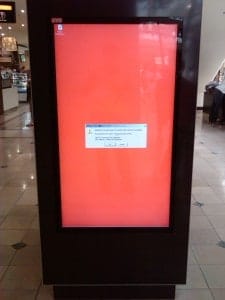
Coincidently on my third trip back to Melbourne for a digital signage project rollout, I came across something that is too familiar to me.


Digital Signage gone wrong
Almost 9 out of 10 times when digital signage goes wrong through my observations, they are running Windows. There is no perfect system out there regardless what hardware, operating system, or configuration you may have, but according to Murphy’s Law, when something does go wrong how do control it? Does your software allow you to show an exception or alternate display?
Weirdly enough, these observations have now become second nature to me, whereby I notice all other people would just walk right past it. Not to mention the urge for me to take out my blackberry to snap it.
Category: Digital Signage Blog Info
Flying High on Digital Signage
Its been a crazy past many weeks for us here at advertise me. In the past 2 months gone, I’ve been hopping between different cities every week for digital signage installations and meetings.
It is interesting to see where each city is at with the influence of digital signage, and I have noticed that the usage of its application differs between different regions across the country. However one of the disappointing things that I have picked up is the management of downtime for systems going offline. In less populated cities, when a screen goes offline it can be left like that for days without anybody coming to its attention. In more populated cities, the screen will be back live again by the afternoon, or the next day at latest.
I’ve got a couple more places to go before the end of this month, and that should leave me with an open, but not easy December where I can get my feet back on the ground and plan for the next year. By gosh its mid November already and Christmas is just around the corner!

Telstra building in Melbourne

Offline Screen in Perth Domestic Airport
Has anybody found any other trends with digital signage applications across different regions of your country?
Category: Digital Signage Blog Info
Weekend Fun or NOT: Displaying incorrect Facebook Events date
This weekend we almost missed an important event that was created and organised through the facebook events application. For some reason, the event displayed the correct date on the Facebook website, but on the iphone and the blackberry it showed the incorrect date (using the mobile application) – the reminders were not triggered because of this issue. My guess is that there is probably an issue related to the timezone (ie Australia). Does anyone else have the same issue?
If you’re integrating facebook with your digital signage application and are displaying events just make sure you check and test that the dates are displaying correctly before publishing this to the screens.
Category: Digital Signage Blog News
Digital Signage – Brisbane Casino
During one of our business trips to Brisbane Australia, we visited the Brisbane casino. When a colleague of mine told me the building I was looking at was the casino, I didn’t believe him. This is what I saw:
From the outside it looked like a museum, but it was not until we actually walked into the building that I couldn’t believe my eyes – it was a casino and most surprisingly digital signage was everywhere. Unfortunately I couldn’t take any photos of the screens but I noticed that each of the playing tables there was a screen displaying information. I was particularly intrigued about the roulette table, since the screen instantaneously displayed the winning number as soon as the ball landed. I stood there for a while trying to figure out how this was achieved and I came to the conclusion that the digital signage system included a sensor to determine where the number landed on the roulette table. Does anyone else know how this actually works? I also came up with the silly idea that someone watching through one of the cameras was typing this information in the system….
There were screen literally everywhere you looked; at the top of the teller stands, at the waiting areas, at the cafe, at each table and pretty much in every corner of the room. This got me thinking how maybe we should target and approach casinos with a good innovate digital signage system.
Category: Digital Signage Blog News
Digital Signage Portal reaches 300 members
Today, the digital signage portal (http://www.digitalsignageportal.com) has reached 300 members… although these numbers may seem small but we think it’s a good achievement considering we haven’t spent that much time to market and grow this website.
Next year we have a number of goals we plan to achieve and we have already started planning for some of these changes. One of them is offering advertising to selected digital signage companies (if you are interested please email info@digitalsignageportal.com) but more importantly we will revamp the design and layout of the website.
For those of you who haven’t visited the portal yet, what are you waiting for? Registration is free.
Category: Digital Signage Blog News
Digital Signage Blog Guest Bloggers
Guest BloggersDigital Signage Featured Links
Recent Posts
Featured Posts
- Product Review: Synrax Onyx Mini
- Introducing digitalsignagearticles.com
- Experience the digital signage world at the ABC Bondi Shop
- Will the Microsoft Xbox 360 take over the Digital Signage Industry?
- Subscribe to the digital signage blog
- Want to be featured on the digital signage portal newsletter?
- About Advertise Me
- Klips: Share your digital signage snap!
Most Viewed Posts
- Forum Post: World Wide Digital Signage Network - 33,159 views
- Digital Signage Portal Forum Post: CISCO Film Making Competition - 17,594 views
- Digital Signage Portal Forum Entry: Help with digital signage business plan - 12,406 views
- Points to consider for a Digital Signage Business Plan - 11,667 views
- Digital Signage:How do I create a video wall? - 11,431 views
Recent Comments:
- Samsung LED screens (2)
- LED Outdoor Screen: It’s gratifying to see your such a great information. We really impressed with your such a...
- Digital Signage Klips: Supermarket in Miami Florida (1)
- olga vega: hi, I would like to have information to publish my company a clip video and/or a photo screen on a tv on...
- Digital Signage Klip: Free Mobile Phone Charging station with a twist (3)
- Robustsigns: All new businesses should get the advice of a professional.
- Clever Concept Vending Machine with See-Through Display (1)
- Fresh vending locations: Fresh Vending – Locations, food franchise business, you will receive the help you need...
- Parramatta Westfield LED Screen (17)
- LED Displays Outdoor: It’s gratifying to see your such a great information. We really impressed with your such...
Popular Tags used in our posts
advertise advertise me Advertisements australia blackberry blog Caption Digital Id digital signage digital signage network digital signage player Digital Signage Software Digital Signage Solutions email Fun Google iphone klip Klips lcd screen lcd screens led screen Poll Id portal screens Signage Industry Signage Solution Signage System Sydney Australia video wall
Digital Signage Blog Categories
- Digital Signage Blog Events (29)
- Digital Signage Blog Info (123)
- Digital Signage Blog News (191)
- Digital Signage Blog Products (35)
- Digital Signage Blog Video (16)
- Digital Signage Case Study (11)
- Digital Signage Guest Posts (11)
- Digital Signage Ideas (4)
- Digital Signage Interview (8)
- Digital Signage Jobs (5)
- Digital Signage Klips (32)
- Digital Signage Newsletter (7)
- Digital Signage Polls (14)
- Digital Signage Reviews (12)
- Digital Signage Techie (25)
- Digital Signage Tutorials (1)
- Digital Signage Weekend Fun (29)
- Featured Post (41)