Digital Signage Blog Archives


Archive for April, 2009


Inside the world of a Digital Signage Player

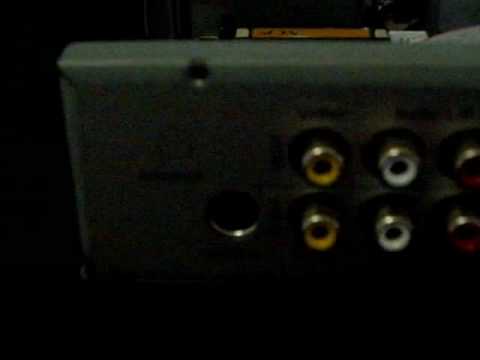
This week, our team thought of doing something different from our usual postings – we decided to open up the NDSP-500 digital signage player and give you a brief look at what’s inside one of these players. The video is not of the greatest quality but it does give you an idea of the components inside a typical digital signage player and what connections are available. So here’s the video:

As you can clearly see, the unit is small… it’s smaller than half of an A4 paper. With this particular unit, there are several connectors at the front:

1. RS232 – this is usually to provide serial communications with another device. It can be used to control and manage an display screen – that’s if the screen supports RS232.
2. Secure compartment to store the SD card – it’s also a quick way to easily swap out the SD card without having to open up the box

At the back of the unit you will notice the following connectors:

1.Video output:  the unit has these typical connections – S-Video Output/Composite Video and Audio, DVI, and VGA.

2. Video Input: Composite Video and Audio. With this particular unit you will be able to connect a video input source such as a DVD player, Foxtel, CCTV camera etc.

3. S/PDIF – for great audio quality

4. LAN port which support 10/100 Mbps

5. Two USB ports for connecting USB Storage

6. Power plug to connect the power supply. This power plug was different from other digital signage players we’ve seen in the past. It basically has a connector which allows you to twist and screw the power cable to the power plug.

Inside the player, all you will find is a circuit board, a frame for a small hard disk and several cables. As you can see from the video, you will not find a fan inside the player – this makes the unit very quiet when it’s turned on.

Would you like to see more videos? Let us know what you’ll like to see and we’ll try to get it done.

Feel free to submit your answer as a comment.

Category: Digital Signage Blog News, Digital Signage Blog Products, Digital Signage Blog Video


Advertise Me Interviews Bill Gerba from Wirespring

advertise me: Before we start, we would like to thank you Bill for taking the time to participate in this interview. We know you are a busy man so we’ll hopefully keep this interview nice and short. Could you  please briefly introduce yourself for those of our readers who don’t know “Who is Bill Gerba?“.

Bill Gerba: Hi Marco, thanks for the chat. Well, for those who don’t know me, I’m the CEO and co-founder of WireSpring Technologies, a digital signage software and services company in Fort Lauderdale, Florida. On top of our software development operations, we also do a lot of industry research, which we publish on the WireSpring blog (which was recently renamed the “Digital Signage Insiders” blog). It’s the oldest digital signage blog out there, started in 2004, and has about 18,000 readers

Advertise Me: When and how did the company Wirespring start? How did the company derive it’s name?

Bill Gerba: We started out in May of 2000. At the time, wireless (cellular, WiFi and Bluetooth) were the “next big thing,” so the name tried to incorporate some of that. Our original product was a system that used the Bluetooth signal from your phone to triangulate your position in a retail space and then make promotional offers or provide wayfinding services based on that. Needless to say, with the very dumb cellular devices, low penetration of Bluetooth, and high equipment costs of the time, we met some resistance with that early product. We refocused our efforts on more traditional self-service kiosk and digital signage products soon after that.

Advertise Me: We recently read in your blog that you have been busy releasing a new product. Tell us more about this.

Bill Gerba: Up until very recently, our products were designed for large enterprises people who wanted to manage networks of hundreds or thousands of digital signs or kiosk terminals. While that business has served us well over the years, and we certainly continue to see good growth there, we also wanted to be able to pursue the many, many smaller opportunities that we had to pass on because our enterprise software was too complex. Hence, we decided to take all that we had learned from our enterprise FireCast and ClientCenter products and distill them down to a new, simplified product, and so Digital Signage EasyStart was born.

Advertise Me: What are some of the features that makes this new product stand out from other digital signage products?

Bill Gerba: Well for one, we’re selling the hardware and software as an integrated solution. If you buy EasyStart from us, it comes pre-loaded on a box that we’ve certified to work in every arrangement we can think of. If you’re buying from one of our distributors or resellers with their own hardware platform, we’ve certified that to work as well. For another, we’ve simplified the user interface by making a lot of decisions behind-the-scenes for the user. They want a 4-zone layout with certain aspect ratio? Ok, we’ll figure out the dimensions for each area and tell them. Want to switch between multi-zone and full-screen content? No problem, just check one checkbox. We’ve gone through and made hundreds of tweaks to our system to make it so easy that anyone can be up and running in minutes. We also made sure that it was easy to get in touch with support right from our user interface (over the web), and we bundle in video tutorials for all of the most commonly-used features.

Advertise Me: What are your thoughts on digital signage SaaS? Is Wirespring heading towards this path?

Bill Gerba: By my reckoning, WireSpring was the very first digital signage SaaS company — our ClientCenter web portal went online in August of 2001. Today, about 2/3 of our revenues are from our SaaS products. EasyStart is actually a break from that — there are no recurring fees — because while SaaS tends to work well for mid- to large enterprises, the small guys don’t want to be burdened with another monthly charge.

Advertise Me: Now, you’ve been in the digital signage business for a while, so what challenges and setbacks have you faced thus far?

Bill Gerba: Well, we certainly overestimated the demand in the early years. It was very, *VERY* hard to sell networks back when plasma screens cost $8-9000 each. Likewise, because the SaaS model was so new at the time (it was still called “application service provider” or ASP back then), we had to jump over some hurdles to get customers to understand the benefits of the approach. Thankfully, that has gotten a lot easier.

Advertise Me: Do you have any advice for people who are planning to start a business in the digital signage industry?

Bill Gerba: Two rules cover 90% of what I have seen gone wrong:

Rule #1: If you’re going to start an ad-funded network, you had better have a team of people who are *already* experienced with selling ads.

Rule #2: Everything takes 3x as long as you think it should. Plan out your time and budget accordingly.

Advertise Me: This is our final question. What do you see as the next “BIG THING” in digital signage?

Bill Gerba: That’s a tough one. Certainly interactivity seems to be gaining a lot of ground, though I’ve still seen more cool tech demos than actual deployments using it. Gestural interaction, mobile interaction, anything that can get a viewer to engage with the content is becoming really important. People are also starting to think outside of the box — literally. While LCD screens still make up the majority of DS deployments today, more people are using 3D, unique bezels, or projection onto holographic film to create images that aren’t square in an attempt to be more eye catching. I think that as people get more used to the idea of big screens hanging around everywhere (including their living rooms) network owners are trying to step up their presences with interactivity and unique display formats to remain visible.

Advertise Me: Once again Bill, thanks for your time and we wish you all the best with the release of the new Wirespring product.

To read more interviews click here: http://www.digitalsignageblog.com/category/digital-signage-interview/

About Advertise Me:

Advertise Me www.advertiseme.com.au

Advertise Me is a privately owned Australian company specialising in all aspects of digital signage solutions.

Our team of highly skilled professionals is able to introduce innovative ways for businesses to communicate with their intended audiences for a variety of purposes including informing, educating, entertaining and selling.

You can expect us to:

  • offer the most affordable and cost effective solutions tailored to your specific business needs.
  • provide you with concise and accurate information and will ensure that you understand and are comfortable with our proposals.
  • strive to make our clients happy and successful.

We have partnered with a number of key reputable organisations and will continue to build further partnerships to deliver the most effective solutions for our customers.

Visit our website at www.advertiseme.com.au for more information.

Category: Digital Signage Blog News, Digital Signage Interview, Featured Post


Use Flashpoint to convert powerpoint presentations to flash

Do you have a digital signage player that does not support Powerpoint presentations but only flash? Don’t throw the player out yet because we’ve got an easy solution for you.

There are many software tools available on the market that is able to convert your traditional ppt files to flash but one that we would recommend is Flashpoint from Flashdemo (http://www.flashdemo.net/ppt2flash.html). The software costs US$89.00. There are a couple of demos on the website to show you what the software is capable of doing and they also have a free trial version.

So, rather than redesigning your powerpoint presentations for digital signage compatibility, have a look at Flashpoint – it may save you several hours worth of work.


Do you use Powerpoint in your digital signage solutions?


View Results

Loading ... Loading ...

Category: Digital Signage Blog Products, Digital Signage Reviews


Digital Signage Portal – myBlog

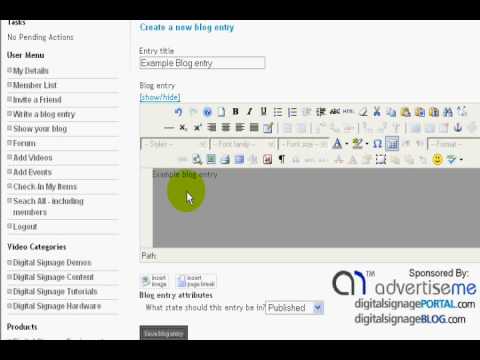
We would like to introduce to you the “myBlog” feature on the digital signage portal (www.digitalsignageportal.com).  We have added the facility for registered members to create their own blog entries and share this with the rest of the digital signage community. We understand that most of you don’t have a business blog or don’t have either the technical expertise or knowledge to set one up. So we’ve done most of the hard work for you. All you have to do now is just post your entries. Here’s a quick tutorial on how to add your own blog entries on the digital signage portal.

Category: Digital Signage Blog News, Digital Signage Blog Video


Integrating digital signage with Sharepoint

We were recently approached by an insurance company asking whether we had a solution that could easily integrate digital signage with their Sharepoint system, so we thought we might as well share this information with everyone.

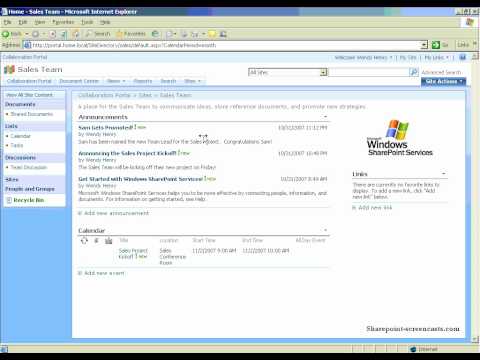
Well, you may be thinking “What is Sharepoint?”. Sharepoint is actually a Microsoft Content Management System which allows business to collaborate and share information quickly and easily. Think of it as a website portal which can be used to store files, events, contacts, tasks, forms and most importantly information. Here’s a video tour of Sharepoint:

Now some companies may want to use digital signage as a communication tool and target information to staff and if this information is already centralised in the one location, SHAREPOINT, then how would you integrate your digital signage solution with this?

From our experience and based on products we have used in the past, if your digital signage player/software is able to display RSS compatible feeds then you have a system that is able to be integrated with Sharepoint – in particular the latest version 2007. With Sharepoint 2007, there is a neat feature which allows content, events, contacts, tasks and information to be displayed as an RSS feed. This is particularly useful as you don’t want to manually update the content on your digital signage player. Once you have the RSS feed, you can easily modify and display this information on the digital signage screens.

For the more advanced digital signage players and software, if your system is able to connect to the Microsoft SQL server that stores all the data, then your solution will be able to connect to the database and grab the relevant data to be displayed on the screen. As an example, if one of your clients used Sharepoint to schedule company outings and important company events then we would be able to deploy a digital signage solution which dynamically uses the RSS feed from the Sharepoint server and display this on the digital signage screen located in the main foyer. This will help remind employees of upcoming company events.

Hopefully this post has provided you with better ways on how to integrate existing systems with digital signage.

Have you seen any innovative digital signage integrations?

Feel free to submit your answer as a comment.

Category: Digital Signage Blog Info, Digital Signage Blog Products


Screen and Player compatibility?

I find myself that more often than not, I am always re-calibrating our players each time we get a new screen. That is, the result of what is being displayed on one screen will be different when the exact same player is plugged into another screen of a different manufacturer.

The results vary quite largely and this is an issue that still bothers me every time. Although having said that, I have not tried many digital signage players, so it could be an isolated issue. But I won’t be surprised if it isn’t.

Video signals going into a screen can vary in all sorts of resolution sizes, and each screen is required to convert (or scale) that signal into something it can display (I will talk more about native resolution in my next post).

One of the most bizarre cases that I have come across is a 1366×768 resolution size from a player was being scaled to 1600×1200 on a Samsung LCD. So what resolution do you design your templates at?

Is this a common issue?
If it is, what are people doing to address it?
If not, is your digital signage a customised or generic solution?

Category: Digital Signage Techie


How reliable is your digital signage solution?

This blog post will be purely about your feedback. We want to find out what you think makes a reliable digital signage solution. Is it ensuring having 24/7 power running to the screens and digital signage equipment? Is it making sure that the digital signage player is maintained on a monthly/weekly basis? Is it the operating system the digital signage software runs on?

Yes, we want to know what makes a digital signage solution reliable…


How reliable is your digital signage solution?


View Results

Loading ... Loading ...

What makes a digital signage solution reliable?

Feel free to submit your answer as a comment.

Category: Digital Signage Techie


Blackberry excitement for the day! Blackberry App World

Besides the excitement of getting wet in the rain, we were excited with RIM (research in motion) releasing the Blackberry App World (the equivalent of Apples iPhone App Store). If you’re interested in downloading Blackberry App World then visit the RIM site: http://na.blackberry.com/eng/services/appworld/

I’m going to play around with this and I’ll let you know which application I’ve downloaded on my Blackberry Storm. I wonder if there’s any digital signage applications on the Blackberry App World.

Category: Digital Signage Blog Info

Request a Digital Signage Quote

RSS

Or subscribe via email:
 
Digital Signage Blog Sponsors

Advertise Me Sponsorships available here!

Digital Signage Articles

Sponsored Links


Recent Comments: