Digital Signage Blog Archives
Archive for February, 2009
Points to consider for a Digital Signage Business Plan
If you’re starting a business in the digital signage industry and are in the process of writing a business plan there are several areas that I would focus when writing your business plan and these are listed below:
1. CLEARLY STATE THE ROI - Your investors and the client will want to know what their ROI is. Based on the fact that you’re new to digital signage you may not have these figures available. There are several websites on the internet which may provide you with these numbers but my recommendation would be to engage the client to run a trial (for a fee or for free). During this trial you can use various measurement tools or devices to obtain your data. For example, the client may want to know how many people looked at the screen and purchased the product displayed. In this case you can use an audience measurement tool which tracks the number of faces that looked at the screen. One great thing about these tools is that it can help you also track demographic information. You can then correlate this information with the digital signage player logs and the retail management system logs.
In the past, we have been asked whether installing digital signage increases the number of customers walking into the store. The only way to determine this is to compare and track how many people walked into the store before installing digital signage and after. Some stores may already have some measurements tools to track this eg. people counter (uses infrared light to determine how many people entered the store) if they don’t then it may be worthwhile to install one.
2. NEED MONEY TO START YOUR BUSINESS – If your investors decide not to proceed with supporting you financially and your client is still keen to go ahead with your digital signage solution then you may want to consider leasing the equipment through a finance company. Have a read of this article about leasing vs purchasing outright vs rental:
3. SWOT – All business plans should include the SWOT analysis i.e. clearly analyse your business Strength, Weaknesses, Opportunities and Threats and clearly understand where your business may stand in the current market condition. Keep in mind who your current competitors are and how difficult it might be to enter the market. Also keep in mind that a number of existing businesses who are in the video/audio industry are merging into the digital signage industry. These companies will already have existing clients so it will be difficult to win these clients if you don’t have the relevant experience or portfolio.
4. SCALABLE SOLUTION - if you don’t manufacture your own equipment then you will need to clearly state in your business plan what services or equipment you will be providing. You will need to look for a digital signage solution that is scalable, affordable (also one that will make you a profit) and one that reduces administration costs. A centrally managed solution is the perfect choice for your clients needs.
Browse through our Digital Signage Portal Products pages to get more information about what are some of the products available in the market.
5. GET HELP IF YOU NEED IT – Partner with high profile digital signage manufacturers who can guide you and assist you with winning the projects. Do this even before you execute your business plan. Getting your foot in the door is always hard and working with an existing and experienced business will provide you with that extra support.
6. ROI FIGURES – In the ROI include potential advertising revenues figures from manufacturers. In your business plan, you will obviously do your maths and provide figures and number of how much your business will be earning, even if it’s making a loss in the first couple of year. Sometimes you may have to clearly draw the line and decide when it’s best to pull out from the business but generally, the first 5 years is always the toughest and most businesses fail in this period.
7. UNIQUE – are you providing anything unique in the current digital signage industry? If you are, then your business plan should clearly revolve around what additional benefits your product/solution/service will bring to the industry. Otherwise, the competition will be quite rough with existing established businesses.
Hopefully these points helped you in putting together your business plan.
Do you have anything further to add to this list?
Feel free to submit your answer as a comment.
Category: Digital Signage Blog Info, Digital Signage Blog News, Digital Signage Blog Products
my Digital Signage – grow your business
The digital signage portal is a forum for promoting and growing YOUR business, with the aim to lift the level of awareness of your business and digital signage.
We are excited to announce additional features to the digital signage portal website to make your experience and member profile more personalised. The whole intention for establishing the digital signage portal was to provide a means for businesses to connect with one another and also with potential customers but more importantly we wanted to centralise the digital signage community and information in one single location – that’s when the digital signage portal was born.
Now, here is a short list of some of the features we have recently added:
1. Biz Wall – you are now able to write messages on another member’s wall. Basically this can be used to share information with each other, keep each other updated and to improve communication.
2. myBlog – we have added the facility for registered members to create their own blog entries and share this with the rest of the digital signage community. We understand that most of you don’t have a business blog or don’t have either the technical expertise or knowledge to set one up. So we’ve done most of the hard work for you. All you have to do now is just post your entries.
3. myComments – you are now able to comment on articles and other peoples blog posts.
4. Member List – this is the list of all the current members registered on the portal and its something we forgot to originally include when we first launched the website. Think of this as a large contact list so you can get in touch with other registered members.
5. Twitter Status – for those of you that have a twitter account then you now have the option to display your twitter status on your profile.
6. myNoticeboard – yes this is your own noticeboard that you can use to add messages to your profile. You can use it to tell others what you’re doing…basically use it as a noticeboard.
7. More features – we’ve added so many other features which may take too long to list so why not log in to the digital signage portal and see it for yourself. We will soon be adding a dedicated page and video to capture all these features so keep an eye out for this.
For those of you who haven’t visited the website in a while, I highly recommend you to log back in and pay a visit and don’t forget to add your business logo to your profile in order to expose your business further – as you are already aware branding is very important.If you need help with this visit our F.A.Q section.
We always love to hear your feedback so let us know what you think or what you would like to see on the digital signage portal.
Have you read the latest digital signage portal newsletters? Click here to view the latest newsletters.
Feel free to submit your answer as a comment.
Category: Digital Signage Blog Info, Digital Signage Blog News, Digital Signage Newsletter
Outdoor digital signage in Austria
We came across an interesting article about an outdoor LCDs that is able to cope in different weather conditions.
Screen NT has installed a 42in outdoor LCD display to cope with the snow and ice of an Austrian winter. The display not only has to deal with the extreme Austrian winter but the hot temperatures in the summer as well.
The LCD display is installed at the Hotel Tirolerhof in the town of Zell am Ziller, in the Tirol region of the Austrian Alps.
Transreflective screen harnessess the sun to increase the brightness f the picture while a filter system protects the liquid crystals from the sun’s IR and UV rays. The unit also features an automatic air-conditioning system to ensure safe operating temperatures are maintainined throughout the year.
Article and Image Source: avinteractive.com.uk
Category: Digital Signage Blog News, Featured Post
Say Ahhhhh! Digital Signage at the Dentist
Just the other day one of my tooth fillings suddenly broke and being annoyed at having a hole in my tooth I immediately visited the local dentist. I was quite surprised that quite a number of Dentists are not using digital signage in their theaters or offices – let me explain how digital signage can be used in this industry.
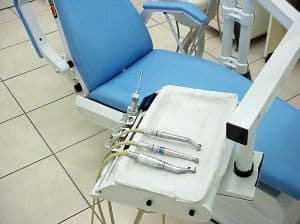
The majority of us will at least once a year visit the dentist, so you all should know what I’m referring to when I use the term “the Dentist chair” – yes that comfortable chair that has a little basin on the side, an extendable arm with a light, and is able to arch all the way back so that the person sitting on it ends up staring at the ceiling (see the top image). If you’re thinking in the right frame of mind you may have just encountered a “light bulb” moment – yes… that’s the spot for digital signage. We talked about location, location, location in one of our previous posts and I believe that’s the perfect location for digital signage.
How long do we generally sit on the Dentist chair, 10 minutes? 30 minutes? Well, my visit lasted 45 minutes starting at a blank ceiling and I must honestly say it was very boring. If there was a digital signage solution installed it can be used for quite a number of purposes and these are:
1. Depending on the age group, the dentist can offer to show a movie, music, a kid’s show to entertain the patient. Rather than having a screaming child, showing one of their favourite shows will help them to calm down making the experience for both the dentist and the patient more comfortable.
2. You may be able to potentially connect headphones to the digital signage solution and let the patient listen to calm music or the audio coming from the video. This is better than listening to all the drilling and crunching noises
3. Educational information – use it to display educational information/videos on teeth maintenance and oral care
4. For those who are intrigued at watching the dentist working inside your mouth, why not have a small camera attached to the drill bit thingy and show the video capture on the screen
5. Advertising – basically you can make some passive income from displaying advertisements. Colgate, OralB and other toothbrush/paste manufacturers would definitely jump on board if there was a network of screens
6. Motivational quotes – I recently watched a movie and in one scene the dentist had two posters stuck on the ceiling. If I remember correctly the quotes where:
Hang in there baby!!!
“Only a life lived for others is worth living.” – quoted from Albert Einstein
Wouldn’t it be great if the dentist a had digital signage solution to display a number of animated motivational quotes rather than a static poster.
So there you go, that’s how we would have used digital signage in this location. I do hope that the next time I visit the dentist I would be able to sit on that chair and maybe watch a movie or see something interesting or educational.
How have you seen digital signage implemented at the dentist?
Feel free to submit your answer as a comment.
Category: Digital Signage Blog Info
If content is king, then back it up!
We’ve all heard the saying “content is king” and the success of any digital signage business is dependent on what content is displayed. In this particular post we won’t go into too much detail on how important content is… we all know that without content, a digital signage network becomes useless – not many people like watching a blank screen. However, I decided to raise the question whether businesses have a system in place for backing up their content from their digital signage players. Would you be able to reproduce the same content from scratch if you didn’t have a copy of the content somewhere?
I guess this is something businesses operating a digital signage network should think about. In the past, experiencing a hard-drive failure can be quite devasting and often quite expensive if you count the number of hours it would take to reproduce the same content. From the top of my head, I could only come up with several ways of backing up the content and these are:
1. Centralise and store the content onto a dedicated server with RAID configuration harddrives. In addition to this, have the files scheduled to be copied to an external storage such as a USB external HHD.
2. If you cannot afford a dedicated server, have the harddrives on the digital signage player set up in a RAID configuration – most operating systems are able to have this function but it will mean have at least two physical hard drives. Otherwise you could always copy the files onto an external medium (CD, DVD, Memory card, HHD, etc).
3. Have files distributed across multiple servers or across an external site (e.g. data center)
For those techies out there, what is the best backup strategy?
Feel free to submit your answer as a comment.
Category: Digital Signage Blog Info, Digital Signage Techie
NEC Multisync X451UN – great for video walls
If you’re looking for a large LCD screen with an ultra thin screen bezel then the upcoming NEC Multisync X451UN will be perfect for your next digital signage wall. In a previous post we talked about how to create a video wall using existing equipment or purchasing specialised hardware such as the NEC Multisync X451UN. Now, the actual screen has a bezel of only 7.3mm and it can be connected to form a 10×10 screen configuration to fill up a space of almost 645 square feet (that’s approximately 60 square meters). This is perfect for locations such as Movie Theaters or any location that needs a large screen area, however it does come with a hefty price – US$6000 and will be available sometime in April.
Some of the additional features of this screen are:
* 16:9 widescreen aspect ratio
* 1,360 x 768 WXGA native resolution
* 700 cd/m2 brightness
* 3,000:1 contrast ratio
* 3-year parts and labor warranty
Source: www.slashgear.com. For more additional specs visit the website.
Category: Digital Signage Blog Products, Featured Post
Webinar: Digital signage – More important than ever in an uncertain economy
Here’s the next upcoming webinar. It is hosted by digital signage Today and seems like it is sponsored by Cisco. Based on the agenda it seems like the host will be marketing the Cisco Digital Media player. We previously posted an article called Cisco Digital Signage Demo – digital signage portal have a quick read.
This is an informative webinar to learn how digital signage can revive your business’ communication, and how the network-based Cisco Digital Media System can help you remain competitive and build strong relationships with both your employees and customers.
Don’t miss this complimentary and informative webinar that will cover:
- Why digital signage is unique in addressing current economic challenges facing businesses
- How you can leverage both digital signage and desktop video within your organization
- The benefits of a centrally managed, network based digital media solution
- Planning and deployment examples
To register click here.
Date: Tue, Feb 10, 2009 Time: 2:00 PM EST Duration: 1 hour
Do you have an upcoming digital signage event? Add it to the events calendar and share it with other members of the digital signage portal.
Feel free to submit your answer as a comment.
Category: Digital Signage Blog Events, Digital Signage Blog Info
The Blackberry Experience – what a storm!
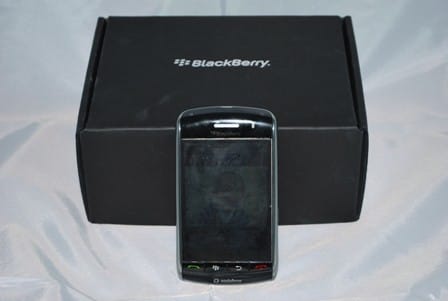
In December 2008, Vodafone Australia released the latest Blackberry device model – the Blackberry Storm. Our team at Advertise Me always had plans to use a device which would allow us to reply to emails, take pictures and videos, and most importantly to post blog entries whilst “on the go”. We assessed our requirements then analysed the Blackberry Storm specifications and it was a perfect match. So now the majority of our team has one of these Blackberry Storm – mind you we came across quite a number of bad product reviews on the net but we just decided to ignore these and give the device the benefit of the doubt.
I have been a valued loyal customer of Vodafone since 1998 (if a customer rep from Vodafone is reading this maybe they can give me a call and send me something for being a loyal customer – c’mon 10 years must be worth something) and have have kept my mobile number the same ever since I purchased my first mobile phone – so thinking about switching to another provider was always a dilemma. Fortunately, we actually purchased the Blackberry Storm from Crazy John’s – a reseller of Vodafone because they had a special deal: for $69 a month the following included in the package:
- the blackberry storm (9500 model)
- Unlimited internet and email (this was one of the main reasons why we went with the blackberry product. Just keep in mind that even though the plan includes unlimited internet it does not necessarily mean that everything is free. Vodafone have a strict policy on this. Basically, if you will be charged PAYG rates for streaming video)
- $340 worth of calls, SMS, etc
- A $50 voucher to spend on Dealsdirect.com.au ( Australia’s largest online department store and save up to 80% off – you should visit this website if you want to save $$)
- A $300 voucher to spend for your holiday
NOTE: To date, I have not received the vouchers yet and it’s been over a month. I’ve spoken to a Crazy John rep and he will chase this up with Vodafone. Hopefully, I should receive that email soon.
If you’re like me I like gadgets and one of the first things I did when I came home was to play with the Blackberry without reading the manual – who reads the manual anyways. I guess that was one of my first mistakes because after a couple of days I started realising that things were missing from my phone. For example, I didn’t have all the messaging applications like Windows Live, Yahoo! Messenger, Google Talk, AOL Instant messenger and ICQ (the image of the blackberry in the advertisement poster had these). When surfing the Internet I also noticed that I kept getting an error message saying that my phone was unable to connect to the data network because I was not in the data coverage area - I found this very peculiar especially when I was able to access the Internet at the same location with my previous Nokia N70 mobile phone . Feeling frustrated I gave in and started reading the manual which didn’t help much. I then ended up calling Vodafone support and after several minutes of explaining what the problems were I found out that my mobile number was not activated with the Blackberry Internet Services - how was I supposed to know that I needed to activate this service when there were not instructions to do so in the manual! The customer services representative also mentioned that I should have received a Message when I first turned on the phone to call Vodafone Support to activate the Blackberry Internet Services …. opps, I ended up clearing all my messages when I first received the phone so I didn’t pay any attention to that initial message. Maybe in future they could put a small leaflet or pamphlet with these instructions stuck on the phone. Once they activated the Blackberry Internet Services the phone starting working as it should have had.
The other thing I found out is that you can actually manage your email boxes on the Australian vodafone website by going to this URL: http://www.mobileemail.vodafone.com.au/ You do have the option to set this up on the actual unit but we found it much easier going to the website.
It has now been over a month since we’ve used the Blackberry and we discovered several good and bad points which we will detail below. Although this device does not fall within the digital signage industry, we can see potential to use this device for remote managing a digital signage network. We won’t discuss this into too much detail in this blog post.
The bad
- Slow navigation – we have noticed that navigating through the applications and changing the orientation between landscape and portrait can be a bit slow. Doing a bit of research showed that hiding the logging can help to improve things (slightly). In order to do this follow these instructions:
In landscape mode - turn the blackberry to it’s side press the menu button (second button) and press Show Keyboard at the bottom of the list. Hold on to the !?123 button until you see the lock on the top left hand corner of this button. This basically means that it will be locked on the numbers and symbols keyboard. Press the / button, then “, then / and then ” again. You will notice the Event Log Warning on the heading of the screen. Press the menu button and then Clear Log. Then go back to the same menu and press on option – this will take you to the EventLogger Options. In this screen click menu and then press on Hide all types. This will disable all the logging.
- Slow capturing images – there seems to take a few seconds of delays when pressing the capture button but with a 3.2 megapixel camera the image of the quality is quite good. If you go back to some of our previous posts I actually took a couple of images with the Blackberry Storm.
- Not that many games or applications compared to the iPhone – there aren’t that many free games or applications that are available to download.
- The USB connector (micro USB) on the Blackberry Storm is not the same as the previous Blackberry units – so if you’re looking at upgrading your existing Blackberry and have existing accessories, you may have to upgrade these too. Also, be careful if you’re intending to buy a USB cable or a Car charger from eBay - just make sure that the item is actually for the Blackberry Storm. If you notice that the item description is also for other Blackberries then it’s most likely not compatible with the Storm.
- Streaming videos from youtube actually costs money! Read Vodafone’s fair use policy here.
We have also been advised that the next version of the firmware (4.7.0.90) will improve speeds and rectify most of the above issues.
The good
- Nav4All – is a really good and free mobile phone navigation software for the Blackberry storm. The software is only free until the 1/1/2010.
- Good quality images – the quality is much better than the images I have taken with past photos.
- Watching video on the unit is awesome – I compared this to the iPHone and the video quality was much better.
- There are several cool features that we stumbled across and here’s our list:
- When checking your emails you can filter your inbox by Sender or Subject – in order to do this you basically hold over the name or subject and you will see a bar scrolling to the left.
- When listening to music, if you hold on to the up and down volume button it actually acts as a forward and rewind button.
- GPS – this is a great feature to have especially when you get lost or need to search for the location of an address. Vodafone have a program called Vodafone Compass but once again this costs money. - Emails – obviously the blackberry are renowned for this technology and we love this functionality to receive emails where ever we go
- Screen Push technology – something that people need to get use to but we like the idea of being able to push on to the screen to select something
Using the Blackberry as a modem
We actually spent quite a bit of time to work this one out but if you’re interested to setup your blackberry as a modem then follow these instructions:
Firstly, there are two options that can be used to connect to your laptop or PC – one is via the USB cable and the other is via the Bluetooth Dongle. You need to make sure that both of these connections are working (including getting the blackberry to communicate with the software Blackberry Desktop Manager) before trying to use the blackberry as a modem otherwise no matter how hard you try – it will not work. NOTE: we couldn’t really get the blackberry desktop manager to work with the bluetooth on our laptop but according to some documentation on the web we need to install the generic bluetooth drivers – the blackberry only works with the microsoft bluetooth drivers.
Once you’ve installed the Blackberry software go to phone and modem options in the windows control panel and click the Modems Tab. You will see the below screen:
Click on Standard Modem and click on properties and then the advanced tab. You will need to type the command string +cgdcont=1,”IP”,”vfinternet.au” – note you will need to replace vfinternet.au with your local APN (access point network):
Once that’s done go to network connections and create a new connection. Click Create a new connection – we won’t go into too much detail on how to set this up. But once you’ve set this up make sure you’ve included the below additional options (use the phone number *99#):
Click configure and make sure you have all hardware features turned off:
When you’re ready connect just dial the new connection. There you go hopefully this helped a poor soul out there.
Ever since we got the phone, we have received good feedback from our clients telling us how prompt and efficient we are with our email responses - I guess I just revealed one of our secrets for improving our Customer Services.
Category: Digital Signage Blog News, Digital Signage Newsletter, Digital Signage Reviews
Panasonic cuts jobs and post annual loss of $6.5 billion
I recently read in an article that:
Japanese firm Panasonic, the world’s biggest plasma TV maker, will slash 15,000 jobs after warning it will post an annual loss of $6.5 billion.
The maker of Viera flat TVs and Lumix digital cameras joins a growing list of electronics makers stepping up restructuring in the face of a global slump that is shaping up to be nastier than the last major downturn in 2001 after the IT bubble. Sony, Toshiba and Hitachi are all facing multi-billion dollar losses, crippled by falling sales and a strong Japanese currency that eats into overseas profits when repatriated.
Source: Australian mx magazine.
Following on from this article, here’s our next poll:
Category: Digital Signage Blog Info, Digital Signage Blog News
Eco-screen?
The environmental hype for a cleaner world has been explored in many different ways, from emissions to .. printing. That’s right, printing!
A Dutch company have found ways to reduce the environmental costs of printing by creating a new font that uses up to 20% less ink. The whole idea behind the design is to remove parts of a letter using small circles while maintaining readability.
After Dutch holey cheese, there now is a Dutch font with holes as well.
source: www.ecofont.eu
So how would this apply for digital signage screens, if any effect at all?
Do the electric charges behind each pixel contribute to a different voltage for every colour output onto the screen?
Is there such thing as green content for screens?
Feel free to share your thoughts.
Category: Featured Post
Digital Signage Blog Guest Bloggers
Guest BloggersDigital Signage Featured Links
Recent Posts
Featured Posts
- Product Review: Synrax Onyx Mini
- Introducing digitalsignagearticles.com
- Experience the digital signage world at the ABC Bondi Shop
- Will the Microsoft Xbox 360 take over the Digital Signage Industry?
- Subscribe to the digital signage blog
- Want to be featured on the digital signage portal newsletter?
- About Advertise Me
- Klips: Share your digital signage snap!
Most Viewed Posts
- Forum Post: World Wide Digital Signage Network - 33,159 views
- Digital Signage Portal Forum Post: CISCO Film Making Competition - 17,594 views
- Digital Signage Portal Forum Entry: Help with digital signage business plan - 12,406 views
- Points to consider for a Digital Signage Business Plan - 11,667 views
- Digital Signage:How do I create a video wall? - 11,431 views
Recent Comments:
- Samsung LED screens (2)
- LED Outdoor Screen: It’s gratifying to see your such a great information. We really impressed with your such a...
- Digital Signage Klips: Supermarket in Miami Florida (1)
- olga vega: hi, I would like to have information to publish my company a clip video and/or a photo screen on a tv on...
- Digital Signage Klip: Free Mobile Phone Charging station with a twist (3)
- Robustsigns: All new businesses should get the advice of a professional.
- Clever Concept Vending Machine with See-Through Display (1)
- Fresh vending locations: Fresh Vending – Locations, food franchise business, you will receive the help you need...
- Parramatta Westfield LED Screen (17)
- LED Displays Outdoor: It’s gratifying to see your such a great information. We really impressed with your such...
Popular Tags used in our posts
advertise advertise me Advertisements australia blackberry blog Caption Digital Id digital signage digital signage network digital signage player Digital Signage Software Digital Signage Solutions email Fun Google iphone klip Klips lcd screen lcd screens led screen Poll Id portal screens Signage Industry Signage Solution Signage System Sydney Australia video wall
Digital Signage Blog Categories
- Digital Signage Blog Events (29)
- Digital Signage Blog Info (123)
- Digital Signage Blog News (191)
- Digital Signage Blog Products (35)
- Digital Signage Blog Video (16)
- Digital Signage Case Study (11)
- Digital Signage Guest Posts (11)
- Digital Signage Ideas (4)
- Digital Signage Interview (8)
- Digital Signage Jobs (5)
- Digital Signage Klips (32)
- Digital Signage Newsletter (7)
- Digital Signage Polls (14)
- Digital Signage Reviews (12)
- Digital Signage Techie (25)
- Digital Signage Tutorials (1)
- Digital Signage Weekend Fun (29)
- Featured Post (41)