Digital Signage Blog Archives
Archive for January, 2009
Does your digital signage solution pass our Security Checklist?
Based on our previous posts relating to Security (Digital Signage: How secure is your digital signage solution? and Secure Your digital signage solution -here’s why!), we decided to put together a Security Checklist (something businesses implementing digital signage should consider). Here’s the list:
- Avoid using the default ports for common application protocols such as FTP (port 21) or web (80). Change these to something unusual for example port 2122 or 8089. Basically make it harder for hackers to guess what ports you are using for certain applications.
- Avoid using common passwords such as “password” and “test”. Increase your “password strength” by using at least 7 characters with at least 1 uppercase letter and 1 number. Case sensitive passwords are harder for Brute Force password software tools to break and hack.
- Rename or disable common login accounts. For example, in the Windows environment rename the “administrator” and “guest” accounts. For Unix, rename the “root” account.
- Enable or Install Firewall Software. Having some sort of protection (the built in Microsoft Windows Firewall suffice) is better than not having anything at all. When creating firewall rules, make sure you only allow IP addresses that require access to the device. Don’t get into a habit of just allowing everything through – only use this for testing or special circumstances. If you have a digital signage appliance and cannot install any firewall software, invest in purchasing a hardware Firewall.
- Enable or Install Antivirus Software. This will prevent viruses and Trojans from getting into your digital signage network.
- Ensure your Operating System, whether it’s Unix or Microsoft Windows has the latest software updates. There is a considerable amount of security vulnerabilities out there – just make sure that you backup your operating system before installing any new patches.
- Physically locate your devices in a secure environment e.g. in a rack or a communications cabinet or use a kensigton lock if it’s in a public location.
- For wireless connectivity to your network, disable the wireless SSID and use the latest encryption methods such as WPA.
- Don’t just use HTTP to manage or transmit files – this is an unsecured protocol and the login and password is transmitted using clear text. Use HTTPS, with at least 128 bit encryption.
- If you have to manage multiple sites, don’t purely connect the digital signage players to the Internet, but instead setup VPNs (Virtual Private Network). With the right equipment you can easily setup a VPN tunnel in no time.
- If using the unit in standalone mode i.e not connected to the network, then disable the interface cards (wireless or physical)
- If using a web based player or SaaS, ensure that the web browser is using 128 bit encryption and SSL (basically you will see HTTPS at the front of the URL). We cannot stress enough that using HTTP is not secure as the login and password is sent in clear text, meaning that someone can easily capture your login and password credentials.
- Install the latest Operating System Service Packs ie. if using Windows XP, then install SP3.
- Disable any SNMP services (Simple Network Management Protocols). By doing so you will avoid hackers using SNMP tools to remotely manage your devices. Also avoid using the standard community strings “public” and “private”. If you do intend to use SNMP then use at least SNMP v3 as it is more secure.
- Disable any remote management tools (remote desktop, VNC, Dameware, PCAnywhere, telnet, SSH) unless it’s required for managing the network.
- Disconnect keyboard or mouses from the digital signage device unless required.
- Screen lock – make sure your software actually locks the player window so that the public is not able to access or change settings on the player without a password.
So there you go, thats our Security checklist. Have a look at your current digital signage solution and check to see whether it meets all or any of the above items. Now having worked for large corporate organisations, most of the above security requirements are mandatory in any IT department. So if you’re serious about winning those large tenders or contracts then make sure you consider validating your digital signage equipment against this Security Checklist before you submit your next proposal.
Protect your investment and review your digital signage solution to see whether it passes items listed in the above Security Checklist.
Are there any other Security aspects that we’ve missed? Please let us know.
Feel free to submit your answer as a comment.
Category: Digital Signage Blog Info, Digital Signage Blog News, Digital Signage Techie
Charge your viewers for digital signage?
Now this piece of news we found has to be one of the most interesting news we came across. The article is titled “Council considers fee increase for digital signage on campus” is from Suunews.com. The article mentions that there are plans for a SUUSA council (Southern Utah University Student Association) to increase student fees by $1.50 in order to have digital signage throughout the university. The article states the following:
The money made from the possible fee increase would be used to pay a part-time student to update the digital signage output every day with new information, Smith said, and any leftover money would go toward buying more monitors. Source: Suunews.com
We found this article quite interesting and here are our thoughts on this: 1. we like the idea of charging potential viewers (students) with a fee to pay for a network that may make the university money from advertisers and businesses – how clever is that!!!
2. looking back at my university days at the University of Technology Sydney Australia, digital signage at this university was not present several years ago and it would have been good to have this facility in place so that students could have been kept up to date with major events such as Exam week, Year end parties, and general communications. When I recently re-visited the university, digital signage was everywhere.
3. why not establish a digital signage course and get students to volunteer to manage the network. That way there wouldn’t be a need to pay for a part-time student
4. if this goes ahead and using the same model/concept, could this mean that shoppers in major shopping centers will be charged an additional fee in order for the shopping center to establish a digital signage network. The shopping center can add this fee when customers purchase products from retailers in the shopping center – I like this concept but I’m not sure how it will work. In any case, here’s our next poll.
Category: Digital Signage Blog News, Digital Signage Polls, Featured Post
Statbrain figures
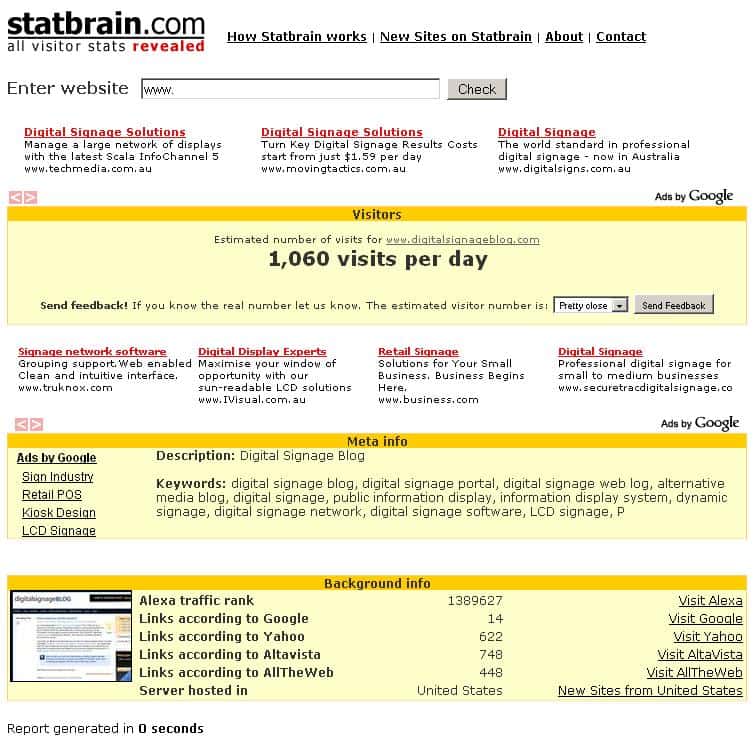
One of our readers kindly pointed us to a website called statbrain.com. We’ve never heard of this site before but it was quite interesting to see what information the website generated.
Basically, according to the website (source: www.statbrain.com) here’s what it does:
With Statbrain.com you can find out how many visits any site has, enter the site into the form below.
Statbrain uses different resources on the web combined with mathematical and statistical methods to estimate how many visits a website has. Please enter the URL of the website that you would like to check.
We thought we’d share this information with you so that you can get an idea of how many visitors we get (just note that no where on the website does it say whether it’s a unique visitor or not).
I’m not too sure whether the results are accurate or not (1,060 visitors per day) but it clearly does give us a good overview of what our visitor and links stats are for popular search engines. Just as a comparison, we manually checked our Alexa ranking for our digital signage blog and it’s currently ranked 1,168,300 and the Digitalsignageblog.com traffic rank in other countries that they are listed on Alexa is United Kingdom 210,745, United States 898,627. We too are quite surprised that our UK ranking is 210,745 – not bad!! Our aim is to get below the 1,000,000 mark by the end of this year. Hopefully we will use these figures as a benchmark and gradually build up our online presence in the digital signage industry. As a result, we aim to gain more exposure for our potential advertisers.
Do you want to advertise your business on this blog? For more information or to find out the benefits click here.
Feel free to submit your answer as a comment.
Category: Digital Signage Blog News
Australia Day and Happy Chinese New Year
Today marks a special occasion – it’s Australia Day and Chinese News Years (Gong Xi Fat Choy) so its a public holiday in Australia but look at me, I’m in front of the computer typing out this blog post.
We want to wish all our partners and readers a prosperous new year.
P.S: You may be wondering why the colour of this text is all in red but keeping with the Chinese Tradion, red is meant to bring good luck – not that we need it.
Category: Digital Signage Blog Events, Digital Signage Blog News
Webinar: Content Best Practices for Digital Signage Networks
Have you registered for the upcoming Content Best Practices for Digital Signage Networks Webinar? We have included this event on our digital signage portal events. If you have any upcoming events (exhibitions, seminar, webinars, etc) feel free to add them to the events (note registration is required).
Here’s the Meeting Description and details that was sent to us. We will try our best to join this webinar but because of the time difference, it will be 4AM in Australia and I’m normally in bed. Hopefully the hosts will be able to record this webinar and share it with the rest of the digital signage community:
Date: Thu, Jan 29, 2009
Time: 12:00 PM EST
Duration: 1 hour
Host: Digital Signage AssociationJoin us for a very special webinar where members of the Digital Signage Association Content Best Practices Committee will present a methodology that delivers the highest possible viewer impact, influence and response for digital signage networks. The presenters will discuss the critical DO’s and DON’Ts for creating content and programming schedules.
1. How to create powerful content that drives results
2. How to structure playlists to achieve maximum effect; loop times, day parts and update frequency
3. Adding elements that create additional viewer interest such as weather, news and subscription services
4. Understanding environmental issues such as display placement, location, and traffic
Do you have an upcoming digital signage event? Let us know or add it to the digital signage portal events calendar.
Feel free to submit your answer as a comment.
Category: Digital Signage Blog Events, Digital Signage Blog News
Are you breaching RSS copyright laws?
Most digital signage players on the current market will support the ability to import or use RSS feeds to display dynamic content. If you don’t know what RSS is and the copyright laws governing its use then keep reading.
What is RSS?
RSS stands for Really Simple Syndication and is used mainly for syndicating (updating) content on websites and readers. In digital signage, RSS can be used to dynamically grab information such as news, weather, stocks and any content on a website that supports RSS and display this on the screens. Normally, the RSS feeds are in XML format so they can be easily read by most RSS readers or XML compatible applications.
Copyright issues?
As digital signage players makes it easier for us to add RSS feeds, have you really stopped for a second and checked whether you are allowed to use the feed. For example, quite a number of news websites provide its readers with the option to feed content so they are able to receive the latest news information via their RSS reader. So for a digital signage network this is great feature to have as you will be able to entertain your viewers with dynamic information. Now here’s the complication, if you used the feed without obtaining approval from the content owner then you are most likely breaching copyright laws. If you carefully read the fine print on most websites you’ll notice that the feed can only be used for personal and non-commercial purposes. Are you getting worried now? This goes with many online websites such a this one. As a rule of thumb, it is always best to contact the website owner and obtain their approval to use the RSS feed even if there are no terms and conditions.
This blog receives over 100 rss requests per day so hopefully no one is re distributing this content without properly referencing the source.
So the next time you add an rss feed as part of your digital signage solution make sure you read the fine print.
Now if you need help in sourcing a news feed or any other RSS feed contact us and we’ll be more than happy to help.
Do you use rss in your digital signage solution? If you answered yes, fell free to let us know what you use rss for by adding a comment.
Feel free to submit your answer as a comment.
Category: Digital Signage Blog Info, Digital Signage Blog News, Digital Signage Polls
Digital Signage Portal Newsletter 2009#2
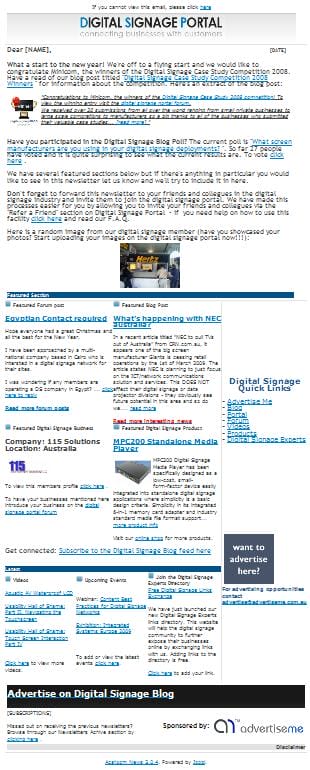
Here’s a preview of the digital signage portal Newsletter 2009#2:
Here’s the link http://www.digitalsignageportal.com/Newsletters.html , but we do hope that you register on the portal so that you can receive the newsletter via email as soon as we publish it.
Have you registered on the digital signage portal? To register on the portal click here.
Feel free to submit your answer as a comment.
Category: Digital Signage Blog Info, Digital Signage Blog News, Digital Signage Newsletter
Product Review: Synrax Onyx Mini
Reviewed By: Advertise Me
Price Range (RRP): AU$700 – $900 (depending on the exact hardware requirements)
What’s black, compact, fast, affordable and can be used for almost any industry environment?
It’s the Synrax Onyx Mini.
We had the privilege to be one of the first companies to review this product. Below is our findings but before we start with our product review here’s the product specifications.
Product Specs
The unit offers the following features:
- Intel Mobile Processor 2.0Ghz Single Core or Dual Core (you can almost run any software application with this processor speed)
- 1GB DDR2 SDRAM (can be upgraded to 2G if you need to run memory intensive applications)
- High Definition Output via HDMI – (great feature to have if you need high quality video output, especially if you’re deciding to use this for digital signage or multimedia applications. It also has the standard video connectors such as VGA and S-Video)
- HD Audio via Optical SPDIF – (great for capturing your audience using sound)
- 6 USB ports (2 at the front and 4 at the back. Just think of how many USB devices you can connect to the unit)
- Storage Options (the unit supports SSD compact flash cards, IDE and SATA HHD. This is pretty standard these days but it’s definately good to have the flexibility to choose your own storage device)
- Ethernet Port (the unit supports 1Gbps speeds. Once again with this speed, the unit is ideal for streaming high quality video over the network)
- 212mm x 126mm x 62mm Enclosure (It’s small…in terms of size, the Onyx Mini is almost the same size of a DL envelope. Here’s a picture to prove it)
Performance
For the digital signage industry, the Onyx Mini meets the video and processor performance requirements to run almost any high definition video or digital signage application. We tested this by playing a sample 1080p high definition file (the video was downloaded from the Microsoft Site – WMV HD Content Showcase) through Windows Media player and we didn’t notice any lags or freezes. The CPU utilisation didn’t even hit the 100% mark. Here’s a video to prove it:
We also used a trial version of PerformanceTest by passmark.com and ran several performance tests, and here are the results. The unit received a passmark rating of 343.8. Visit passmark.com for further details about this rating.

Our verdict
Bad
- We couldn’t find anything bad about the unit except that the fan noise was quite loud. In any case, this is something minor but we did find out from the vendor that the noise was actually related to the size of the air holes on the side of the unit.
- Another minor issue was that the unit had no labels at the front to indicate which button was the power and reset. It took us a while to figure this out.
Please note that the vendor will address both of the above issues in the next batch of units.
Good
- The Mobile Intel 965 Express Chipset video graphics card supports dual screens – this is quite handy to have especially if you intend to run a solution which requires you to drive either the same or different content to two screens. It also allows you to position both screens in different layouts. I love this feature!
- It can be used in almost any industry, whether its the digital signage, medical, home (great for media centers or desktop pc), retail business, KIOSK, and the list goes on.
- You can install and manage your OWN operating system – not limited to a particular manufacturer or system application
- Has very good ventilation – we left the unit on for several days and the casing never got “too hot to handle”
- We like this unit and we have decided to include it in our product range so that our customers can benefit
If you want us to review your product, contact advertise me via email: review@advertiseme.com.au
About Synrax Australia
Synrax Australia Pty Ltd was established in year 2002 initially as a local distributor of embedded computing components, providing the services in Australia and New Zealand. Since it’s inception, Synrax’s dedication to provide quality reliable products was rewarded with great responses from our clients. This helped our company to grow rapidly and establish ourselves into the market despite its young history.
Category: Digital Signage Blog Info, Digital Signage Blog News, Digital Signage Blog Products, Digital Signage Reviews
Redefine: What is digital signage?
Since it’s the start of the new year, we decided to go “back to basics” and decided to re-look at the definition of “Digital Signage“. So we scouted around the web to find various definitions and here’s our list:
To start off the ranks, here’s the definition from advertise me:
Everybody knows the conventional method of using posters to deliver messages, whether it is to sell a product or service or to inform the audience.
Using a digital signage player, Digital Signage takes this traditional approach of delivering messages and allows for the greater control and flexibility over how the message is delivered on a digital screen.
Digital Signage is the use of digital technology such as a digital screen, digital signage players and software to deliver content such as information, advertisements and entertainment to a captive audience…
Source: http://www.advertiseme.com.au/content/DigitalSignage.Home.asp
Digital signage is a form of electronic display that is installed in public spaces. Digital signs are typically used to entertain, inform or advertise (together known as “adfotainment”). Major benefits of digital signs over traditional static signs are that the content can be exchanged more easily, animations can be shown and the signs can adapt to the context and audience, even interactively…
Digital signage, also called dynamic signage, is a specialized form of slivercasting in which video or multimedia content is displayed in public places for informational or advertising purposes. A digital sign usually consists of a computer or playback device connected to a large, bright digital screen such as an LCD or plasma display…
Source: http://searchcrm.techtarget.com/sDefinition/0,,sid11_gci1197791,00.html#
Digital Signage, by definition, is an electronic billboard system, used to present dynamic information electronically, on flat panel displays such as LCD, Plasma or DLP Projectors. Wherever you need to advertise, educate or inform customers, consumers, staff, students or partners, digital signage is a fast, reliable and simple way to get your message heard…
Source: http://www.nec.com.au/74c02936e97b44d8bf739b99ab4b75c7.htm
Digital signage is remotely controlled distribution and playback of digital content across networks of displays. It is used for delivering visual messages at point-of-purchase, or at any other public venue…
Source: http://www.broadsign.com/digital-signage/digital-signage.html
A most simplistic definition of digital signage is that of a “remotely managed digital display, typically tied in with sales, marketing and advertising.”
Source: Page 2 of the Digital Signage Book by Jimmy Schaeffler.
Digital signage refers to electronically controlled signs that you can update on-the-fly, without having to touch the physical sign itself. You can change the content quickly and inexpensively, and deliver targeted messages to hundreds or thousands of displays at once. These dynamic displays are often used to present a custom-tailored mix of informational and advertising content, including product promotions, timely news, and upcoming events…
Source: http://www.wirespring.com/Solutions/digital_signage.html
There may be more definitions but we couldn’t obviously put them all here in this post. What we found common amongst most of the above definitions is that some are refeering to digital signage as being able to “remotely manage” or located in “public locations” - I don’t necessarily think this is the case. Standalone units which can have the content updated via a media card would not fall under this definition. There are also several businesses that use digital signage for internal communications and don’t necessarily have the display screens located in public locations. So maybe lets all collaborate and redefine this term.
What is your definition of digital signage?
Feel free to submit your answer as a comment.
Category: Digital Signage Blog Info, Digital Signage Blog News, Digital Signage Techie
What’s happening with NEC australia?
In a recent article titled “NEC to pull TVs out of Australia” from CRN.com.au, it appears one of the big screen manufacturer Giants is ceasing retail operations by the 1st of March 2009. The article states NEC is planning to just focus on the ICT/network communications solution and services. This DOES NOT affect their digital signage or data projector divisions – they obviously see future potential in this area and so do we.
Could NEC be affected by the financial crisis as well? According to another article by Darran Yates titled “Downturn claims two more victims – Creative Labs and NEC“, he believes that both NEC and Creative labs are victims of the economic downturn. If you want to find out which other companies have been affected by the economic downfall read this post “Will digital signage businesses survive during this economic downfall?“.
How would you convince businesses to deploy digital signage solutions during this economic downfall? If possible share your marketing strategies with the rest of the blog readers.
Feel free to submit your answer as a comment.
Category: Digital Signage Blog News, Featured Post
Egyptian Contact required
One of the digital signage portal forum members is looking for an egyptian contact and posted the following entry:
Hi All, Hope everyone had a great Christmas and all the best for the New Year. I have been approached by a multi-national company based in Cairo who is intersted in a digital signage network for their sites. I was wondering if any members are operating a DS company in Egypt? Our company (115 Solutions) is only interested in installing and maintaining DS networks with in Australia and New Zealand. On that note i would still like to assist this company in finding a solution if possible. Any assistance would be appreciated.
If you can help, reply to this post on the digital signage portal forum.
Want to become a member of the digital signage portal? Click here, it’s free.
Feel free to submit your answer as a comment.
Category: Digital Signage Blog Info
Digital Signage Case Study Competition 2008 Winner
Congratulations to Minicom, the winners of the Digital Signage Case Study 2008 competition! To view the winning entry visit the digital signage portal forum.
We received over 20 submissions from all over the world ranging from small private businesses to large scale corporations to manufacturers so a big thanks to all of the businesses who submitted their valuable case studies.
There was an interesting mix of digital signage solutions and the parties involved in delivering them. What we found most common amongst smaller businesses is that they operate with numerous partnerships and work together to provide the most cost effective digital signage solution for their customers. We did also notice that most of the businesses who submitted a case study ranged from various industries such as Information Technology, multimedia, video, sound and were not purely focusing in the Digital Signage industry.
Most of the submissions were confidential and bound by privacy agreements, so we have decided not to discuss any of the submitted companies and their clients. Although you might have missed out in winning this competition don’t feel disheartened because this year we will be running more competitions so make sure you regularly check this blog.
Once again, congratulations to Minicom and thanks to all that participated.
Category: Digital Signage Blog Info, Digital Signage Blog News, Digital Signage Case Study
Did you receive the Digital Signage Newsletter?
If you’re not a member of the digital signage portal then you’ve missed out on receiving the latest digital signage newsletter but we didn’t forget about you. If you do want to read this newsletter we have made it available for you to read and enjoy.
Here’s the link http://www.digitalsignageportal.com/Newsletters.html , but we do hope that you register on the portal so that you can receive the newsletter via email as soon as we publish it.
Have you registered on the digital signage portal? To register on the portal click here.
Feel free to submit your answer as a comment.
Category: Digital Signage Blog Info, Digital Signage Blog News, Digital Signage Newsletter
Digital Signage Experts link exchange
We have just launched our new Digital Signage Experts links directory. This website will help the digital signage community to further expose their businesses online by exchanging links with us. Adding links to the directory is free. Click here to join the Digital Signage Experts list.
Category: Digital Signage Blog Info, Digital Signage Blog News
Digital Signage at Oceanworld Manly Australia
It’s the holidays so I decided to take the family out to Oceanworld Manly Australia so the kid could experience and see the tropical and temperature fishes, sharks, snakes, lizards and insects. I’ve been there before so I wasn’t excited as the kid, but when I entered the first section of the venue (Middle Level – Level 2) my excitement grew. Yes… I saw digital signage being used around the floor which wasn’t there the last time I visited.
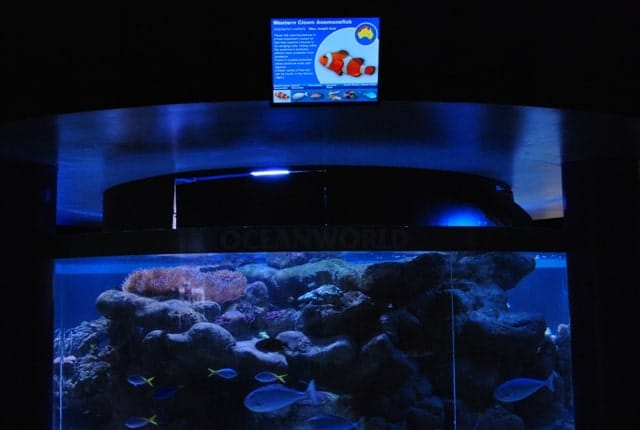
I’m always on the lookout for digital signage so this was a great opportunity for me to understand how Oceanworld implemented their system and if any, recommend ways to improve their setup. At each of the tanks, there was a 15-17 inch LCD screen displaying information about the fish or animal inside the tanks. This was located above each of the tanks and it eliminated the need to have a static board with this information.
Here’s an image of the screen:
I noticed that some of the screens had one static slide (I’m assuming that the system was using powerpoint), however there were other screens which had pictures of each of the different types of fishes in the tank at the bottom of the screen. This however wasn’t initially obvious to me or to the people I asked as the time it took to rotate to the next slide was several minutes – I wasn’t going to stand around and wait for several minutes just to find out more information about each of the different types of fish in the tank. Overall, the solution was quite average and may need to be reviewed. Here is our recommendation of things that may need to be improved:
1. LCD screen location – to view the screen, one would need to step away from the tank and tilt your head slightly up. I think the screens could have been strategically better located so the visitors would actually see the information whilst looking at the fishes in the tank. Just as a thought, maybe install a waterproof screen at the back wall of the tank??? We talked about strategically positioning your screens in one of our previous posts called “Location, location, location“.
You’re probably thinking “waterproof screens????”… yep here’s a video from youtube to prove it that it does exist.
For more Digital Signage videos visit the Digital Signage Portal.
2. Use touch screen technology to enable the visitors to interact with the fish tank. Currently, visitors like myself would not be standing around to wait for the next slide so why not get the visitor to initiate the slide change. Otherwise, decrease the time it takes for each slide to rotate and also place a reference on the screen stating that “The below fishes can be found in the tank”. Make the image of the fish at the bottom of the screen that the information is referring to more noticeable – either fade the other images or highlight the current image. We talked about touch screen technology in one of the previous posts called “To touch or not to touch – that is the question“.
3. I also found that the solution installed was using the Windows XP operating system. How did I know this? We that was easy because there was that typical windows notification balloon at the bottom right hand corner of the screen. Maybe disable all Windows XP notification messages.
4. On another screen there was also a notification that it found the Wireless network. This is definitely a security issue as the SSID of the wireless network was clearly visible to the public. We talked about digital signage security issues in two of our previous posts called “How secure is your digital signage solution?” and “Secure your digital signage solution – here’s why“.
Well that’s my recommendation based on what I saw and I apologise in advance if I misrepresented the solution and setup but I hope our readers can learn something from this post.
Do you have any digital signage experiences you would like to share with us?
Send us an email to info@digitalsignageblog.com or feel free to comment here.
P.S: For those who are interested in going to visit Oceanworld, there is a 15% discount if you enter after 3:30pm. Overall, the kid had fun and we will most likely visit Oceanworld again in the near future.
Category: Digital Signage Blog News, Digital Signage Reviews
Outdoor digital signage banned?
An interesting post for the start of the new year 2009.
We stumbled across an article titled “Banned outdoor signs sprout in L.A” from the Los Angeles Times website. Although the article was not specifically directed at digital outdoor signs, we believe that digital signage may eventually fall within this new law. Basically, there is a new ban on outdoor signs in Los Angeles which prevents large advertising on buildings.
I have not read the full details of the new law but I’m hoping some from L.A can shed some light as to whether this law affects digital signage.
If any, what are your country’s law regarding outdoor digital signage?
Feel free to submit your answer as a comment.
Category: Digital Signage Blog News, Featured Post
Digital Signage Blog Guest Bloggers
Guest BloggersDigital Signage Featured Links
Recent Posts
Featured Posts
- Product Review: Synrax Onyx Mini
- Introducing digitalsignagearticles.com
- Experience the digital signage world at the ABC Bondi Shop
- Will the Microsoft Xbox 360 take over the Digital Signage Industry?
- Subscribe to the digital signage blog
- Want to be featured on the digital signage portal newsletter?
- About Advertise Me
- Klips: Share your digital signage snap!
Most Viewed Posts
- Forum Post: World Wide Digital Signage Network - 33,159 views
- Digital Signage Portal Forum Post: CISCO Film Making Competition - 17,594 views
- Digital Signage Portal Forum Entry: Help with digital signage business plan - 12,406 views
- Points to consider for a Digital Signage Business Plan - 11,667 views
- Digital Signage:How do I create a video wall? - 11,431 views
Recent Comments:
- Samsung LED screens (2)
- LED Outdoor Screen: It’s gratifying to see your such a great information. We really impressed with your such a...
- Digital Signage Klips: Supermarket in Miami Florida (1)
- olga vega: hi, I would like to have information to publish my company a clip video and/or a photo screen on a tv on...
- Digital Signage Klip: Free Mobile Phone Charging station with a twist (3)
- Robustsigns: All new businesses should get the advice of a professional.
- Clever Concept Vending Machine with See-Through Display (1)
- Fresh vending locations: Fresh Vending – Locations, food franchise business, you will receive the help you need...
- Parramatta Westfield LED Screen (17)
- LED Displays Outdoor: It’s gratifying to see your such a great information. We really impressed with your such...
Popular Tags used in our posts
advertise advertise me Advertisements australia blackberry blog Caption Digital Id digital signage digital signage network digital signage player Digital Signage Software Digital Signage Solutions email Fun Google iphone klip Klips lcd screen lcd screens led screen Poll Id portal screens Signage Industry Signage Solution Signage System Sydney Australia video wall
Digital Signage Blog Categories
- Digital Signage Blog Events (29)
- Digital Signage Blog Info (123)
- Digital Signage Blog News (191)
- Digital Signage Blog Products (35)
- Digital Signage Blog Video (16)
- Digital Signage Case Study (11)
- Digital Signage Guest Posts (11)
- Digital Signage Ideas (4)
- Digital Signage Interview (8)
- Digital Signage Jobs (5)
- Digital Signage Klips (32)
- Digital Signage Newsletter (7)
- Digital Signage Polls (14)
- Digital Signage Reviews (12)
- Digital Signage Techie (25)
- Digital Signage Tutorials (1)
- Digital Signage Weekend Fun (29)
- Featured Post (41)