Digital Signage Blog Archives


Archive for July, 2008


Digital Signage in Beijing Olympics 08

With only a couple of days to the Beijing Olympics ’08, I was thinking about what digital signage implementations will be used in the Olympic venues and around the Beijing stadium.

We won’t be going to Beijing this year, but we are interested to know what digital  signage solutions they are using there. Does anyone know? If so, we’ll like to hear from you (in fact, I think the online digital signage community would also like to hear from you too)  and if you have any images of the solution feel free to post it up on our digital signage portal forum. We have created a topic there for you to discuss and upload pictures.

Finally, we hope that the Beijing Olympics runs smoothly and without any dramas.

Beijing Olympics Logo

Category: Digital Signage Blog Events, Digital Signage Blog Info, Digital Signage Blog News


Top 10 search terms

The top 10 search terms people are using which is landing to our digital signage blog from search engines are:

1.  digital signage blog

2. digital

3. digital signage

4. signage blog

5. cellular digital signage

6. what is rs232

7. digital signage blogs

8. how does digital signage work

9. digital signage rfid

10. digital signage player

Category: Digital Signage Blog Info, Digital Signage Blog News


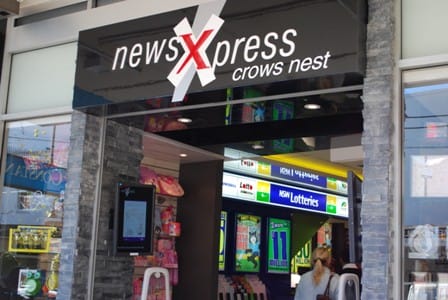
Advertise Me installs digital signage at newsXpress

This month, we completed a digital signage install at newsXpress. Here’s a couple of images of the digital signage solution using the latest Cayin product:

digital signage newXpress install

digital signage newXpress install

digital signage newXpress install

digital signage newsXpress install

digital signage newXpress install

A case study will be posted shortly.

If you have any images of digital signage solutions, feel free to post them in the digital signage portal (registration is required). The digital signage portal allows your business to showcase your digital signage case studies, photos, advertisement templates and examples all in one location.

Category: Digital Signage Blog Events, Digital Signage Blog Info, Digital Signage Blog News


Digital Signage: Purchasing outright vs leased vs rental?

A typical digital signage solution is generally expensive and from experience, one of the most critical factors as to whether a client purchases the equipment or not is the final cost (basically the number of zeros in the figure). Even calculating and presenting the ROI may not persuade the client to make that final purchasing decision.

A financial strategy which we believe will help in landing any project, is to also include rental and leased financial options with every quote you submit to your client.

In summary, some of the advantages of rental and leased plans over outright purchases are :

  • preservation of cash flow. The cost of the equipment can be spread over the term of the agreement. This means a full upfront payment is not required enabling the client to spend money running the business.
  • there are many tax advantages. For rental and lease options, both payments are 100% tax deductible. If the equipment was to be purchased outright, only the value of the equipment depreciation is tax deductible. GST can be claimed on monthly payments through BAS claims whereas for outright purchases, GST is only claimed at the time when the equipment purchased.
  • For the rental option, there is a flexibility to upgrade, add or delete the equipment during the term of the agreement. For the leased option, the client may be required to payout the remaining payments and residual value before upgrading to new equipment. For outright purchases, any upgrades or add-ons will need to be required to be purchased by the customer.
  • With the rental option, the client will not be stuck with outdated technology. The equipment can be returned to the Finance company. For the leased and outright purchase options, , the equipment needs to be disposed of by the customer which may prove to be costly.

Visit the digital signage forum to further discuss some of these advantages in detail.
At Advertise Me, they are able to provide their clients with outright, leased and rental options for all of their digital signage solutions.

Category: Digital Signage Blog Info, Digital Signage Blog News


About Advertise Me

Advertise Me www.advertiseme.com.au

Advertise Me is a privately owned Australian company specialising in all aspects of digital signage solutions.

Our team of highly skilled professionals is able to introduce innovative ways for businesses to communicate with their intended audiences for a variety of purposes including informing, educating, entertaining and selling.

You can expect us to:

  • offer the most affordable and cost effective solutions tailored to your specific business needs.
  • provide you with concise and accurate information and will ensure that you understand and are comfortable with our proposals.
  • strive to make our clients happy and successful.

We have partnered with a number of key reputable organisations and will continue to build further partnerships to deliver the most effective solutions for our customers.

Visit our website at www.advertiseme.com.au for more information.

Category: Digital Signage Blog Info


Digital Signage Products: The Green Factor

With the increasing focus for businesses to help reduce global warming, what measures are we taking to ensure our digital signage solution is “environmentally friendly”?

As new technology is being developed, most manufacturers are designing digital signage products which will help reduce power consumption.

Generally for a digital signage solution one would need a screen and also a digital signage player (can be a PC, a small form factor embedded PC, or digital signage player).

When implementing a digital signage solution one should consider the following:

- the average power consumption of a plasma screen is 350 watts compared to LCD 213 watts

- the average power consumption of a PC is 78 watts compared to an embedded PC 8 watts (linutop)

If power efficiency is what you’re after, take note of the following:

- use screens, in particular LCD’s that consume less power

- screens uses power even when they’re not turned on!!! The standby power uses several watts. The best thing to do is to turn the device from the power point.

- decrease the LCD’s backlight. Most LCD’s these days have the option to control the intensity of the backlight but by doing so it makes the LCD screen less bright.

- use software tools to automatically shut down your digital signage player and screen rather than leaving it on 24/7

If you have any further ideas on how to futher save power, please let us know or discuss it on our digital signage forum.

Category: Digital Signage Blog News

Request a Digital Signage Quote

RSS

Or subscribe via email:
 
Digital Signage Blog Sponsors

Advertise Me Sponsorships available here!

Digital Signage Articles

Sponsored Links


Recent Comments: